


Participant
July 19, 2019
Answered

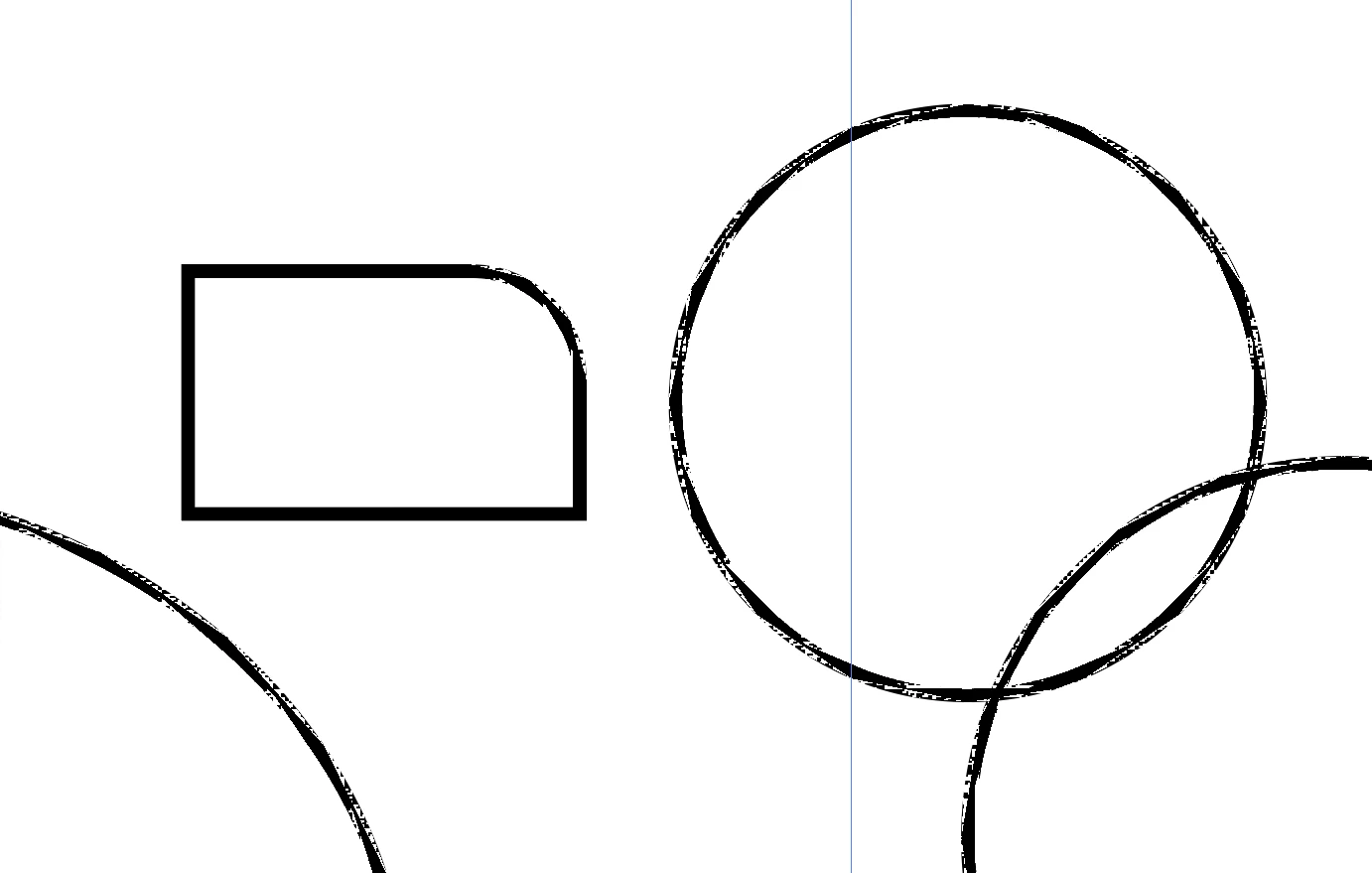
Why are my curved lines doing this?

  • July 19, 2019
  • 1 reply
  • 394 views

Whenever I draw a curved line on AI, instead of getting a clean solid line, I get a sketchy hand-drawn looking line. As shown in the photo, I have no issues with straight lines but once I start adding a curve to them, the format changes. Anyone know what's going on or how I can fix this? Any suggestions would be appreciated!
    This topic has been closed for replies.
    Correct answer Jacob Bugge

    Ellie,

    Ctrl/Cmd+E will let you toggle from GPU to CPU, and enjoy.

    This is what GPU is about:

    https://helpx.adobe.com/illustrator/kb/gpu-performance-preview-improvements.html

    Graphics cards have been included in the system requirements:

    https://helpx.adobe.com/illustrator/system-requirements.html

    Apart from an inadequate card, the issue can be caused by lack of driver updating, lack of proper recognition of the card by the computer, and whatnot (including rifts in the space time, moon, weather, and the fact that Illy sometimes moves in mysterious ways).

    Here are a few more pages about GPU troubleshooting:

    https://helpx.adobe.com/illustrator/kb/gpu-performance-errors-troubleshooting-workarounds.html

    https://helpx.adobe.com/illustrator/kb/illustrator-gpu-performance-driver-update.html

    1 reply

    Jacob Bugge
    Community Expert
    Jacob BuggeCommunity ExpertCorrect answer
    Community Expert
    July 19, 2019

    Ellie,

    Ctrl/Cmd+E will let you toggle from GPU to CPU, and enjoy.

    This is what GPU is about:

    https://helpx.adobe.com/illustrator/kb/gpu-performance-preview-improvements.html

    Graphics cards have been included in the system requirements:

    https://helpx.adobe.com/illustrator/system-requirements.html

    Apart from an inadequate card, the issue can be caused by lack of driver updating, lack of proper recognition of the card by the computer, and whatnot (including rifts in the space time, moon, weather, and the fact that Illy sometimes moves in mysterious ways).

    Here are a few more pages about GPU troubleshooting:

    https://helpx.adobe.com/illustrator/kb/gpu-performance-errors-troubleshooting-workarounds.html

    https://helpx.adobe.com/illustrator/kb/illustrator-gpu-performance-driver-update.html

    Participant
    July 19, 2019

    Wizardry! Thank you so much!!

    Jacob Bugge
    Community Expert
    Community Expert
    July 19, 2019

    You are welcome, Ellie.

    Wizardry indeed. GPU grunging.