

c.pfaffenbichler
Community Expert
Community Expert
April 17, 2020
Question

align stroke to inside for excluded overlap

  • April 17, 2020
  • 3 replies
  • 975 views

Indesign 15.0,2 on macOS 10.15.3


Please excuse if this has been addressed before, I could not locate a pertinent thread or find the information in the Reference. 


I get an unexpected result when applying Stroke to a compound path with excluded overlap. 

»Align stroke to inside« will align the stroke to the inside only on the outer path-element, but outside relative to the inner path-element – meaning the stroke will cover the fill only one one side. 

And vice versa for »Align stroke to outside«. (see screenshots, I hope the blue line indicating the actual paths will be evident.)
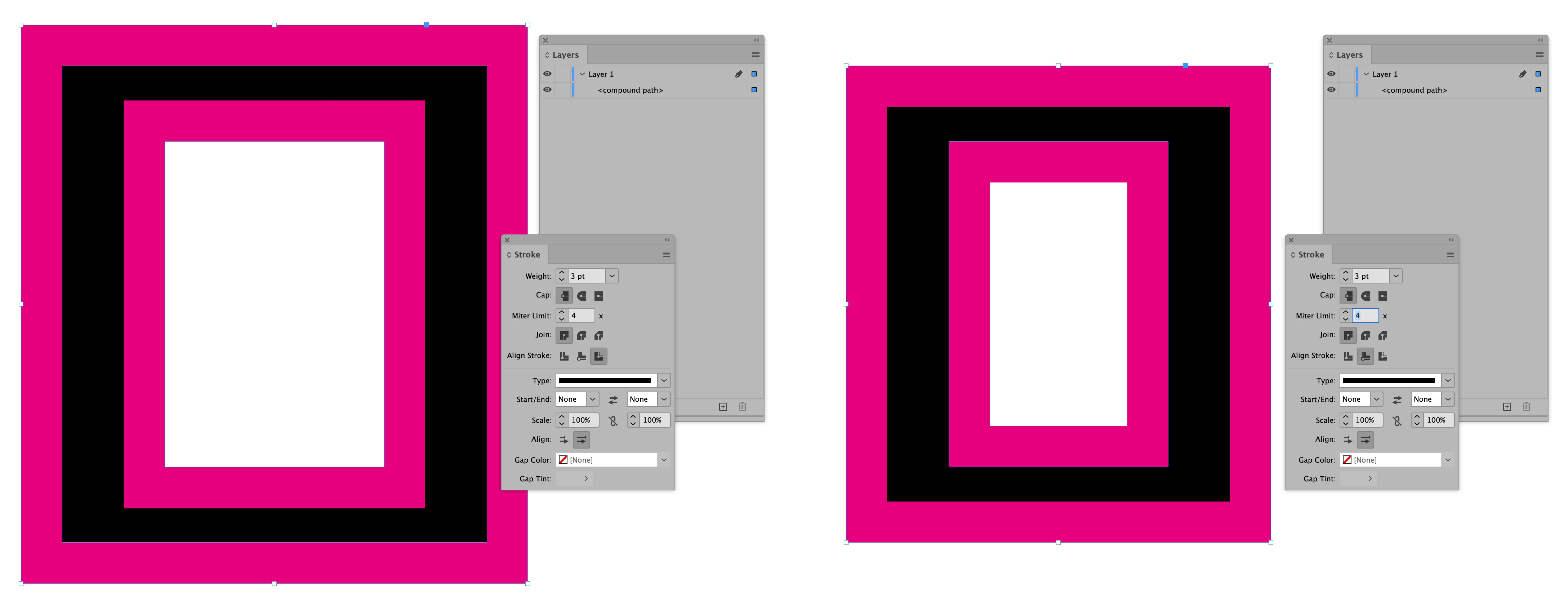
 

This seems incongruous with stroke behaviour in Illustrator or Photoshop, so am I overlooking something or is this ins some way intentional? 


Thanks in advance, 

Pfaffenbichler 

This topic has been closed for replies.

3 replies

Community Expert
April 17, 2020

Hi Pfaffenbichler,

you are absolutely right: This seems incongruous with stroke behaviour in Illustrator or Photoshop, so am I overlooking something or is this ins some way intentional?


It's also incongruous with InDesign's own stroke behavior with type.

FWIW: With type only Align Outside and Align Center is available. Align Inside is grayed out.


Regards,
Uwe Laubender

( ACP )


c.pfaffenbichler
Community Expert
Community Expert
April 17, 2020

Another example to illustrate what I consider to be Indesign’s nonsensical interpretation of »Inside« for Compound Paths – a Compund Path consisting of two overlapping circles: 

rob day
Community Expert
Community Expert
April 17, 2020

You could file a feature request. I don‘t think it will be considered a bug—Align Stroke has always worked this way.


https://community.adobe.com/t5/indesign/where-do-i-post-indesign-bugs-and-feature-requests/td-p/10945700?page=1

c.pfaffenbichler
Community Expert
Community Expert
April 17, 2020

Thank you for the attention. 


As this behaviour is

• inconsistent with Stroke behaviour in Illustrator and Photoshop (see screenshots) and 

• it seems obvious to me that the »inside« of a Path is where the fill is 

I guess I will post a Bug Report. 

rob day
Community Expert
Community Expert
April 17, 2020

I hope the blue line indicating the actual paths will be evident.


It looks like you have made the selection using the Selection tool (black arrow) . I might be misunderstanding your question, but if you use the Direct Selection tool (white arrow), the stroke relative to the selection marquee would be what I think you are expecting:


c.pfaffenbichler
Community Expert
Community Expert
April 17, 2020

Thanks for checking this out. 


But I am afraid that’s not my issue, I’ll try to explain better. 

For »Align stroke to inside« I would expect the Stroke to cover the Inside area (the one where the Fill is) no matter if the path is the very outmost one or not. 

As it is only the Stroke of one of the two elements does that and the other expands into the non-object-area.

(… and vice versa for »Align stroke to outside«)


Maybe screenshots with a transparent stroked object can help clarify: 

rob day
Community Expert
Community Expert
April 17, 2020

It seems right to me, Align Stroke is relative to the path—the stroke here is to the inside of the path: