
Participant
November 18, 2018
Answered

Alternatives to multi-state objects for interactive PDF's

  • November 18, 2018
  • 2 replies
  • 2050 views

Hello, first post here!
I have been struggling for days trying to make something like this (you need to download the pdf in order for it to work):

PrintableHeroes_Goblin_Sword&Bow_Free.pdf - Google Drive


You can click on the art and cicle through the different versions, activate the black silhouette and change the color of the bases. I'm trying to make something exactly like that, but with my own art, and managed to make a working version with Indesign using MSO's, however, when exporting to PDF, they don't work at all. I have found an alternative, which is exporting first a .SWF, then placing that in a new Indesign document and exporting that as a PDF, but that is a pretty sub optimal way to do it, and I'm pretty sure it's not how the author of the original file has done it.

I am assuming that the original author uses MSO's and exports directly to PDF, but maybe he is not doing it like that ad there's another way to accomplish the same result that I am not thinking about. I can make interactive PDF's with text blocks with no problem, but the MSOs just don't work.

Here's how I'm exporting:
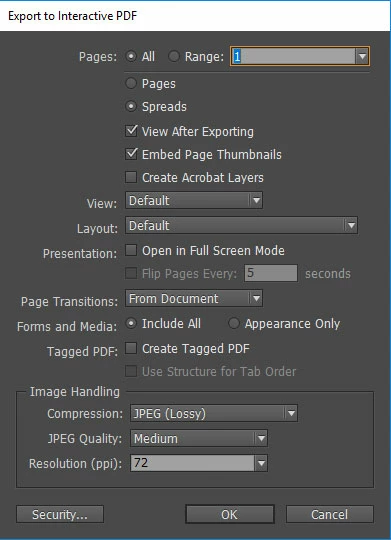
Do you think that he's using MSOs and I'm doing something wrong, or is he using any other method?

This topic has been closed for replies.
Correct answer rayek.elfin

BobLevine​ I cannot be sure, of course, but the author of the original file has over 3000 followers that use the pdf format he makes, not counting the people that don't follow him and use that method, so I figured, if it works for them, I better settle for an easy to use format.
The only problem I'm facing right now is one layer not being in the right order on the pdf, but still, I have already wrestled with this for too long now.
Since it is giving me so much trouble, I might go the html road. Is there a way to produce a single file and not have to add a swf to it? Because that would remove the problem you mention of using a crappy pdf reader, but replace it with not having (or not knowing how to use) decompression software.


The layering can be solved in Acrobat. I noticed the same issue when replicating those printable tokens, and InDesign doesn't keep the proper object arrangement in the interactive PDF.

Acrobat is quite expensive, though, and a great inexpensive alternative is

Tracker Software Products :: PDF-XChange Editor

In PDF-XChange Editor I solved the problem by activating the black mask layer and arranging it to the back. It worked.

Or just use the Editor to create all the buttons. More work, though.

Absolutely avoid SWF: that is a dead-end, and no longer acceptable. As for HTML, unless you package the entire thing as an executable, there is no good way to create a single packaged file. It is possible to encode all the images to code (base64 encoding), but with print resolution images this is a terrible idea, and results in ridiculously big files. Files a slower computer and a browser will choke on.

Just use PDF, but you will require either Acrobat or the above mentioned PDF Editor to fix the layering.

2 replies

Dave Creamer of IDEAS
Community Expert
Community Expert
November 18, 2018

Unless I'm not understanding the question correctly, it looks like it is simple hide/show form field. The graphics are simple field icons.

David Creamer: Community Expert (ACI and ACE 1995-2023)
BobLevine
Community Expert
Community Expert
November 18, 2018

I concur and should mention that MSOs do not work in PDF under any circumstance.

BobLevine
Community Expert
Community Expert
November 18, 2018

Best advice I can give you is to read my blog post on the subject of Interactive PDF.

https://www.boblevine.us/its-okay-to-say-no-to-interactive-pdf/

Participant
November 18, 2018

BobLevine Thanks! In my attempts to make the thing work, I had already found and read your blog. Publishing online and gogle forms are not really an option for my case, and I could not make an epub that has interactivity, or at least the kind I need. I need something that people can download, interact with and then print in as few steps as posible, preferably without the need to download additional software to read formats like epub. Besides, the author of the original file make the interactive pdf work, so why can't I? Don't get me wrong, your article has helped me a lot to discover alternatives to interactive pdf's, but I don't think I have found a solution yet.

BobLevine
Community Expert
Community Expert
November 18, 2018

As already mentioned this looks like simple (though very tedious with this many) show/hide procedures.