


Participant
September 9, 2026
Answered

Bengali typesetting issues (World Paragraph thinks it's Arabic?!)
  • September 9, 2026
  • 3 replies
  • 29 views


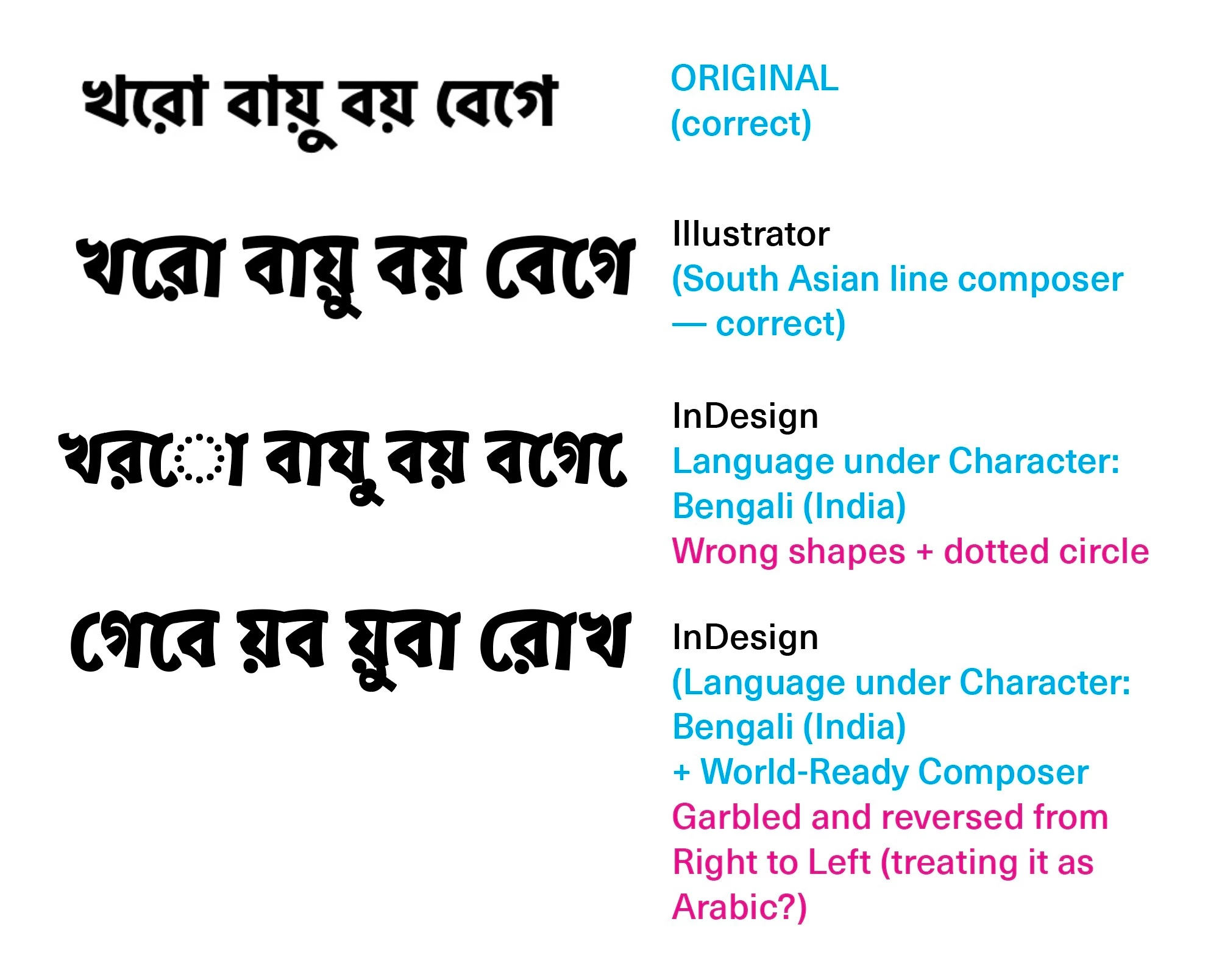
Comparisons between Original, Illustrator and the weird InDesign Bengali typesetting

Am trying to typeset a document in Bengali. This is using a Bangla font from Adobe Fonts. I could get it to match the correct wordings using Illustrator (with “Show Indic Options” selected under Preferences, but I cannot get it to work in InDesign even with the Language set to “Bengali (India)”. I tried selecting “World-Ready Paragraph Composer” but it looks even more “off/wrong”.

What am I doing wrong? I tried installing the middle east InDesign but it’s still the same.

I have tried troubleshooting with the Adobe live support and had a 40 min call / remote desktop sessions with them but they don’t understand what’s the problem either.

Please help as I don’t want to rely on Illustrator for this book I am working on!

    Correct answer Joel Cherney

    It looks like the final option would be correct if it were running left-to-right. We can’t really guess why it’s running RTL - it could be something wrong with how InDesign is installed, but it just as easily could be e.g. something wrong buried in the styles imported from MS Word. If you have an Arabic installation right now, you can test this by selecting a paragraph and clicking on the left-to-right paragraph button in the Paragraph panel. If you don’t have an Arabic installation, I’d be curious as to what’s in the paragraph style you currently have applied to that text, and what overrides are currently applied. If you’re coming from Illustrator, you might be expecting that you could apply local formatting to fix this; paragraph style management might be only useful in Illustrator, but in InDesign it’s essentially mandatory, and if your paragraph styles are messed up or inconsistently applied, you could spend hours trying to fix this with no success.


    Can you post a sample document? 


    (Let’s fix this, and not let you lay out a whole book in Illy!)

    3 replies

    Joel Cherney
    Community Expert
    Joel CherneyCommunity ExpertCorrect answer
    Community Expert
    September 9, 2026

    It looks like the final option would be correct if it were running left-to-right. We can’t really guess why it’s running RTL - it could be something wrong with how InDesign is installed, but it just as easily could be e.g. something wrong buried in the styles imported from MS Word. If you have an Arabic installation right now, you can test this by selecting a paragraph and clicking on the left-to-right paragraph button in the Paragraph panel. If you don’t have an Arabic installation, I’d be curious as to what’s in the paragraph style you currently have applied to that text, and what overrides are currently applied. If you’re coming from Illustrator, you might be expecting that you could apply local formatting to fix this; paragraph style management might be only useful in Illustrator, but in InDesign it’s essentially mandatory, and if your paragraph styles are messed up or inconsistently applied, you could spend hours trying to fix this with no success.


    Can you post a sample document? 


    (Let’s fix this, and not let you lay out a whole book in Illy!)

    Participant
    September 10, 2026

    Hi Joel. You were right about the paragraph styles messing things up!!! I just changed the paragraph style to “Basic paragraph” and now it appears correctly, the same as the Illustrator version. Thank you!

    Joel Cherney
    Community Expert
    Community Expert
    September 10, 2026

    No problem! But if you think you might ever need to copy your text from one document to another, or share this file with someone else so they can work on it, then you should most liketly make a new paragraph style. 


    If the text looks right, then click into the paragraph with the Text tool, and then click on the flyout menu in the Paragraph Styles panel and click “New Paragraph Style.” That new style definition will have all of the formatting of your currently selected paragraph. If you apply your new style to your text, then you shouldn’t have any unexpected right-to-left behavior, or any of the other possible issues that crop up when you use Basic Paragraph.


    Or if you think you will never share this file, or try to copy content from this file to another, and you're not inclined to read the longish thread full of discussion, pro and con, regarding the use of the Basic Paragraph Style? I suppose you could get away with using it. Good luck, in any case!