Known Participant
January 19, 2020
Answered

Cant't open older InDesign file. Notice: EPS Page Item

  • January 19, 2020
  • 7 replies
  • 1581 views

Hi community members


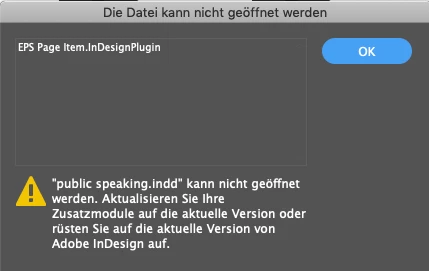
I can't open an older InDesign file (2006). The following message comes up (in German):

"xxx.indd can't be opened. Update your plugIns to the current version or update InDesign." On top of message the line "EPS Page Item.InDesignPlugIn".


InDesign is current. Machine is Mac (2013). Older versions from 2008 and later are opening. Otherwise also no problems. Just the files from 2006 and older 2004.


Thank you in advance should anybody have an idea.
 

This topic has been closed for replies.
Correct answer Laubender

Found this old thread with exactly the same issue:

https://community.adobe.com/t5/indesign/how-to-open-indd-from-indesign-version-2-02-version-not-cs2/m-p/10287891#M128770


Jongware provided the diagnose.


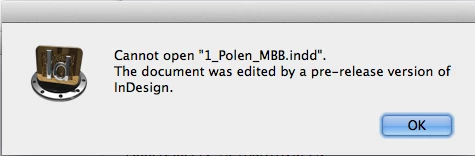
The document was saved with a pre-release version of InDesign.

This screenshot is by Jongware from InDesign CS4 in this old thread:


https://community.adobe.com/t5/indesign/how-to-open-indd-from-indesign-version-2-02-version-not-cs2/m-p/10287899#M128778


I think, the riddle is solved.

But I see no option for Manfred to open his old documents.


Regards,
Uwe Laubender

( ACP )

7 replies

LaubenderCommunity ExpertCorrect answer
Community Expert
January 19, 2020

Found this old thread with exactly the same issue:

https://community.adobe.com/t5/indesign/how-to-open-indd-from-indesign-version-2-02-version-not-cs2/m-p/10287891#M128770


Jongware provided the diagnose.


The document was saved with a pre-release version of InDesign.

This screenshot is by Jongware from InDesign CS4 in this old thread:


https://community.adobe.com/t5/indesign/how-to-open-indd-from-indesign-version-2-02-version-not-cs2/m-p/10287899#M128778


I think, the riddle is solved.

But I see no option for Manfred to open his old documents.


Regards,
Uwe Laubender

( ACP )

caphowAuthor
Known Participant
January 20, 2020

I would like to thank Eugene, Uwe and Peter for their support. This combined expertise explained the situation thoroughly. Even though it seems like I am in a dead end, at least I know what is going on. I checked my InDesign version and it shows this peculiar EPS Item:


I will mark this as done, even though there is no solution available. After all I did get the correct answer(s) knowing now what is going on. Thank you all again, this was a very positive community experience. 

Community Expert
January 19, 2020

Something I forgot. The links to the mentioned scripts to identify the version of an InDesign document:


IDentify.jsx by Jongware

[Ann] Identify Your InDesign File

_Jongware_, Dec 08, 2011

https://community.adobe.com/t5/indesign/ann-identify-your-indesign-file/td-p/3809701


Modified version of IDentify.jsx by Oleh Melnyk in the same thread:

https://community.adobe.com/t5/indesign/ann-identify-your-indesign-file/m-p/3809730#M12174


WpsIndFileIdentifier.jsx by Werner Perplies

https://www.weepee.de/forum/indesign/viewtopic.php?f=60&t=107


Regards,
Uwe Laubender

( ACP )

Community Expert
January 19, 2020

Hi Manfred,

I still hope, that the Adobe engineers can identify the exact version, open and save the documents for you.


Regards,
Uwe Laubender

( ACP )

Peter Villevoye
Community Expert
Community Expert
January 19, 2020

Your old file(s) probably contain some EPS element(s), and any standard installed InDesign natively carries a plugin called "EPS Page Item.InDesignPlugIn". So the error is about a missing, or corrupted or at least an incompatible remnant of an older installation or addition. Check out your currently installed version by (on a Mac) pressing the Command key or (on WIN) Control key while choosing the "About InDesign" command. And compare yours with my (Dutch) version looking like this:


Community Expert
January 19, 2020

Hi Peter,

I also cannot open Manfred's sample document that was saved with a previous version. Tried that in vain with several versions of InDesign on Windows 10. Here a screen from my German InDesign 2020 that is showing that the EPS PAGE ITEM plug-in is installed:


Some news on the version of InDesign that saved the document:

First I thought the document was created by InDesign CS2, now I think it was saved by InDesign 2.0.

Why? I looked through some scripts to identify the exact version of the supplied document. The one by Jongware, IDentify.jsx threw an error:


Error number: 2
Error string: l2 is undefined
Source: alert ( 'You can open "'+filename+'" with this version; it has been saved as Adobe InDesign ('+l2+').\r'+


Another script, WpsIndFileIdentifier.jsx by Werner Perplies, identified the document maybe erroneously as:

InDesign-Version >= CS2.0.?(???)


And looking through my sample InDesign documents I came accross a different sample from InDesign 2.0.2 ( not CS2 ) that showed exactly the same behavior with the same error message about the missing plug-in.


Here the icon of the sample document in my file system I could not open and is showing indeed ID 2.0:

Regards,
Uwe Laubender

( ACP )

Community Expert
January 19, 2020

Hallo Manfred,

danke für die zugesendete Datei.


Ist wohl mit InDesign CS2 gespeichert.

Das ist das wenige, was ich herausgefunden habe.


Hatte leider keinen Erfolg die Datei mit beisipielsweise InDesign CS6 zu öffnen.

Oder anderen, höheren Versionen auf die ich derzeit zugreifen kann.


Mögliche Ursache:

1. Datei ist beschädigt.

2. Oder: Eine Beta-Version von InDesign CS2 hat die gespeichert.

Wieso komme ich darauf? Andere CS2-Dateien bei mir auf dem Rechner lassen sich problemlos mit höheren InDesign-Versionen öffnen.


Was kann ich noch probieren?

Ein Test mit InDesign CS4, CS5 oder CS5.5 auf Mac OS X.

Den zugehörigen Rechner habe ich aber gerade nicht verfügbar. Da musst Du bis morgen warten.


Was kannst Du derweil machen?
Schick die Datei an Adobe. Eugene hat Dir den Link gepostet.


Gruß,
Uwe Laubender

( ACP )

Community Expert
January 19, 2020

Hallo,

jetzt vielleicht mal in Deutsch, da ich etwas verwirrt bin, mit welcher Version von InDesign Du was probiert hast:


1. Du hast mit dem aktuellen InDesign 2020 versucht, eine alte InDesign-Datei zu öffnen?

2. Dann kam die Fehlermeldung?


Das sollte aber in jedem Fall funktionieren.

Es sei denn, die alte InDesign-Datei wurde mit einem Zusatz-Plug-In eines Drittherstellers gespeichert, das nun in Deiner neuesten Version nicht verfügbar ist.


Hast Du ältere Versionen von InDesign installiert, die die betreffenden Dateien öffnen können?
Dann speichere diese im InDesign-Austauschformat IDML ab. Bei Versionen unter CS4 als INX-Format.


Das aktuelle InDesign 2020 kann IDML- wie INX-Dateien öffnen.


Gruß,
Uwe Laubender

( ACP )

caphowAuthor
Known Participant
January 19, 2020

Hallo Uwe


vielen Dank für Antwort. 


1. Richtig

2. Richtig


Funtioniert auch mit Dateien, die ich ab ca. 2008 gespeichert habe. Keinerlei Probleme. Drittanbieter hatte ich eigentlich nicht installiert, zumindest nicht bewusst. Was von Adobe eventuell dazukam, kann ich nicht beurteilen. 


Ältere Versionen habe ich nicht mehr installiert - bin voll auf CC. Damals war's eine Version von CS. 


Viele Grüße


Manfred

Community Expert
January 19, 2020

This works on a Windows computer only

http://kasyan.ho.com.ua/indesign/all/blind_open_and_idml-export.html


Alternatively send your file here

 corrupt_indesign_docs@adobe.com


caphowAuthor
Known Participant
January 19, 2020

Thanks Eugene.


If no other way I may send to Adobe. Good hint - thanks.