

Participant
October 17, 2018
Answered

Color profiles missing

  • October 17, 2018
  • 1 reply
  • 4394 views

So, i've updated to the latest version of InDesign v14.0 and all my color profile for export is missing.

Same story in my InDesign v13.1, since the update.
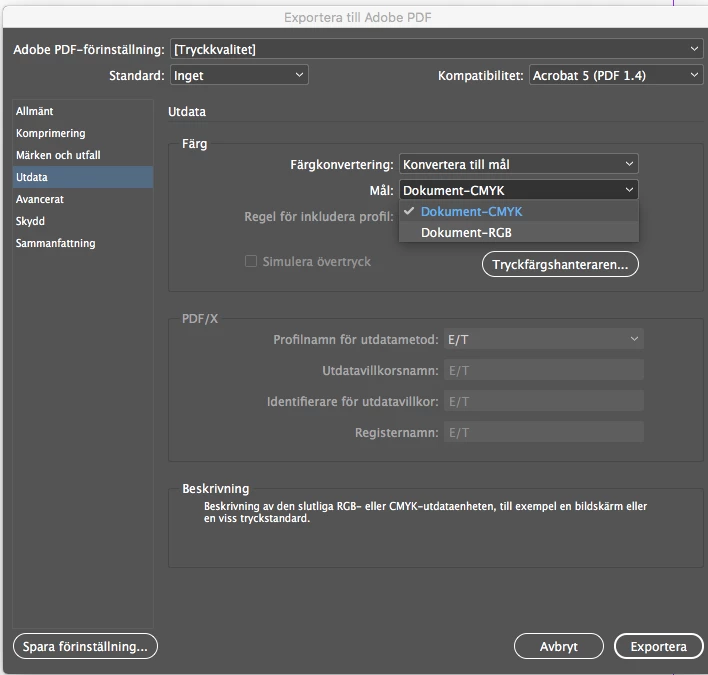
The icc file location is in User/username/Library/ColorSync/Profiles.
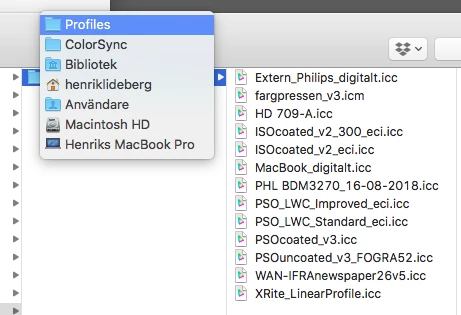
Anyone experiencing the same problem? Any workarounds?

Do i need to save the icc profiles in another location?

This topic has been closed for replies.
Correct answer henriklideberg

Solved it!

Seems like the color management was deactivated due to the update. With that one activated again, everything went back to normal.

1 reply

henriklidebergAuthorCorrect answer
Participant
October 17, 2018

Solved it!

Seems like the color management was deactivated due to the update. With that one activated again, everything went back to normal.

Participant
October 17, 2018

Hi henriklideberg

I am having the same issue and have a catalogue going to print! How did you reactivate them?

Many thanks!

Participant
October 17, 2018

In InDesign, check Edit menu and Color management/settings (?translation).

In the color management/settings make sure the setting Simulate Adobe InDesign 2.0 with CMS deactivated is not selected. Instead set the option to Custom or any predefined setting. Hit OK, and then try to export again.