


Participant
April 25, 2021
Answered

Copy and Pasting Nepali/Foreign Languages from Word to Indesign

  • April 25, 2021
  • 2 replies
  • 4760 views

Hello,

I am trying to copy and paste translated Nepali text into Indesign. I downloaded Adobe Devanagari and it is working to the extent that there are no longer boxes with Xs in them, but it is not copying and pasting correctly (e.g.): 

Original Text: बर्लिंगटन लीड कार्यक्रम 

Adobe Text: 
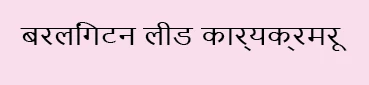
I cannot read/speak/write Nepali, but these do not look the same to me. I have updated the Paragraph Style so that it is in the same font as the font itself. I have tried Nimala UI which also seems to be a Nepali-friendly font (but still has the same issue). I have not done anything with Unicode because I don't really have a good understanding. Any advice/quick workarounds appreciated. Thanks!

This topic has been closed for replies.
Correct answer City of5E42

For anyone else who may see this - I found the answer here: https://community.adobe.com/t5/indesign/trouble-copy-pasting-sanskrit-from-word/m-p/10454925#M141540

2 replies

Diane Burns
Inspiring
April 26, 2021

I think for this language you need to have the World-Ready Paragraph Composer applied, not the Adobe Paragraph Composer. Has that been set?

Srishti Bali
Community Manager
Community Manager
April 25, 2021

Hi there, 


Thanks for reaching out. Please try importing text from word file instead of copy-pasting. Steps are shared here.


Regards,

Srishti

Participant
April 25, 2021

Hello,


After trying this - there was no change in the result. I tried many different import settings and the characters always came out the same - not how they are in the word doc. 


Thanks,

-SD

City of5E42AuthorCorrect answer
Participant
April 26, 2021