Participating Frequently
August 29, 2017
Answered

Corrupted Cursor in InDesign

  • August 29, 2017
  • 24 replies
  • 43319 views

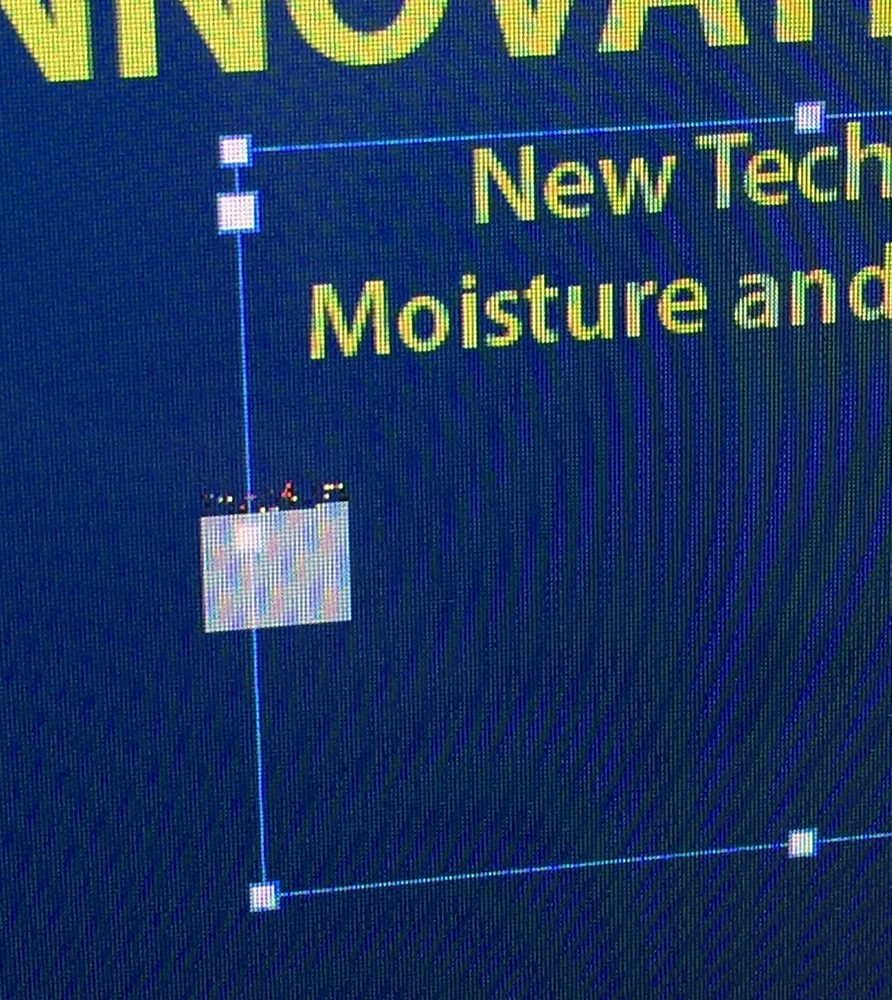
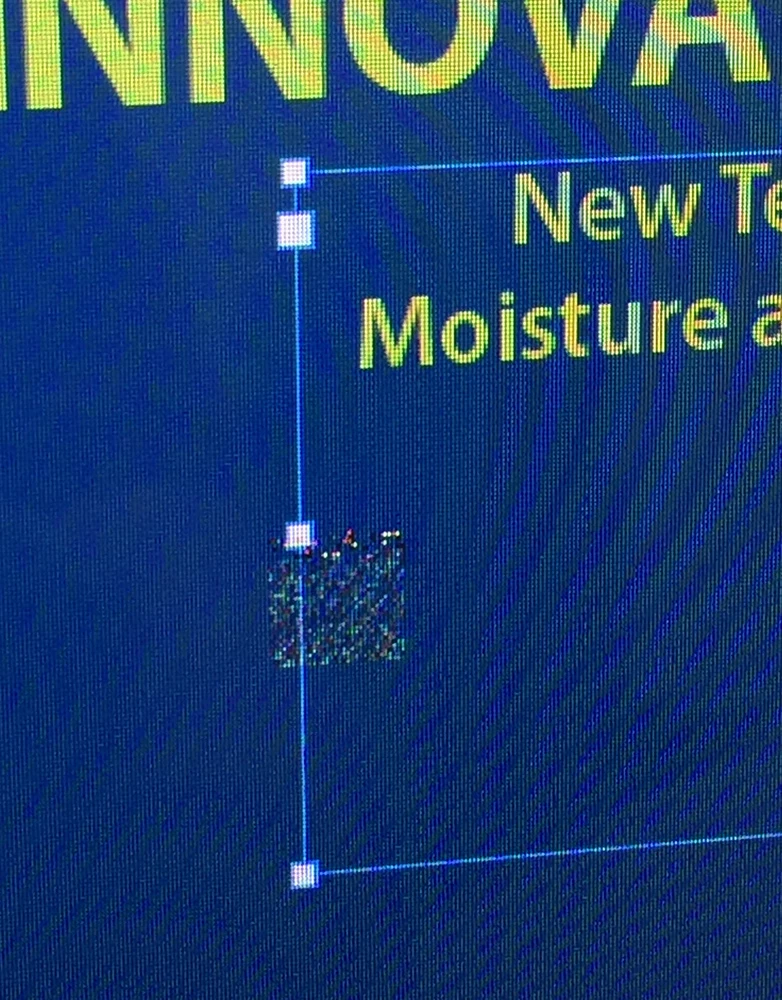
I can't verify if this is an issue with the upcoming version of macOS High Sierra (I've noticed it across several public betas), but the cursor will begin to act odd after switching between apps and InDesign 2017.1. When switching between other apps and InDesign, the regular arrow mouse cursor becomes to a box that changes depending on the the interaction with the page elements.  It takes a restart of InDesign to get the normal cursors/arrow back. Not sure if it's unique to switching between certain apps, but it's quite tricky to use once it acts up like this. No issues like this with any other Adobe apps. Anyone else on High Sierra have this issue?
This topic has been closed for replies.
Correct answer wrensauer

Hi everyone,

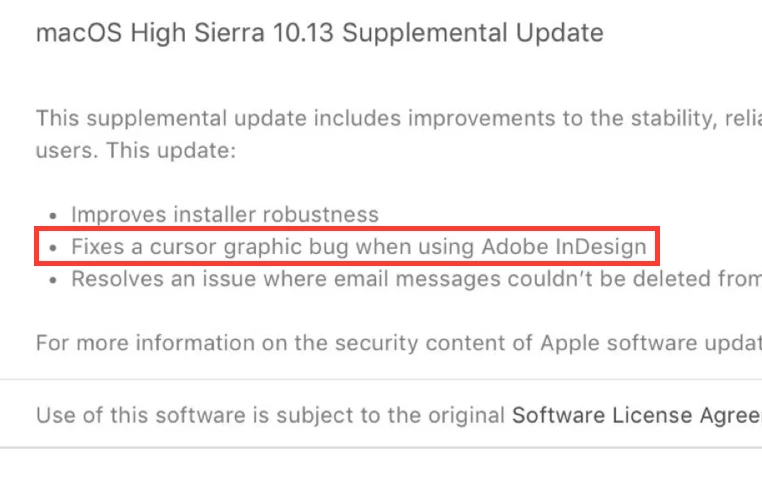
This issue has been resolved with the MacOS 10.13 Supplemental Update released today. Please update your OS if you're experiencing this issue with High Sierra.

Thanks,

Wren

24 replies

Pradeep Verma
Adobe Employee
Adobe Employee
September 19, 2017

Thank you for reporting the issue and also reporting it with Apple. We are actively working with Apple on this issue to get it resolved as soon as possible, but it may not get fixed with the GM build of High Sierra (10.13), but a subsequent Dot Release.

Regards,

-Pradeep.

days_of_speed
Inspiring
September 22, 2017

I have the GM seed of High Sierra and the issue is still here despite the GPU checkbox being off.

This is only in InDesign. I find it bizarre Adobe don't test their apps during Beta - or do they? Odd that a new OS release can throw a vital part of an app like this. AI and PS are fine.

To suggest rolling back an OS is insane especially given the file changes this one makes.

I hope the fix is soon - this is making ID unworkable.

BobLevine
Community Expert
Community Expert
September 22, 2017

Why do you think this is an Adobe bug?

Participant
September 18, 2017

I tried the workaround on the GM release of macOS High Sierra (17A362a) but the garbled cursor reappears after a period of time. Any idea when a fix may be released? Thanks.

Participating Frequently
September 18, 2017

My guess is the issue will not be addressed before the full High Sierra release September 25th. I did submit a bug report to Apple a beta or two ago but who knows if the solution will come from an Apple bug fix or an Adobe InDesign update. Does anyone know if Adobe has a more proper way to inform them of issues like this other than this forum? Or maybe they won't act until Apple has officially released High Sierra?

Colin Holgate
Inspiring
September 18, 2017

You report things with Feedback Assistant, and as they get to it you receive an email to tell you there's an update. When you open Feedback Assistant again you see what they have said, and if they claim to have fixed it, you get an option to say if it's fixed or not. If there's a question from them you type your answer in Feedback Assistant.

I've had a few of those, but not to do with the cursor problem, I haven't seen that happen.

Out of interest, how do you get the 17A362a build? I keep getting offered the 17A360a one, which I'm already running.

Participating Frequently
September 15, 2017

Bummer, I just installed the latest beta (Golden Master Candidate - 17A362a) and the issue eventually reappears for me. Not sure it's worth filing another bug ticket with Apple or if it'll eventually get addressed with Apple/Adobe at a later date/update.

BobLevine
Community Expert
Community Expert
September 15, 2017

Welcome to the fun of using a beta. This is what you sign up for.

I’m sure other users will be thankful at some point for the volunteers.

Participating Frequently
September 27, 2017

Well, guess what … it's in the release version too!

maxjamesxx
Participating Frequently
September 14, 2017

This issue has been present since the first beta of High Sierra. My guess is it’s related to Apple’s Metal graphics framework and will be fixed once adobe releases new versions with official support for the latest OS. While surprising it hasn’t been fixed yet, I’m sure that a fix is on the way. Nevertheless this is annoying as hell.

Participant
September 12, 2017

Same issue here. 5K iMac, Late 2014, 32Gb ram, running High Sierra Developer Beta 9 with the latest version of InDesign 2017.1 12..1.0.56 Build.

It looks like turning off the GPU Performance works. The cursor has been stable for a couple of hours. I've been switching between Illustrator, InDesign and Photoshop all morning. I'll let you know if the problem comes back.

Participant
September 14, 2017

Nope. Two days later and the problem is back!

Participating Frequently
September 14, 2017

Right, most of us have tried that "fix" and it doesn't hold. High Sierra will be released on the 25th and I don't have too much faith that Adobe will have this resolved by then. Their recommendation will be to not upgrade I'm sure.

Participant
September 8, 2017

Running MacOS 10.13 Beta (17A360a) here and I can report I'm having the same issue. Fingers crossed for a swift fix as it's becoming increasingly more frustrating.

BobLevine
Community Expert
Community Expert
September 8, 2017

While it may well be an InDesign issue, it may very well be an O/S issue. I suggest reporting it to Apple.

Colin Holgate
Inspiring
September 8, 2017

In messages 7 and 10 you can see that both people reported to Apple. Mr E38 could do so too.

Participant
September 8, 2017

I have had this issue for a while now (also on the developer preview). Holding Ctrl + Alt + Command + Shift after clicking on InDesign clears the cache and seems to delay it happening a bit longer. I almost had a day without it! It is so annoying! Hopefully will be fixed soon.

Participating Frequently
September 6, 2017

I filed a bug report with Apple using the Feedback Assistant and detailed the problem best I could. Since it's only happening with Beta users, it should be something they can get to the bottom of.

Are any of you others, with the issue, noticing that it mostly happens when you switch between apps and come back to InDesign? Seems if I stay within InDesign, the cursor stays okay.

Colin Holgate
Inspiring
September 6, 2017

I tried and couldn't see any problems. There have been a few beta updates since the topic was started. Is it still happening for you in 10.13 Beta (17A360a)?

maxjamesxx
Participating Frequently
September 6, 2017

I'm running 17A360a and the bug is still present.

maxjamesxx
Participating Frequently
September 6, 2017

I'm also seeing this. Running latest version of InDesign CC on macOS 10.13 Beta (17A360a). Extremely frustrating. FWIW, my machine does not support GPU Performance - it's off by default and I am still seeing this issue.

Participant
September 5, 2017

This is happening to me as well. I have to restart InDesign every 5-10 minutes to go back to a normal cursor, but then it comes back. Just FYI. Came here while searching for answers. Only InDesign, not seeing this in other Adobe CC apps (though I haven't tried many aside from Photoshop & Illustrator).