

graphics_4075
Inspiring
June 8, 2026
Question

Custom workspace keeps getting tabs added

  • June 8, 2026
  • 4 replies
  • 63 views

Pretty simple and unusual bug. I haven’t noticed a pattern yet, but I have set a custom workspace at least 5+ times in the past 2 weeks and CC Libraries and Style Packs keep getting added. I have never added those and manually removed them multiple times (and then saved that workspace.)
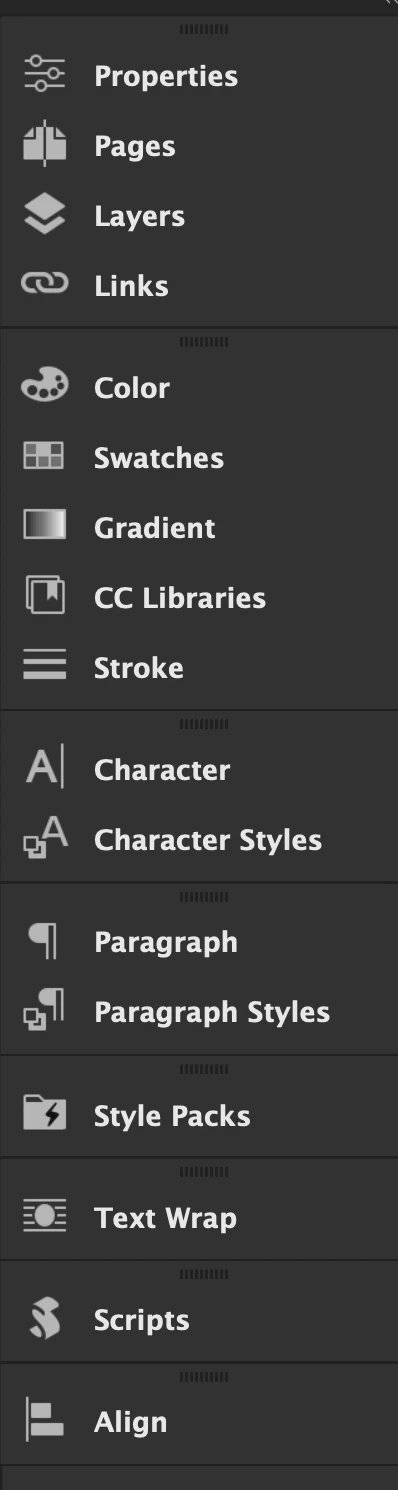
I have deleted the workspace and made a new one, overridden it, seemingly tried everything. This is such a small thing that is driving me crazy.


InDesign 21.3 on Mac Tahoe 26.2. Before telling me to update to 21.4, I will not because of the bugs breaking simple layout and selection things :)

    4 replies

    Anubhav M
    Community Manager
    Community Manager
    June 8, 2026

    Hi @graphics_4075,
     

    Sorry to hear about the trouble with workspaces in InDesign. I was able to reproduce the issue on my end and have forwarded the details to the product team for further investigation. I'll update this thread as soon as I have more information.


    Feel free to reach out if anything else comes up in the meantime.

    Anubhav

    Barb Binder
    Community Expert
    Community Expert
    June 8, 2026

    I’m working on macOS 26.5.1 and haven’t experience this personally, but you are the second person to mention it.

        ​@Eugene Tyson’s advice is spot on but if you do both and the behavior returns, consider setting up a keyboard shortcut to reset the workspace until this is fixed. I use Cmd+Opt+5 but pick one that is easy for you to remember. 

    EDIT: I just watched your video so this won’t be helpful.

    ~Barb at Rocky Mountain Training
    graphics_4075
    Inspiring
    June 8, 2026

    Hi Barb,


    I thought I was the only one so maybe I’m not crazy… if you check my reply to Eugene I attached a screen recording of making a new workspace + resetting it, and showing how resetting seemingly merges my new workspace with whatever one I built it off of. I am unsure if setting up a shortcut to reset will fix anything, but will try if nothing else works!


    P.S. if this was mentioned in another post here, could you link it to me? just curious

    Cheers
    Barb Binder
    Community Expert
    Community Expert
    June 8, 2026

    Yes, I’ll find the post but I’m still playing with it and 

    1. Can exactly replicate your video (InDesign 21.4) and
    2. Can see a disconnect between using Reset in the Window menu and Reset in the Workspace list. Something is off here that isn’t happening with my own custom workspaces (which I copied from an older version). 

    I’ll be back in a few minutes with more details.

    ~Barb at Rocky Mountain Training
    BobLevine
    Community Expert
    Community Expert
    June 8, 2026

    Current version of Taho is 26.5. I don’t know if that’s a factor but you should do the update.

    Community Expert
    June 8, 2026

    Try resetting your preferences, then rebuild your workspace.

    graphics_4075
    Inspiring
    June 8, 2026

    Hi Eugene,


    I tried this and don’t think it work but DO think it showed me what the issue is here. I have attached a screen recording but will briefly explain.


    In my video I had reset my preferences and deleted all workspaces. I started on the Advanced workspace, removed a couple tabs and added a couple that weren’t there by default. I then saved that workspace as “Test” and then hit reset. What this did was combine the tabs I added under “Test” with the default tabs of “Advanced”. AFAIK, since this is how I’ve always made my workspaces, this has never been a feature. You can see after that happens, I can no longer actually select the “Test” workspace and InDesign only recognizes the altered version of the “Advanced” one. 

    Cheers