
Participating Frequently
June 17, 2020
Question

Cut and Paste Within InDesign Removes Formatting

  • June 17, 2020
  • 11 replies
  • 1395 views

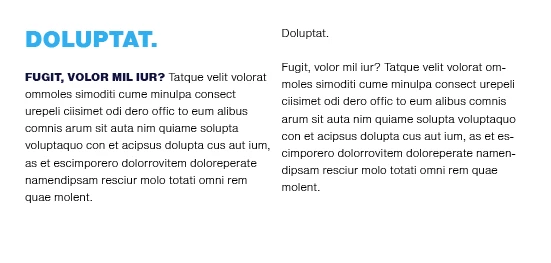
When I try to cut and paste a block of text within the same document in InDesign, it removes all of the styling. It doesn’t matter if I’m using style sheets or not. I also updated InDesign to the latest version today and it did not resolve the issue. See attached – when I select, copy and paste the left hand-column copy into the right column, all of the styling is lost.
This topic has been closed for replies.

11 replies

Sheena Kaul
Community Manager
Community Manager
June 26, 2020

Hi there,


I am hoping that your issue has been resolved till now. If not, please feel free to update this thread else let us know if any of the suggestions shared above helped you or not.


Regards,

Sheena

Barb Binder
Community Expert
Community Expert
June 24, 2020

Hi kblvgo:


I tried restoring preferences and that didn't seem to solve the problem.

How, exactly, did you reset preferences? If you haven't followed the steps under "Rebuilding the cache files",  be sure to give them a shot.


I will also try to see if indeed there is perhaps a third party app that is affecting this somehow. Not sure how to determine that though...

And are you using a clipboard manager? What operating system are you using? 


~Barb


~Barb at Rocky Mountain Training
Barb Binder
Community Expert
Community Expert
June 22, 2020

Hi Frans:


Where is that preference?


~Barb 

~Barb at Rocky Mountain Training
Frans v.d. Geest
Community Expert
Community Expert
June 22, 2020

I'll bet ya you have set InDesign/Preferences to Paste without formatting...

Jeff Witchel, ACI
Community Expert
Community Expert
June 22, 2020

This problems does not happen on my computer using your file. Works as expected when pasting formatted text.

Have you tried restoring all preferences and default settings?

https://helpx.adobe.com/in/indesign/using/setting-preferences.html


kblvgoAuthor
Participating Frequently
June 24, 2020

Thank you Jeff and BarbBinder. I tried restoring preferences and that didn't seem to solve the problem. I will also try to see if indeed there is perhaps a third party app that is affecting this somehow. Not sure how to determine that though...

Barb Binder
Community Expert
Community Expert
June 22, 2020

Hi kblvgo:


I'm not experiencing this issue with the file. 


Next step is to rebuild preferences/cache: https://www.rockymountaintraining.com/adobe-indesign-rebuilding-preferences-cache/


~Barb

~Barb at Rocky Mountain Training
vladan saveljic
Inspiring
June 18, 2020

Have you try to reinstall indesign to solve this problem?

Also, this problems may occur if you have recently installed a third-party utility

If yes, try to uninstall it and see if you solved the problem

Barb Binder
Community Expert
Community Expert
June 17, 2020

Do you want to share the file so that we can take a look?


~Barb 

~Barb at Rocky Mountain Training
kblvgoAuthor
Participating Frequently
June 18, 2020

Here's the file: https://we.tl/t-K8Xaa5qhDw The copy and paste issue is only happening on my machine. I tested on another computer and it copy and pasted as expected. 

vladan saveljic
Inspiring
June 17, 2020

do you paste without formatting perhaps?

when you paste do yo use "command + V" or "command + shift + V" ("ctrl + V" or "ctrl + shift + V" on pc)?

kblvgoAuthor
Participating Frequently
June 17, 2020

I'm doing the usual selct copy, "command + c", and then "command +v". If I do it using the menu, the option to paste without formatting is actually grayed out and not an option.

Scott Falkner
Community Expert
Community Expert
June 17, 2020

Does this happen when copying from one document them pasting in another, copying and pasting within the same document, or both? Does this happen with all documents or only some documents? Have you tried deleting preferences?


https://indesignsecrets.com/rebuilding-indesign-preferences.php

kblvgoAuthor
Participating Frequently
June 17, 2020

It happens both within the same doc and when I create a new doc and try to paste it in. I just tried deleting the preferences as you suggested, but the issue persists.