
drw92689762
Participant
November 15, 2018
Answered

Data Merge table with multiple rows

  • November 15, 2018
  • 8 replies
  • 14695 views

Hi

I'm experimenting with Indesign, trying to use the data merge tool

I have a CSV file with multiple records, with each row being a unique product and each product having SKU, description, price etc

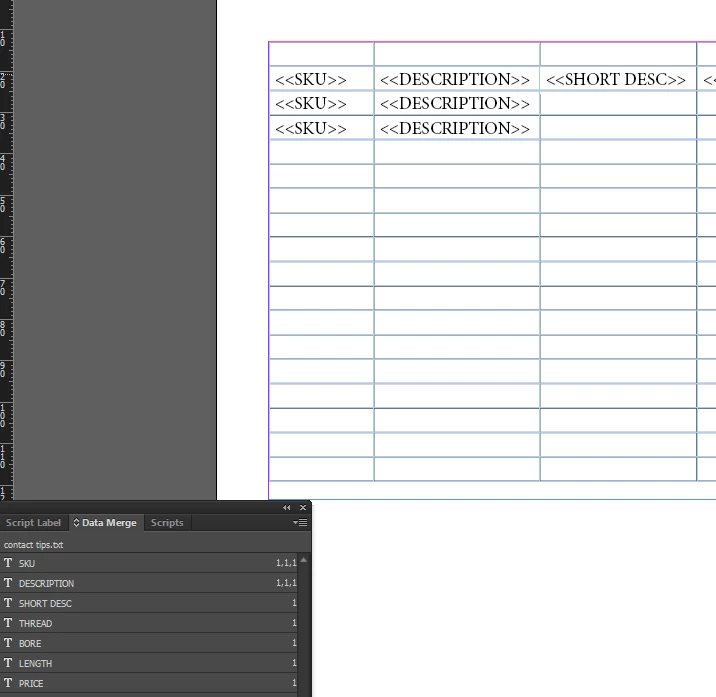
I want to merge this information into a table in Indesign with each row being unique.

However when I try it it just duplicates the first row of the CSV file into every row on the Indesign table

Is there a way to make each row in indesign use a specific row in the csv?
    Correct answer SJRiegel

    The built-in InDesign Data Merge is not set up for that sort of merging. It is limited to an exact repeat of the layout with one record per instance. 

    For what you need, a third-party plug in like EasyCatalog would do the job.

    8 replies

    Participant
    February 18, 2019

    Copy the Content of your CSV file and paste into a Text Box in InDesign, then: Table > Convert Text to Table.

    It may not be Dynamic, but since I can just copy and paste, it takes nearly no time at all.

    drw92689762
    Participant
    November 15, 2018

    Thanks, oh dear, I never noticed how much it costs and it's for a limited number of assets and pages.

    That's out the window then.

    Thanks for all your help anyway people. I will mark this thread as answered.

    drw92689762
    Participant
    November 15, 2018

    SJRiegal; thanks, I had found out about this when Googling my problem, was hoping to avoid buying more additional software on top of this subscription. Maybe Adobe's not for me.

    vinny38; thanks for reply. Not using Excel, the data shown and talked about is just a small part of a very large dataset. I'm trying to learn so please bear with my stupid questions and inability to explain myself on software I have never used before.

    BobLevine; thanks for reply, I'm not really sure about faking but sounds like a workaround that might be more trouble than it's worth once I'm not using sample data.

    Colin Flashman; thanks for testing that script for me. I had again found this on Google but was a bit unsure about it and how to get it work. I will have a play and see what it can do.

    To all:

    I was trying to use Adobe Indesign because of a template I found here https://pagination.com/templates/ (2nd one down)

    I was hoping I could make this fit our business.

    Legend
    November 15, 2018

    drw92689762  wrote

    was hoping to avoid buying more additional software on top of this subscription.

    Pagination.com is another of the third-party solutions that work with InDesign. The templates you found work with their subscription services, which are not cheap at $3500 a year.

    vinny38
    Legend
    November 15, 2018

    Four completely different answers for the same question...

    Maybe you should be more specific about what you're trying to achieve exactly?

    I have the strong feeling I didn't understand at all what was the question...

    Colin Flashman
    Community Expert
    Community Expert
    November 15, 2018

    Hmmm...

    I've re-read the OP's question and my guess is that they're trying to make a parts catalogue of some kind. I believe the link supplied in my earlier post should lead to a solution.

    That said, the script I've linked to has advantages if trying to merge data to a table if the table isn't intended to be set out exactly like it is in the Excel file. If the data is meant to come in exactly like it has in the excel file, then data merge probably isn't necessary and the excel file can be imported via the file/place function.

    The script I've linked to works well if the data coming in has to be in table format, BUT be laid out differently (in David Blatner's original example in the article, the table has two columns but is taking in six fields with carriage returns between lines in places).

    If the answer wasn't in my post, perhaps it might be on my blog at colecandoo!
    Colin Flashman
    Community Expert
    Community Expert
    November 15, 2018

    There is an older script that can assist you with this task, it is called CSV2tables. Have a read of this article at indesignsecrets and follow the link in the article to the script @ scriptopedia. Just tested the script then and it is still working for CC2019.

    https://indesignsecrets.com/using-data-merge-to-create-a-table-for-a-directory.php

    If the answer wasn't in my post, perhaps it might be on my blog at colecandoo!
    Participant
    June 18, 2025

    Sadly, the website scriptopedia doesn't seem to work anymore--anyone know where it went?


    BobLevine
    Community Expert
    Community Expert
    November 15, 2018

    You can fake it by creating a one-row table and setting the merge to multiple records. Make sure there's no margin between the entries and that the text frame fits the table top and bottom.

    vinny38
    Legend
    November 15, 2018

    If I understand correctly your request, I'm afraid you misunderstood how Data Merge feature works...

    Why not simply importing your Excel file as a table? (File > Place + show import options)

    SJRiegelCorrect answer
    Legend
    November 15, 2018

    The built-in InDesign Data Merge is not set up for that sort of merging. It is limited to an exact repeat of the layout with one record per instance. 

    For what you need, a third-party plug in like EasyCatalog would do the job.