



MarkGilvey
Inspiring
February 4, 2019
Answered

Disappearing Copy on "No Break" Style

  • February 4, 2019
  • 2 replies
  • 4034 views

I'm in the process of setting up a GREP to eliminate widows and orphans. One of the steps says to set up a Character Style for the body text where the "No Break" is enabled. When I do this, all my text disappears accept for maybe the first line.

This topic has been closed for replies.
Correct answer Barb Binder

That's great, Mark.

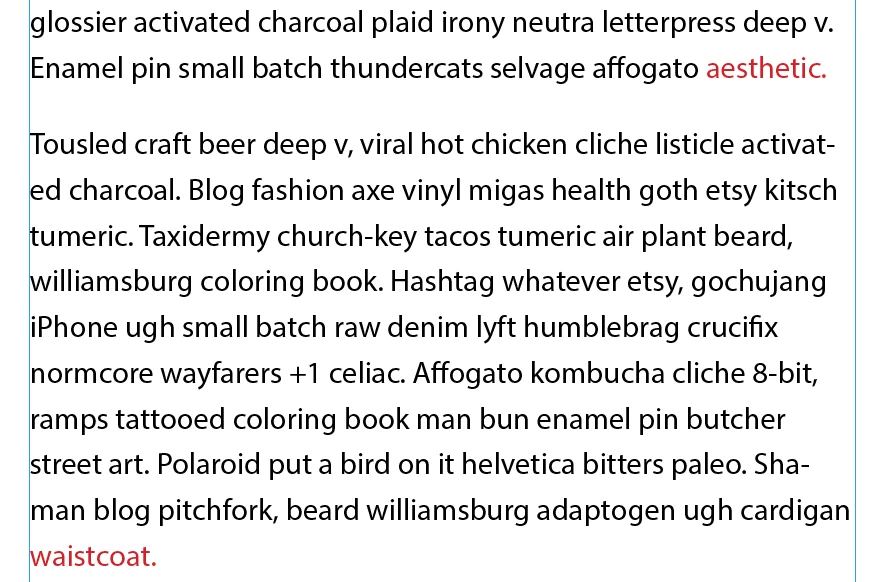
And the color is just so that you can see what is going on. Once you know it is working as expected, you can turn the color back off on your No Break character style.

By the way, my GREP string will keep the last two words together, whereas yours keeps the last 10 characters together.

\w+\s\w+[[:punct:]]+$

vs

.{10}$

Just as a heads up, that will result in a single word on its own line in some situations. As long as that is OK, you are good to go!

~Barb

2 replies

Mike Witherell
Community Expert
Community Expert
February 4, 2019

Widows and orphans are handled in the Keep Options of the paragraph style. Set the Keep Lines Together to 2 and you have a simple solution to preventing widows/orphans.

If, on the other hand, you dislike short runt lines, in general, than either of your GREP solutions that apply the No Break command will help.

Mike Witherell
Barb Binder
Community Expert
Community Expert
February 4, 2019

Hi Mark:

We can help you with this but need a little more information.

Can you show us a screen shot for your GREP Style in your Body text style, similar to mine, below?

And I find it helpful to add a color (temporarily) to my character style so that I can see exactly which letters are being assigned the No Break. If you look at Edit > Edit in Story Editor the text is still there, right? I'm guessing you are signing the No Break style to more characters than you think.

For example, this applies my No Break style to the last two words in a paragraph.

~Barb

~Barb at Rocky Mountain Training
MarkGilvey
Inspiring
February 4, 2019

I think it's working now. I just set up the Paragraph Style to call on the No Break in the Character Style.

I'm not sure what I was doing wrong but now I can see my colored text like in your sample. I think we're done her. Thank you.

Barb Binder
Community Expert
Barb BinderCommunity ExpertCorrect answer
Community Expert
February 4, 2019

That's great, Mark.

And the color is just so that you can see what is going on. Once you know it is working as expected, you can turn the color back off on your No Break character style.

By the way, my GREP string will keep the last two words together, whereas yours keeps the last 10 characters together.

\w+\s\w+[[:punct:]]+$

vs

.{10}$

Just as a heads up, that will result in a single word on its own line in some situations. As long as that is OK, you are good to go!

~Barb

~Barb at Rocky Mountain Training