
Participating Frequently
November 23, 2017
Question

Error code 4 all docs created with CC 2018

  • November 23, 2017
  • 33 replies
  • 20848 views

Hey Guys

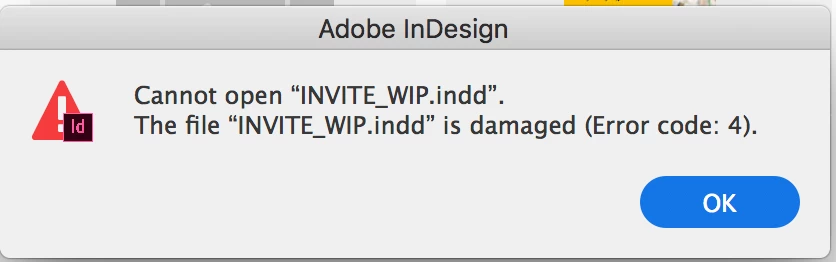
Please help me understand why I cannot open any InDesign documents I create with the new InDesign 2018. All the files I make or save with the new software give me the same error on opening: "Cannot open "INVITE_WIP.indd". The file "INVITE_WIP.indd" is damaged (Error code: 4).

Please help me! I am paying this does not mean I have lost all the work I have created with InDesign CC 2018.

- Sarah
This topic has been closed for replies.

33 replies

Participant
September 4, 2018

None of these suggestions have worked for me. I have cleared the cache in Library, reset preferences, rebooted — nothing. Needless to say, given I JUST finished my project and now I can’t open it, I’m pretty peeved. If anyone has any other suggestions, I’d love to hear them! Otherwise, I guess I’m starting over. 

Srishti Bali
Legend
September 5, 2018

Hi,

Have you tried sending your file on the email address mentioned above?

Regards,

Srishti

Known Participant
August 31, 2018

Read through the 74 messages on this topic. I have same issue and need a fix. But, to help with some of the comments (and hopefully, Adobe), I can say that Cloud storage/working on a cloud/Google Drive/working over a network isn't the issue as I work with all files/apps stored on my MacBook Pro and still have this issue regularly.

In regards to a professional replacement for peace of mind with deadlines and clients, hang in there: Affinity just released a beta of Affinity Publisher and the commercial final should be out this year (hopefully).

Inspiring
August 29, 2018

I've had the same issue almost daily recently. I only updated to High Sierra from Sierra fairly recently. Quitting InDesign and relaunching has always allowed me to open the file. However I have also recently had a similar error on trying to save a file or create a new one. So I had to quit without saving... which is a bit more alarming. I work on both an internal and external SSD, both in and outside of Dropbox. No pattern I've noticed so far. There has also been issue with Photoshop presenting the save as dialogue when the file has already been saved. Then counting to present save as every time.

Participating Frequently
June 9, 2018

ME TOO!! IT'S INCREDIBLY ANNOYING... It also happens when trying to create a new document - although I think then it becomes an error code '0'

Participating Frequently
May 11, 2018

Adobe, please fix this bug!

johanyjutras
Participant
May 3, 2018

I have been having the same problem with my book file.

It first started with "Error 5".

After trying basically every thing that I could find on other threads like this one, I ended not being able to recover my file and had to pay a company (www.markzware.com) to be able to recover my book file. It costed me $64 for them to analyze the .indd file and make sure they could recover it + $140 to finally recover it. They ended up being quick and did the work in less than an hour but still.... A total of CAD$240 to recover my file that was not actually damaged. It's expensive.

Then I decided to start over a new file, to make sure that doesn't happen again plus I made sure to check all of the little things I've read that might actually cause InDesign file to go corrupt:

* Corrupt Font(s) (or corrupt font caches)

* Corrupt Image(s)

* Power Failure

* Placing images via drag-and-drop from an Internet page

* Copying and Pasting Images from Word, PowerPoint, etc into InDesign

* Copying and Pasting text from Word, PowerPoint, etc into InDesign

* Working on an InDesign file over a network or on a remote server

After I save my file and opened it again (the new file) it sais Error 4. File doesn't want to open anymore.   ‍♀️

I have cleared the cache, delete Adobe InDesign, re-installed it. Restart my computer. And now I was able to open it again....

And here I am. I am scared now of closing Adobe. This is ridiculous. I've spent my entire day trying to figure this out.

Hope this can help some of you guys.

Participating Frequently
March 27, 2018

Just got this error again (after updating Indesign a few days ago). So the new Indesign update didn't fix this problem...

wrensauer
Inspiring
April 3, 2018

Hi All,

If you are still running into this issue after troubleshooting, please vote on and comment on the UserVoice bug report here: https://bit.ly/2GzPdXv The InDesign team is actively researching this issue to resolve it and your feedback here will help in fixing this frustrating error.

Best,

Wren

Participating Frequently
April 3, 2018

Hi Wren,

I don't see how this will help because it has nothing to do with the actual Indd file. When we restart InDesign the file works perfectly fine. And when the error occurs, it applies to every single Indd file.You can't open any Indd file until you restart InDesign. I've even had it happen in different Indesign programs (cc2018 and cc2017) and I've had to close both in order to open a file in either one of them.

Ken

Participating Frequently
March 18, 2018

I have this same issue myself - I have had the Adobe Creative suite for 10 years but the recent iCloud pay in instalments has been nothing but trouble.

This new Indesign is painfully slow - it crashes and jams regularly  - and now tonight after closing down - what I believed was properly last night - I get this Error Code 4 message - This is an entire book - I am not only worried - I am deeply upset.

Does anyone have any suggestions?

Participating Frequently
March 18, 2018

Re-Booted my computer and the File now opens - Phew!

But still not happy - These problems seem to have become endemic with 2018 InDesign

It used to be a very reliable piece of software - before it went on to Creative Cloud

and a rented piece of software - Very disappointed.

Inspiring
March 27, 2018

This also happens to me every day. Multiple times.

All I have to do is restart Indesign but I shouldn't have to. Working with multiple files is frustrating because once it does it you can't open anything until you restart ID.

monicat36047669
Participant
March 6, 2018

It is happening to me too. Quitting Adobe CC and then a restart works but that is incredibly inconvenient. Buying the latest greatest Macs and keeping CC up-to-date should be enough.

Abambo
Community Expert
Community Expert
March 7, 2018

Hi Monica,

are you working locally or on a networked disk or even on dropbox or similar?

Abambo.

ABAMBO | Hard- and Software Engineer | Photographer
monicat36047669
Participant
March 7, 2018

Good morning Abambo, I would say I am working locally (from my 4th floor apartment using wifi) on a newly purchased MacBook Pro. I am working from Mexico for the next 6 weeks (which is why I purchased the laptop) and did not run into this error code when working on my iMac from my home in Calgary - also on wifi.

Participant
February 14, 2018

Urgh. This started for me today even though CC2018 has been installed for some time now.
Frustrating.