Known Participant
June 5, 2021
Answered

Flowing reverse type into normal type

  • June 5, 2021
  • 3 replies
  • 1199 views

How can I automatically flow reverse text (white text on solid colour background) from one page to another text box on the next page so that it shows as normal text (black type on white background) ?


It has to auto-update so the reverse type flows into the next text box and becomes normal text.


This topic has been closed for replies.
Correct answer Brad @ Roaring Mouse

I know exactly what you want because I had wanted this many times.


There may be better ways to do this now, but this is a jerry-rigged/tricky way I got it to work for me a few years ago:

Create two Object Styles for your text frames; one for the normal positive text, and a second one for the reverse text.

In the second one's Style Options, change Transparecy Effect for Text to Inner Glow with White as the color*, and adjust the size and choke to fill the characters, depending on your text size.


(*Should work with other colors than White)

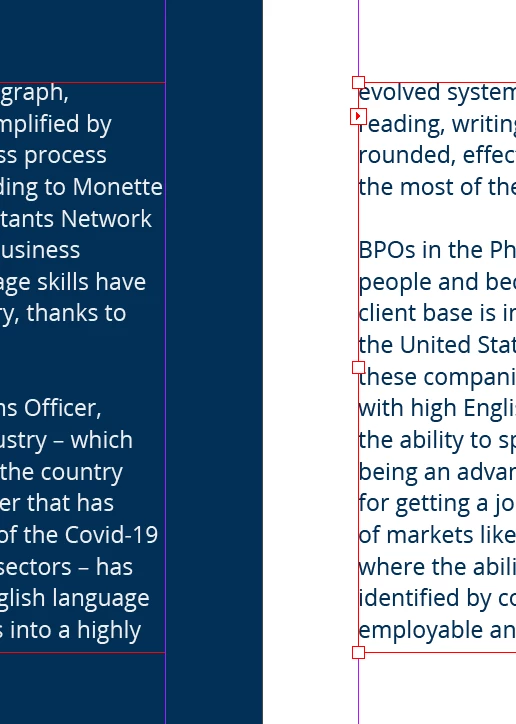
Attached is an example I just did up to show how it worked.


In my case, I defined the second text frame style with the blue background as part of it, but it can just as well be filled with None and the placed over top of any background, be it a colour OR photo



3 replies

rob day
Community Expert
Community Expert
June 14, 2021

Here’s another option—a rectangle filled with white or [Paper] set behind the text frames, and the knockout text frame filled with a color with the Text transparency set to Lighten and Knockout Group checked:


Brad @ Roaring Mouse
Community Expert
Brad @ Roaring MouseCommunity ExpertCorrect answer
Community Expert
June 13, 2021

I know exactly what you want because I had wanted this many times.


There may be better ways to do this now, but this is a jerry-rigged/tricky way I got it to work for me a few years ago:

Create two Object Styles for your text frames; one for the normal positive text, and a second one for the reverse text.

In the second one's Style Options, change Transparecy Effect for Text to Inner Glow with White as the color*, and adjust the size and choke to fill the characters, depending on your text size.


(*Should work with other colors than White)

Attached is an example I just did up to show how it worked.


In my case, I defined the second text frame style with the blue background as part of it, but it can just as well be filled with None and the placed over top of any background, be it a colour OR photo


Known Participant
June 14, 2021

Hey thanks, this work!

Brad @ Roaring Mouse
Community Expert
Community Expert
June 14, 2021

Cool. I can't guarantee it works properly at print time, so take this with a grain of salt.

vladan saveljic
Inspiring
June 5, 2021
Known Participant
June 13, 2021

It's not the answer I'm looking for, unfortunately.