

Font export glitch: Inter Light colon ':'
This is weird, right.
I'm creating a 60 page, bilingual document. English in sans serif, Inter Light, Welsh in serif, Crimson Pro Reg.
When I export for print or as an interactive PDF, the colon of the English translation appears as a kind of hamburger menu or server icon. Observe:

After much testing and headscratching, I've cracked it. But it doesn't make any sense and I'd like to learn from this if I can.
By highlighting and hovering over the offending glyph in the Id doc, you get a choice:
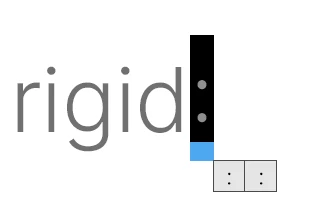
Of course, they look identical and hovering over each one doesn't trigger a popup label.
Looking at the Inter webpage > Glyphs (of which there are 2.5k), I can see there are no less than three colons in the set.

These do have unique labels, but they don't mean anything on the face of it and you can't see them in the document while working. Note you can see them in the Glyphs library under Type in Id:
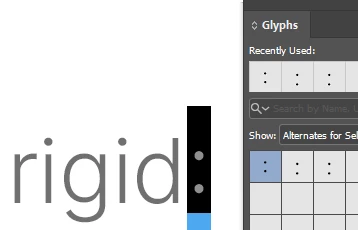
Can someone please tell me if there's something to learn here? Or perhaps it's a glitch that the devs need to iron out. It's definitely robbed me of some good ol' fashion just-trying-to-get-the-work-done-ahead-of-deadline time!
Any helpful feedback or shared experience gratefully received!


 AdChoices