
Inspiring
May 14, 2019
Answered

Font size is being displayed at the wrong size

  • May 14, 2019
  • 3 replies
  • 12096 views

I've been running into an odd problem recently. If i type a line of type and them enlarge it by dragging it bounding box the the size of the font is displayed incorreclty in the tool bar. It usually displays a very small font size and then another font size in parenthesis. The is presists even when I change the type manually in the tool bar. The only solution is to completely delete the text box and start fresh. Why is this? Here is an example of what I am talking about.
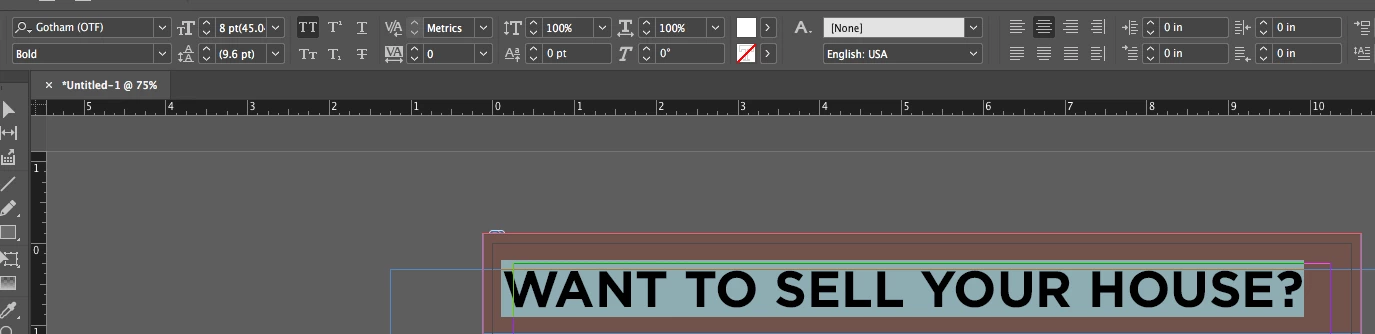
I am using InDesign CC 2018 on a mac running high sierra.
    This topic has been closed for replies.
    Correct answer SJRiegel

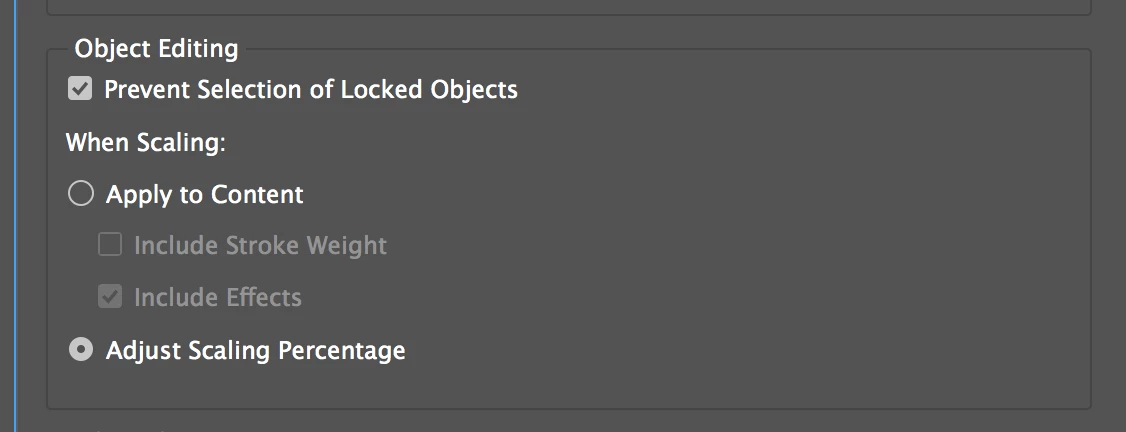
    You can prevent this happening again by changing a preference. Change this setting in General Preferences from Adjust Scaling Percentage to Apply to Content.

    3 replies

    Community Expert
    April 28, 2022

    Cicely said: "The distinction is seen between the two styles - 'long quote' and 'paragraph body' - I must be missing something obvious but I can't see anywhere where these styles should be clashing like this with any character styles etc? They should both be 12pt."


    Hi Cicely,

    the case is easy:

    You have applied superscript as formatting.


    Regards,
    Uwe Laubender

    ( ACP )


    // EDITED

    Participating Frequently
    April 28, 2022

    Thanks Uwe, you saved me! Have a great day.

    Community Expert
    April 6, 2022

    Kwooz said: "This did not work for me."


    Hi Kwooz,

    then make a sample InDesign document available with one single text frame that is showing the issue.

    Could be also substituted contents. Your issue is solvable!


    Thanks,
    Uwe Laubender

    ( ACP )

    Participating Frequently
    April 28, 2022

    I'm also having the same issue and have tried all of the above. Nothing's worked to fix it. 

    jmlevy
    Community Expert
    Community Expert
    April 28, 2022

    I don't see any issue on your screenshots. Can you explain?

    Community Expert
    May 14, 2019

    Hi COGordonW ,

    you scaled the text frame.

    Either scale it back to 100 % or select it, open the Transform Panel and do "Redefine Scaling as 100%".

    Regards,
    Uwe

    SJRiegelCommunity ExpertCorrect answer
    Community Expert
    May 14, 2019

    You can prevent this happening again by changing a preference. Change this setting in General Preferences from Adjust Scaling Percentage to Apply to Content.

    Participant
    April 6, 2022

    This did not work for me.