


Participating Frequently
Nov 22, 2018 3:56 PM UTC
Answered

FR: How to Disable "Learn More" Pop-Ups in InDesign

After a recent update, my InDesign is now showing all these stupid pop-ups the whole time.


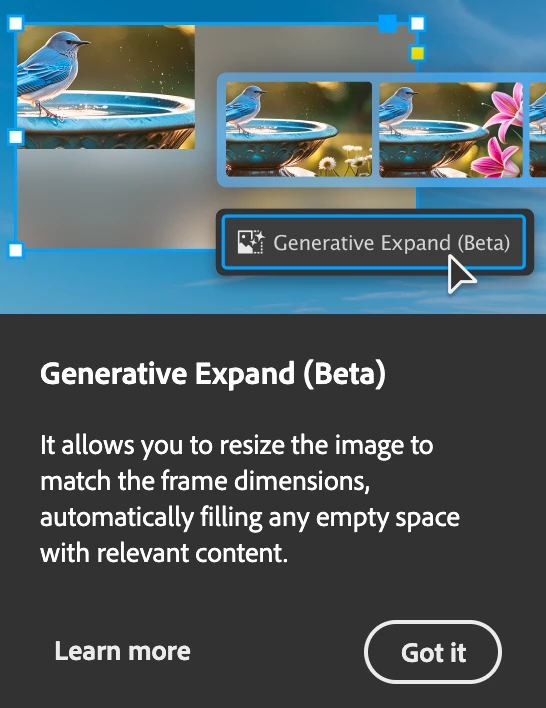
Screenshot attached.  To be absolutely clear, I am talking about the entire dialogue box, not the tool-tip illustrateed in a section of the dialogue box shown.


How do I kill them off once and for all ?  I've looked through Preferences but canot spot anything obvious.


<Title renamed by MOD>

Abhishek Rao
Abhishek RaoCorrect answer
Community Manager
Sep 25, 2026 6:27 PM UTC

Hi everyone,


Thank you for continuing to share your feedback and experiences regarding the recurring in-app notifications and pop-ups. I understand this has been a long-standing concern for many of you.

I wanted to share an update that this topic is being discussed internally, and the product team is actively considering the feedback. We also have a bug logged for this behavior and are continuing to track it.

In the meantime, please follow and upvote the existing UserVoice report for updates and to add your feedback:

ID-4257796 – Provide an ability to disable IAMs and other In-app notifications

Please also update to the latest InDesign 21.6 release and continue to share your observations if you're still seeing these notifications.

I'll keep this thread posted as soon as we have further updates from the team.


Thanks again for your patience and continued feedback!

Abhishek

283 replies

Inspiring
Sep 28, 2026 9:20 AM UTC

After two years, I finally upgraded InDesign from the last stable version, 19, to version 21. I naively assumed that, surely, by now, those stupid pop-ups would have disappeared.

Oh, how wonderfully wrong I was.

Nope. They’re still there, proudly showing up again and again every single time I launch the application. Apparently, Adobe has decided that what every professional needs is to be reminded of the same pointless crap on every single startup.

At this point, I honestly don’t know what to think anymore. Is this some kind of elaborate revenge by Adobe? Or have they genuinely run out of people who have all their marbles and know what a professional application is supposed to do?💩

Translate
Inspiring
Sep 28, 2026 9:16 AM UTC

After two years, I finally upgraded InDesign from the last stable version, 19, to version 21. I naively assumed that, surely, by now, those stupid pop-ups would have disappeared.

Oh, how wonderfully wrong I was.

Nope. They’re still there, proudly showing up again and again every single time I launch the application. Apparently, Adobe has decided that what every professional needs is to be reminded of the same pointless crap on every single startup.

At this point, I honestly don’t know what to think anymore. Is this some kind of elaborate revenge by Adobe? Or have they genuinely run out of people who have all their marbles and know what a professional application is supposed to do?

Translate
Participant
Sep 24, 2026 9:59 AM UTC

7 years later.. no change

Translate
Gavin at MRP
Inspiring
Sep 24, 2026 1:52 PM UTC

Not only “no change” but actually more pop-ups. Plus the one solution that ​@Abhiishek gave to remove them no longer exists in the current release. They apparently closed that gap for us getting rid of pop-ups.

Translate
Abhishek Rao
Community Manager
Community Manager
Jun 11, 2026 6:27 PM UTC

Hi everyone,


First of all, thank you for continuing to share your feedback on this issue. I completely understand how frustrating it can be to have pop-ups interrupt your workflow, especially when you're working on deadlines and using InDesign every day. Many of you have been following this discussion for quite some time, and I appreciate your patience and persistence in helping us improve the experience.

I wanted to follow up on this discussion and see how things are looking today. We've delivered several updates and fixes over the past few releases, and I'd like to know whether you're still seeing any of these unwanted pop-ups in the latest version of InDesign 21.4.

If you're still seeing unwanted "Learn More", onboarding, tutorial, or other disruptive pop-ups in InDesign 21.4, could you please reply to this post with a screenshot of the pop-up along with a brief description of when it appears? For example, whether it shows up when opening a document, selecting an image, exporting a file, working with panels, or during any other specific action.

The more examples we can gather, the easier it will be for me to investigate them individually with the product team and determine whether they're expected prompts, or issues that still need attention.


Thank you again for your feedback and for sticking with us on this. I look forward to your updates.

Best,
Abhishek


<Marking as correct for better visibility on the thread>

Translate
Gavin at MRP
Inspiring
Jun 11, 2026 6:57 PM UTC

The popups are still coming up as of INDD v21.3

I see that there is a v21.4 out there, so I’ll try downloading that today.

Translate
Gavin at MRP
Inspiring
Jun 11, 2026 8:42 PM UTC

I’ve updated to v21.4 and the popups are still there! 😡


Translate
Gavin at MRP
Inspiring
Oct 29, 2025 4:54 PM UTC

I'm sorry — I forgot to jump in this thread on October 8, 2025, to mark the ONE YEAR anniversary of this NOT being solved.

Translate
Blueberrysoup
Participating Frequently
Oct 29, 2025 5:38 PM UTC

Unfortunately your one year anniversary can be applied to many of Adobes annoying 'features' 😞 often hitting the 5 or even 10 year mark in some cases!

Translate
Blueberrysoup
Participating Frequently
Sep 30, 2025 9:06 AM UTC

Please for the love all that is holy in this world can this be removed?
Its been almost a year of this thread existing now and I cannot find any evidence of anyone that wants this feature to stay.

Translate
Legend
Aug 25, 2025 1:35 PM UTC

Hello!

Hasn't this been discussed and voted yet? At least I couldn't find a thread.

ID has started to annoy us with randomly appearing blue pop-up boxes with tips (?), which are usually placed in the lower part of the ID window. Since they're random, not everybody might be affected.

However, this, together with those other "Learn more" annoyances which have been discussed and voted and hopefully brought to Adobe's attention, is the next level of "let's see how we can annoy the user while our programmers have too much time to waste". Instead of fixing the hundreds of bugs listed on ID's uservoice page, they have time for this? Disclaimer: This rant was necessary. 


The actual question is: Any way to turn them off? I couldn't find anything in the prefs.

Translate
Legend
Aug 25, 2025 1:58 PM UTC

For everyone who is new to ID and/or has not yet seem them, this is one of the black tips (similar to "Learn more") pop-ups:


Translate
Legend
Aug 25, 2025 2:47 PM UTC

...and the blue one:


Translate
Known Participant
Aug 22, 2025 6:25 PM UTC

Almost a year later...

Translate
Participating Frequently
Jul 30, 2025 3:14 PM UTC

I just wanted to post a quick thank you to Adobe. You can't imagine how much I love having this ******* hideous black box pop up almost every time I click on my Pages panel. It's just a joy to look at, and it absolutely WILL NOT GO AWAY without clicking on it. It's not timed or anything, and there's no way to turn it off no matter how many times I've seen it, so it's perfect to really ruin my workflow and my mood multiple times a week! Thank you from the bottom of my heart!


And this isn't the only one! There are aggressive, anti-user-friendly boxes for ALL KINDS OF USELESS ****! Like when I export a file! That one's also really fun! I've only seen it about 17 million times, so I haven't had a chance yet to completely read through all the valuable information it contains, but I'm sure by the 34-millionth time I'll finally be able to absorb that critical message. *crosses fingers*


I'm so eager to continue to explore and find more fun easter eggs like this in the future as you continue to throw your waste-infected garbage directly into my face day after day. Yum!


It's high-quality products like this that I'm forced to use by my employer because of your wonderful monopoly that make me so glad I will eventually die. 


Thanks, Adobe! Top-notch work! Keep it up!


Translate
Inspiring
Jul 30, 2025 6:33 PM UTC

Well said, mate. 🙂 You said it funny, but otherwise it's incredibly annoying. I'm using InDesign 19.5.1, which doesn't have these stupid popups, so I don't even know what the current version is, and I don't care because some "very smart" manager doesn't want to stop showing his popups to show his life's work. When 19.5.1 stops working, I'm switching to Affinity.

Translate
Gavin at MRP
Inspiring
Jul 30, 2025 7:21 PM UTC

I use Affinity at home. Unfortunately, we still have to use Adobe at work, because of the stranglehold it has. But I encourage everyone I can to move to Affinity. I used Adobe for 30+ years, and really used to love and respect it. Now, they clearly care nothing for us long-time users.

Translate
Inspiring
Jul 7, 2025 3:09 PM UTC

Unfortunately, you cannot disable these disruptive pop-ups. You just have to live with it. Take a deep breath, cuss Adobe, close the pop-up window, and move on to the next pop-up. Adobe understands that this is disruptive, but they will not fix it (as evidenced in how long this thread is). Oh yea, now these pop-ups are also in Photoshop! Yay! 

Translate
Inspiring
Jul 7, 2025 5:13 PM UTC

That's why I use older versions where these pop-ups don't appear. But that makes paying for a regular subscription pointless for me. It’s probably time to say goodbye to Adobe.

Translate