


Participating Frequently
Nov 22, 2018 3:56 PM UTC
Answered

FR: How to Disable "Learn More" Pop-Ups in InDesign

After a recent update, my InDesign is now showing all these stupid pop-ups the whole time.


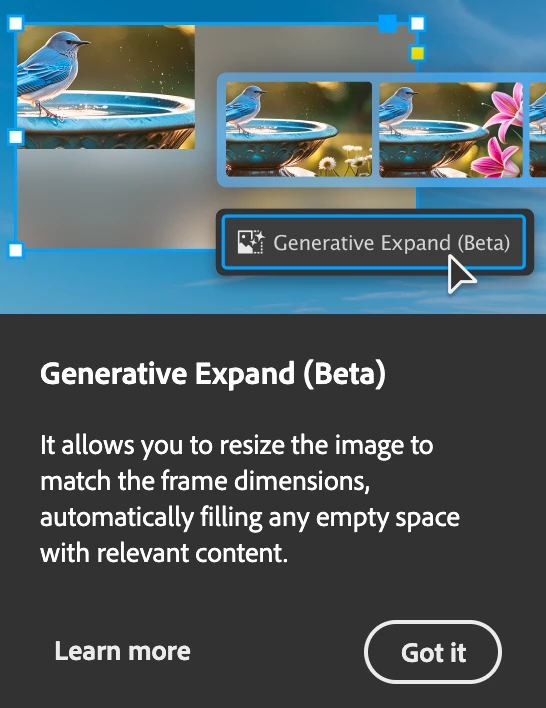
Screenshot attached.  To be absolutely clear, I am talking about the entire dialogue box, not the tool-tip illustrateed in a section of the dialogue box shown.


How do I kill them off once and for all ?  I've looked through Preferences but canot spot anything obvious.


<Title renamed by MOD>

Abhishek Rao
Abhishek RaoCorrect answer
Community Manager
Sep 25, 2026 6:27 PM UTC

Hi everyone,


Thank you for continuing to share your feedback and experiences regarding the recurring in-app notifications and pop-ups. I understand this has been a long-standing concern for many of you.

I wanted to share an update that this topic is being discussed internally, and the product team is actively considering the feedback. We also have a bug logged for this behavior and are continuing to track it.

In the meantime, please follow and upvote the existing UserVoice report for updates and to add your feedback:

ID-4257796 – Provide an ability to disable IAMs and other In-app notifications

Please also update to the latest InDesign 21.6 release and continue to share your observations if you're still seeing these notifications.

I'll keep this thread posted as soon as we have further updates from the team.


Thanks again for your patience and continued feedback!

Abhishek

283 replies

Inspiring
Jun 2, 2025 5:08 PM UTC

I've found a fairly simple solution to this nightmare. It comes in the form of a startup script that selects your custom Workspace everytime ID boots up. When this happens, ID doesn't think you're new and so you won't see them anymore. But you havbe to set up a custom Workspace, which you should anyway, for this to work:


https://community.adobe.com/t5/indesign-discussions/forgetful-workspace-workaround/td-p/15351963

Translate
Participant
Jun 2, 2025 5:13 PM UTC

That's great. Nice work. It's reassuring to know that we can rely on the community to address Adobe's failures.

Translate
Mike Witherell
Community Expert
Community Expert
Apr 25, 2025 3:05 PM UTC

To tell you true, I was expecting a Preference switch in 20.3 about the pop-ups, but I don't see one. 

Also, I am still seeing pop-ups. Am I to expect to silence each of them at least once?

I would prefer a preference switch like the video tooltips. Helpful for the newbie, but I can turn it off in preferences.

Translate
Mike Witherell
Inspiring
Apr 25, 2025 3:22 PM UTC
Yes, that would be the only sensible solution. That's what everyone's been saying over and over again. But there's somebody at the top of Adobe who's obsessed with these popups. He thinks popups will increase profits by at least 50%. So when the question of whether to add a checkbox to the settings was decided at the meeting, he definitely forbade it. He thinks the solution is to keep the popups even if they were to lose most of their old customers. He said popups will attract more new ones.
Translate
Dave Creamer of IDEAS
Community Expert
Community Expert
Apr 25, 2025 4:55 PM UTC

"He"?


Translate
David Creamer: Community Expert (ACI and ACE 1995-2023)
danpinho
Known Participant
Apr 25, 2025 7:33 AM UTC

Updated todat and after a few tests, it seems is FINALLY gone. 

Translate
Zen Creative Agency
Known Participant
Apr 8, 2025 6:07 PM UTC

I keep getting that History pane tour coming up, it's SOOO ANNOYING!!!

Translate
Zen Creative Agency
Known Participant
Apr 8, 2025 6:06 PM UTC

I keep getting that stupid History pane tour coming up, it's SOOO ANNOYING!!!

Translate
Inspiring
Apr 9, 2025 7:03 AM UTC

The History pop-up (my favourite), which always appears unexpectedly and blocks ongoing activity, is a perfect Adobe trap that must have been invented by someone extremely "forward-thinking" and "clever".

Translate
Abhishek Rao
Community Manager
Community Manager
Apr 3, 2025 10:30 AM UTC

Hi everyone,


I wanted to share an update on this issue after following up with the product team. They’ve acknowledged the feedback and confirmed that many onboarding prompts and pop-ups will be removed in the upcoming InDesign 20.3 update, scheduled for release in April.

I’ve specifically raised the concern about the "Learn More" pop-up that appears after updates, installation, or resetting preferences, as this has been a recurring frustration for many of you. The team is checking the status of this particular pop-up, and I’ll provide further updates as soon as I hear back.

I also want to take a moment to thank our community experts, especially @Dave Creamer of IDEAS, for stepping in and backing up this request. Your insights and support go a long way in making sure these concerns get the attention they deserve.

I appreciate your patience, and as always, I’ll keep you posted on any new developments.

If you haven’t already, please continue upvoting the UserVoice request to help keep this a priority. 


^
Abhishek

Translate
designer-images
Known Participant
Apr 3, 2025 10:46 AM UTC

Hi @Abhishek Rao ,


Thanks for the update mate, I appreciate your efforts in trying to move this slow beast of an issue forwards.


Apologies if this is the right place to raise this but I use Typeface for Mac. InDesign 20.2 has a known issue with the font activation feature that causes it to relentlessly crash. Because of that, I'm still on 20.1. If that can somehow be addressed in the upcoming update as well (assuming it's an INDD issue), that would be greatly appreciated as I'd love to finally say goodbye to these intrusive popups.

Translate
Abhishek Rao
Community Manager
Community Manager
Apr 3, 2025 11:02 AM UTC

Hi @designer-images,


Thank you for your kind words. This is a known issue, and the product team has been working on it. A fix is planned for the upcoming 20.3 release and already in the current pre-release or InDesign (https://adobe.ly/3DTi8sx). You can follow the discussion and updates in this thread:
InDesign 20.2 crashing after export to PDF/close file

Additionally, the issue has been reported on UserVoice, where you can upvote and add any comments: InDesign 20.2 - Open any document, do nothing in it, and crash

I appreciate your patience. 


^
Abhishek

Translate
Abhishek Rao
Community Manager
Community Manager
Apr 1, 2025 7:46 PM UTC

Hi everyone, 


Thank you for sharing your thoughts on the persistent "Learn More" pop-ups. I understand how much value this feature would add for users. I have escalated this with the product team and they are looking into it. 


For better visibility, could you please upvote this UserVoice here: Preference to disable contextual menus annoyance

and add your comments. 

I’ll be sure to share any progress on this thread soon as I have more information!


We truly appreciate your patience.


^
Abhishek

Translate
Inspiring
Apr 2, 2025 7:31 AM UTC

You've got to be kidding me. This is unbelievable. So we have to register on another server because no one reads the opinions of users on your server?

Translate
Dave Creamer of IDEAS
Community Expert
Community Expert
Apr 2, 2025 1:26 PM UTC

Use the same log-on info you use on this forum. That makes it easier to log in.


This forum is mainly a user-to-user support forum, often with "how to" questions. Some Adobe employees, such as Abhishek, do frequent them, but as a whole, this is not where Adobe determines what is important to add/fix in their software. 

For example, there were/are issues with InDesign on Mac--some caused by non-Adobe utilities--that where all over the InDesign forum. Why? Because it was causing a problem for THOSE users. However, a majority of the users were not having a problem, but if you looked at just the forum, one would think it was affects most of the users.


That's why the UserVoice site is critical to post your opinions--just be sure to search for existing posts to eliminate duplicate posts. That just dilutes the vote numbers and the number of votes shows Adobe what to focus on first.


Translate
David Creamer: Community Expert (ACI and ACE 1995-2023)
Abhishek Rao
Community Manager
Community Manager
Mar 28, 2025 4:22 PM UTC

Hi everyone,  


I appreciate all the feedback shared. Just wanted to let you know that this is something the product team is actively looking into. We’re working on improvements, and I’ll share any updates as soon as I have them. Thanks for your patience and for being part of the InDesign community! 


Best, 

Abhishek

Translate
Inspiring
Mar 28, 2025 4:27 PM UTC

Abhishek, for what it's worth I'd like to reiterate that it's clear to many of us that these popups wouldn't happen as often as they do, or ever again,  if the ID team could once and for all solve the years-long issue of ID constantly forgetting our personal Workspace setup. No other app does this, including other Adobe apps. It's been infuriating and a productivity pylon.

Translate
danpinho
Known Participant
Mar 28, 2025 5:05 AM UTC

Still can’t disable it. Still no official fix. Still pretending this is normal in professional software.


For those new to the community:
I will be posting about this every time Adobe pushes an update. Or maybe every month IDK. Why?


Because after eight months of feedback, silence, and repetitive interruptions to my workflow, it’s clear the only consistent part of the InDesign experience is this pop-up.


This is less about venting and more about creating a searchable record so users know it's not just them. Adobe hasn’t addressed it, so here we are.


See you all again on the next update. Same time, same pop-up.

Original from October: https://community.adobe.com/t5/indesign-discussions/how-to-disable-quot-learn-more-quot-pop-ups-in-indesign/m-p/15233833#M618030

Translate
Mike Witherell
Community Expert
Community Expert
Apr 1, 2025 11:36 AM UTC

Hi Dan,

Yes, this should be switchable in Preferences. On for newbies; off for veteran users.

Translate
Mike Witherell
Abhishek Rao
Community Manager
Community Manager
Apr 1, 2025 5:05 PM UTC

Hi @danpinho,  


I hear you, and I understand how much value this feature would add for users. Just wanted to let you know that the product team is actively working on this request, and we appreciate your patience. You should be hearing an update on this soon.  

I’ll share any new developments as soon as I have them!  


^

Abhishek

Translate
Participant
Mar 26, 2025 8:52 PM UTC

For now, and unless someone has discovered a disable option, all I have found was reporting it:

https://indesign.uservoice.com/forums/601180-adobe-indesign-bugs?query=Pop%20Up%20Window%20-%20History%20Panel%20Tour

Translate