


Participating Frequently
Nov 22, 2018 3:56 PM UTC
Answered

FR: How to Disable "Learn More" Pop-Ups in InDesign

After a recent update, my InDesign is now showing all these stupid pop-ups the whole time.


Screenshot attached.  To be absolutely clear, I am talking about the entire dialogue box, not the tool-tip illustrateed in a section of the dialogue box shown.


How do I kill them off once and for all ?  I've looked through Preferences but canot spot anything obvious.
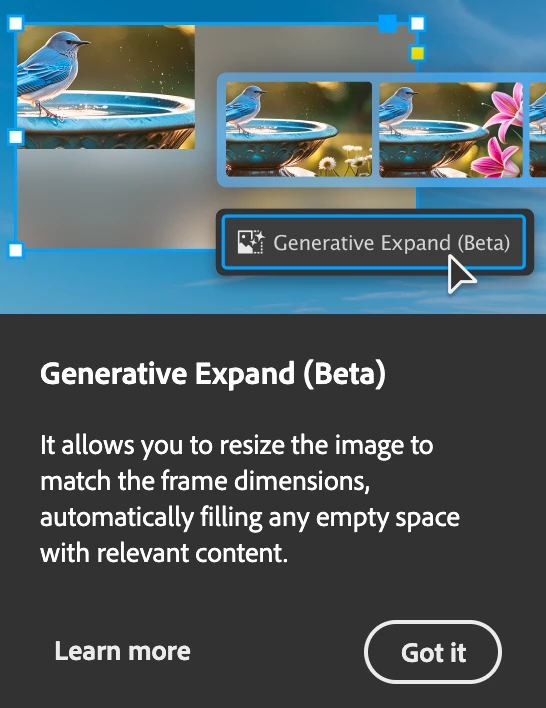


<Title renamed by MOD>

Abhishek Rao
Abhishek RaoCorrect answer
Community Manager
Sep 25, 2026 6:27 PM UTC

Hi everyone,


Thank you for continuing to share your feedback and experiences regarding the recurring in-app notifications and pop-ups. I understand this has been a long-standing concern for many of you.

I wanted to share an update that this topic is being discussed internally, and the product team is actively considering the feedback. We also have a bug logged for this behavior and are continuing to track it.

In the meantime, please follow and upvote the existing UserVoice report for updates and to add your feedback:

ID-4257796 – Provide an ability to disable IAMs and other In-app notifications

Please also update to the latest InDesign 21.6 release and continue to share your observations if you're still seeing these notifications.

I'll keep this thread posted as soon as we have further updates from the team.


Thanks again for your patience and continued feedback!

Abhishek

283 replies

Participant
Mar 26, 2025 4:32 PM UTC

My favorite is when InDesign crashes repeatedly and forces you to endure the same Tours and Tips over and over and over and over and over. 


Stop asking me to invite people to my library. Stop asking me to share my work. Stop dangling new features in front of my workspace, disrupting my workflow. Most people have a specific goal in mind every time they open these applications - interruptions are just an annoying obstacle to overcome before achieving that goal, closing the software for the day, and getting on with life. Stop advertising your products to people who are already paying to use them. Give us an opt out.

And while I'm at it - can you please stop telling me via popup that I can "update my profile" every time I interact with the Adobe Community? We know how web forums work. Believe it or not, we use digital products regularly!

Translate
SummersJ
Participant
Mar 21, 2025 11:10 PM UTC

I had to crash Photoshop just to get rid of the #@$% blue tooltip, too, even after I'd closed the garbage pop-up!

Translate
Participant
Mar 19, 2025 5:46 PM UTC

These pop ups have got to stop! It keeps telling me the same things on repeat while I'm trying to work. Make it stop, for the love of God.

Translate
Participant
Mar 18, 2025 5:49 PM UTC

What if you can't even click the pop up to close it? Suddenly with a recent update I assume, the popups are oversized and only partially show, so I can't click to close them. I can't work with them covering part of my document. I'm on a laptop with high res display. If I adjust the scaling smaller, I can't read anything, all the text and icons are microscopic. Adobe really needs to provide a way to disable these.

Translate
Participant
Mar 16, 2025 9:11 AM UTC

Once upon a Time, when you bought a software, it was a complete finished quality product. Nowadays all of these companies, laughing at your face. 

Can someone please mention all of Indesign finest alternatives out there?

Translate
Dave Creamer of IDEAS
Community Expert
Community Expert
Mar 16, 2025 3:00 PM UTC

@NMS2025 Are you looking for an alternative because of the popups? (That's what this thread is about.)

Did you try googling your question or was it just a retorical question/complaint?


Translate
David Creamer: Community Expert (ACI and ACE 1995-2023)
Participant
Mar 16, 2025 6:18 PM UTC

Hey, this pop-ups are just an example of a wider phenomenon...
In Each update which supposed to fix the problem - You get a bunch of other problems.
That's why I'm looking for other options (which in my case need to be with RTL support)

And yes, currently these pop-ups driving me crazy 🙂

Translate
Inspiring
Mar 10, 2025 5:30 PM UTC

Years after users complained, these pop up windows are here to stay. They won't go away after being dismissed many times. They always pop back up again with different things users can learn more--stopping users from working on projects, disrupting workflows, and increasing blood pressure.  Way to go Adobe.  😞

Translate
timz67519437
Inspiring
Mar 7, 2025 9:51 PM UTC

This is still happening. In 2025. No way to turn off these annoying blue bars. I get one almost every day that I open InDesign.

Translate
Participant
Mar 5, 2025 4:11 PM UTC

Has anyone else noticed a general enshittification of the usablity of InDesign and Illustrator? Maybe other apps too, but they're the two I use the most so they've become the most annoying.


Things like:

- ENDLESS unwanted pop-ups, product tours, and suggestions (I'm looking at you, InDesign History panel) and no way to turn them off?

- I do not need a tour of CC Libraries every single time I open Illustrator. General info on this forum suggests that they stop after a couple weeks, but nope. Every. Single Time.

- Those blue banners at the bottom of the screen yelling at me to Try This New Thing You Don't Need! Also no way to shut them off.


Halp. I'm thinking of resorting to ~Canva~


Translate
Inspiring
Mar 5, 2025 5:01 PM UTC

It seems to be connected to the fact that InDesign doesn't remeber our Workspace setting from boot to boot, so it thinks we're new all the time.

Translate
Participant
Mar 5, 2025 5:09 PM UTC

Thanks for that intel. It makes sense if that's the case but still so annoying. I have many grey hairs and memories of Photoshop 2.0 to prove that I'm not new 

Translate
danpinho
Known Participant
Feb 28, 2025 5:10 AM UTC

Congrats Adobe, 7 months later and still no solution. But when it comes to increase Subs prices…

Translate
Participating Frequently
Feb 28, 2025 4:33 PM UTC

So frustrating. So maddening. So irritating. What do we do? I have some ideas but I can't say them here. But I do I suggest we start writing letters to the Adobe board: https://www.adobe.com/about-adobe/leaders/board-directors.html.

Be nice. Be polite. But let them know.

quote

Congrats Adobe, 7 months later and still no solution. But when it comes to increase Subs prices…


By @danpinho


Translate
designer-images
Known Participant
Mar 5, 2025 4:02 AM UTC

Like you all, this has been an irritating and disruptive issue for me too over the last few months.

A couple of days ago I saw an update to 20.2. Interestingly, the relentless popups for Generative Fill etc. stopped, with exception of the History Panel Tour popup (which I could live with).

However, after updating, i then endured endless crashes, usually when exporting to PDF or sometimes when closing a file...

My custom workspace would always switch to the default upon restart, so I wondered if that had something to do with it, but it didn't.

Don't know if it's related but I use Typeface and use the Auto Activation for Indesign feature which worked well until this version. Tried switching that setting off, but it made no difference. I even uninstalled and reinstalled InDesign with fresh preferences but it still crashed all the time.

I've now reverted back to 20.1 and got to say hello again to my old mate... (looks like popups are back for me again). 

However, Indesign hasn't been crashing (yet), and my font activation through Typeface is behaving more as it should it seems. So it's possible Adobe have solved one problem and created others in the process. Anyway thought I'd share my experience, Perhaps proceed to 20.2 with caution if you feel you must.

Translate
Participant
Feb 25, 2025 2:55 PM UTC

For me, this has become a hard stop. A forced tutorials locks up in a state I can't dismiss, and I'm not able to make use of the program at all. My only way out is through by closing out the program through task master. I've uninstalled and reinstalled to no effect. Suggestions welcome.

Translate
Inspiring
Feb 25, 2025 4:41 PM UTC

You can't and Adobe doesn't care. This has been going on for almost a year with many updates since it first became a nuisance. 


What's happening, and is more important, is that InDesign is not remembering our personalized Workspace setting. It seems random when it forgets. And so each time it thinks you're new. Mindbending.

Translate