
Participating Frequently
November 22, 2018
Question

FR: How to Disable "Learn More" Pop-Ups in InDesign

  • November 22, 2018
  • 51 replies
  • 34659 views

After a recent update, my InDesign is now showing all these stupid pop-ups the whole time.


Screenshot attached.  To be absolutely clear, I am talking about the entire dialogue box, not the tool-tip illustrateed in a section of the dialogue box shown.


How do I kill them off once and for all ?  I've looked through Preferences but canot spot anything obvious.
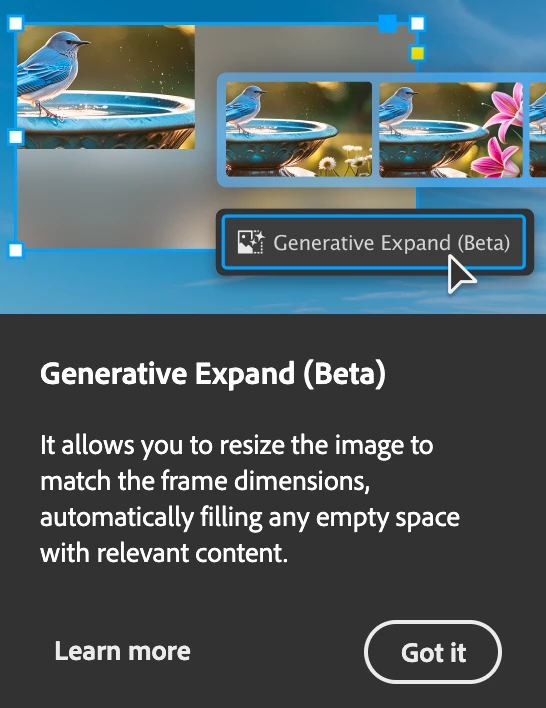


<Title renamed by MOD>

51 replies

Inspiring
January 28, 2025

Hi,

Is there a way to turn off all the Adobe pop-ups in InDesign? Screenshot attached. 

Many thanks


Mike Witherell
Community Expert
Community Expert
January 28, 2025

Alas! No. At least not yet. But I did ask for it to be added to preferences.

Mike Witherell
Participating Frequently
January 18, 2025

new year. same old adobe, same old popups, same old lack of response. they could fix this today and refuse.

Participating Frequently
January 20, 2025

I feel your pain. It seems like all tech is getting worse at it gets older. I am hoping soon that there is a visionary in Adobe to can adopt the mantle of "Make Adobe Great Again" and really work with it's users to empower them and support them. I just completed one of their surveys and I'm not very hopeful. For one thing they introduced the idea of "membership" which is just a fancier, more "upscale" term for subscription. I just want tools that work at a reasonable price that are customizable to my production needs. It was once this way in a galaxy far, far away.

michellep42148198
Participant
December 31, 2024

The pop ups are driving me insane. And I come to this page to find out if I can turn them off, so I can get back to work... and I'm hit with two more pop-ups from adobe.com. Sooo, does that Adobe thinks everyone wants to click through a forest of pop-ups every five minutes, everywhere they go?

InDesign is suddenly infuriating, in this latest version. I can't believe it isn't possible to disable them.

rszeles
Participant
December 21, 2024

This is infuriating. I got online hoping to find a simple say to disable these pop-ups. I'm going to go back to using an older version of InDesign. It is beyond belief that there is no way to turn this off. Does Adobe realize the amount of distraction and extra time it takes to deal with these Pop-up suggestions?

Gavin at MRP
Inspiring
December 9, 2024

+1 on removing the annoying pop-ups!

I would also like to disable the blue oval SHARE button at the top. This is a feature that we never use, because our workflow differs from this method. I've wanted to remove that since they first introduced it. 


It feels like the app has gotten terribly bloated, and slow. 


It would be nice if most newly added features had options to choose to use OR NOT. 


I'm not against new features being added, but would love to get a faster, more nimble app by turning off features which are not relevant to my my workflow.


Dave Creamer of IDEAS
Community Expert
Community Expert
December 9, 2024

Can't you just ignore the share button? 


David Creamer: Community Expert (ACI and ACE 1995-2023)
Gavin at MRP
Inspiring
December 9, 2024

No.


Incidentally, this is just my work account. I've been using Adobe since the 80's (since before some of the apps were even owned by Adobe). But about 2 years ago, I dropped Adobe completely in my home business, and only use it at my day job. 


There were 2 determining factors in this: 1. The subscription model (I got tired of shelling out $700 year), and 2. The pervasive attitude that what bothers the Users of this paid app does not matter.


There used to be an app called QuarkXPress, which dominated the Desktop Design Market. Quark got the idea that they were irreplaceable, and stopped listening to their user base.


Today, only a very small percentage of designers use QuarkXPress, with estimates placing it at less than 5% of the design market due to the dominance of Adobe InDesign. 


Adobe needs to take a lesson. Other industry quality apps are coming up, ready to step in.

Participating Frequently
December 8, 2024

while you are working on fixing this CONSTANT disruption of our work ... don't fotget illustrator, photoshop and Acrobat too ... it's unbelievably annoying to be constantly and repeatedly forced to click these away.

Participating Frequently
December 8, 2024

I really hate this. I need to work, not to close all these stupid popups all the time.

Participating Frequently
December 2, 2024

@Adobe, This is one of the MOST ANNOYING additions to the app ever. There NEEDS to be a preference setting for this and it should govern ALL tips and hints within the app.

These dumb things keep popping up despite repeated dismissals. Make it GO AWAY.

Community Expert
December 2, 2024

There is a thread here:

https://community.adobe.com/t5/indesign-discussions/how-to-disable-quot-learn-more-quot-pop-ups-in-indesign/m-p/14926530#M593247

But ranting there won't change anything.


To request a change, add your voice to the problem in Uservoice.

Participant
November 28, 2024

anytime i click on a image in indesign 2025 it appears the artificial intelligence pop up on my screen, i tried to click on it to see if it would be gone after but it isn't. what can i do??

Participant
November 14, 2024

+1 for wanting the option to turn off all "help", "tour", and "explanation" tooltips, including the one that CONSTANTLY tells me I should go sign up for the beta. If I get stuck, I know how to search the web for a solution. I don't particularly enjoy being harrassed with tips for features I'll never use.

Participant
November 21, 2024

Another "inconvenienced user" here (as @foobared said earlier, I can't imagine anyone who isn't inconvenienced by this). You've been getting feedback for a month now. Get these annoying popups out of our face so we can get work done and focus on InDesign projects rather than focusing on cleaning crap off the desktop (including off of right in front of what I'm working on, over and over). You've had enough time to patch the software to turn these things off or provide a preference to turn them off. Post an update RIGHT NOW.