


Participating Frequently
Nov 22, 2018 3:56 PM UTC
Answered

FR: How to Disable "Learn More" Pop-Ups in InDesign

After a recent update, my InDesign is now showing all these stupid pop-ups the whole time.


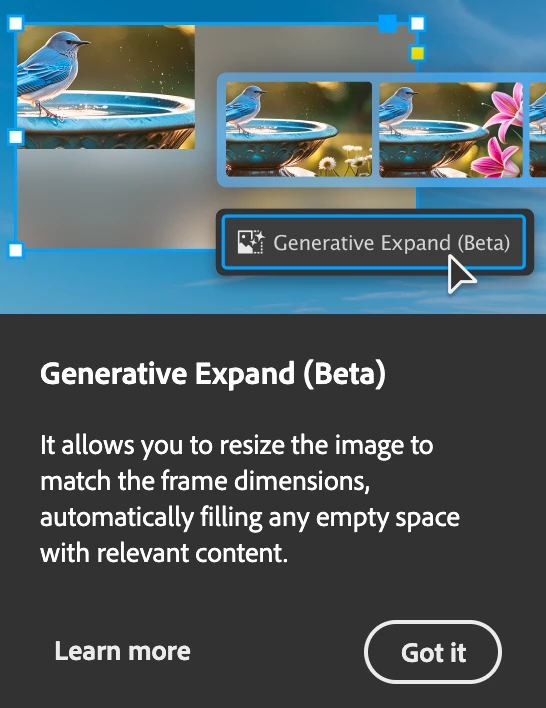
Screenshot attached.  To be absolutely clear, I am talking about the entire dialogue box, not the tool-tip illustrateed in a section of the dialogue box shown.


How do I kill them off once and for all ?  I've looked through Preferences but canot spot anything obvious.


<Title renamed by MOD>

Abhishek Rao
Abhishek RaoCorrect answer
Community Manager
Sep 25, 2026 6:27 PM UTC

Hi everyone,


Thank you for continuing to share your feedback and experiences regarding the recurring in-app notifications and pop-ups. I understand this has been a long-standing concern for many of you.

I wanted to share an update that this topic is being discussed internally, and the product team is actively considering the feedback. We also have a bug logged for this behavior and are continuing to track it.

In the meantime, please follow and upvote the existing UserVoice report for updates and to add your feedback:

ID-4257796 – Provide an ability to disable IAMs and other In-app notifications

Please also update to the latest InDesign 21.6 release and continue to share your observations if you're still seeing these notifications.

I'll keep this thread posted as soon as we have further updates from the team.


Thanks again for your patience and continued feedback!

Abhishek

283 replies

Inspiring
Dec 8, 2024 2:57 PM UTC

I really hate this. I need to work, not to close all these stupid popups all the time.

Translate
Participating Frequently
Dec 2, 2024 9:34 PM UTC

@Adobe, This is one of the MOST ANNOYING additions to the app ever. There NEEDS to be a preference setting for this and it should govern ALL tips and hints within the app.

These dumb things keep popping up despite repeated dismissals. Make it GO AWAY.

Translate
Peter Kahrel
Community Expert
Community Expert
Dec 2, 2024 10:07 PM UTC

There is a thread here:

https://community.adobe.com/t5/indesign-discussions/how-to-disable-quot-learn-more-quot-pop-ups-in-indesign/m-p/14926530#M593247

But ranting there won't change anything.


To request a change, add your voice to the problem in Uservoice.

Translate
Participant
Nov 28, 2024 2:47 PM UTC

anytime i click on a image in indesign 2025 it appears the artificial intelligence pop up on my screen, i tried to click on it to see if it would be gone after but it isn't. what can i do??

Translate
Participant
Nov 14, 2024 6:25 PM UTC

+1 for wanting the option to turn off all "help", "tour", and "explanation" tooltips, including the one that CONSTANTLY tells me I should go sign up for the beta. If I get stuck, I know how to search the web for a solution. I don't particularly enjoy being harrassed with tips for features I'll never use.

Translate
Participant
Nov 21, 2024 6:52 AM UTC

Another "inconvenienced user" here (as @foobared said earlier, I can't imagine anyone who isn't inconvenienced by this). You've been getting feedback for a month now. Get these annoying popups out of our face so we can get work done and focus on InDesign projects rather than focusing on cleaning crap off the desktop (including off of right in front of what I'm working on, over and over). You've had enough time to patch the software to turn these things off or provide a preference to turn them off. Post an update RIGHT NOW.

Translate
Participating Frequently
Nov 8, 2024 8:08 PM UTC

Exact same thing is happening here, very similar circumstances- clean install of Win 11, followed by clean install of Adobe CC. Seems like it's a bug.

Translate
Participating Frequently
Oct 31, 2024 8:16 PM UTC

Really Adobe? What is going on? Why didn't you even THINK about providing a disable for this situation? Who is running your ship and making decisions? We have been using InDesign for years (although I do miss Quark which was fun to use, a lot, and FreeHand before that got killed too). This inconvenience is simply UNACCEPTABLE. We pay A LOT  of money to use your software, so isn't it about time you start respecting them and supporting them? This rectification needs to happen yesterday.

Translate
Ciphony
Participating Frequently
Feb 26, 2026 7:15 PM UTC

Please count me as one more InDesign user -- since 2001 -- who is actively looking to move on due to this issue and others like it. The utter contempt for users and the condescending, tin-eared comms on display in this thread are intolerable given the subscription cost.

And yeah -- “some” users find this stuff disruptive? No. The fact is, no one wants this. Ever noticed how if you download a free app, you get tons of pop-ups as an incentive to pay the full price for a clean version? The reason that works is because PEOPLE HATE BEING INTERRUPTED, even when they’re not on deadline. We pay more than enough to be left alone, and a lot of us are not going to AI to summarize documents WE JUST WROTE no matter how many times you advise us to. 

You had a great product, and you had every opportunity to make it better for the people who rely on it, but instead you’re going to strangle it and drive long-time users like me away because you apparently can’t help yourselves.

Translate
Participant
Oct 30, 2024 8:53 AM UTC

How does one get rid of the blue tip boxes popping in Indesign? They are distracting and I would like to remove them permanently from my program. If I want tips I will search for them myself.


<Title renamed by MOD>

Translate
jane-e
Community Expert
Community Expert
Oct 30, 2024 8:58 AM UTC

@annief61299112 


I've moved your post from Creative Cloud desktop to the InDesign forum.


Jane


Translate
dublove
Legend
Oct 24, 2024 2:10 AM UTC

It's a little annoying.

And sometimes pressing Esc won't make it go away.
The dialog box stays on the screen for a long time.

Translate
Community Expert
Oct 24, 2024 3:45 AM UTC

Is this in 2025? I checked my 2023 and 2024 installation and I did not get any popup on launch. Though I do remember some kind of popup on fresh install.

-Manan

Translate
-Manan
David 66
Known Participant
Oct 23, 2024 6:00 PM UTC

When working on a document and I need to undo something, quite often a prompt pops up after undoing, showing the history panel tour (please see attached screenshot). I've gone through the tour a few times, but it keeps appearing. It also leaves the history window in place as shown below, which is irritating because I have to move or close it.


Is there a way to turn this off? This has been happening with the last few versions of InDesign.


Translate
Participating Frequently
Oct 23, 2024 8:29 PM UTC

Sadly no way to turn it off @David 66 .   And if the post from Adobe above yours is to be believed, apparently we are a minority, we are merely the "some users" who are inconvenienced.

Translate
DERJUNG
Inspiring
Oct 21, 2024 12:30 PM UTC

is there a way to make this constant tutorial disappear? I don't know how many times I've clicked through it and yet it keeps coming back way to often. I like working with the CC Library, but these pop-ups in the window are just annoying.


<Title renamed by MOD>

Translate
Abhishek Rao
Community Manager
Community Manager
Oct 21, 2024 12:49 PM UTC

Hi @DERJUNG,


Thank you for reaching out! I completely understand how frustrating it can be to deal with persistent pop-ups, especially when you're trying to focus on your work.

The tooltips you’re experiencing typically occur after an application upgrade, a fresh installation, resetting preferences, or when adding plugins. They’re designed to help users get acquainted with the features, but they can indeed become a bit overwhelming. Generally, these prompts should only appear for the first 3-4 times you launch the application after one of those changes.


If the pop-ups continue beyond this initial period, please let us know. We’d be happy to explore additional options or settings to help reduce the frequency of these tutorials. Your feedback is valuable, and we appreciate your patience as we work to enhance your experience with the CC Library.


Thank you for being part of our community!


Best, 

Abhishek Rao

Translate
Participant
Oct 23, 2024 4:13 PM UTC

I am experiencing the same thing! In Illustrator, every time that I open the library the pop-up tour begins. I click thru and it still does it the next time it is opened. I am really tired of it. I use the library constantly. It started with the last update. Using v29.0

Translate