
Participant
January 28, 2019
Question

Fuzzy type when printing from Adobe applications

  • January 28, 2019
  • 6 replies
  • 1492 views

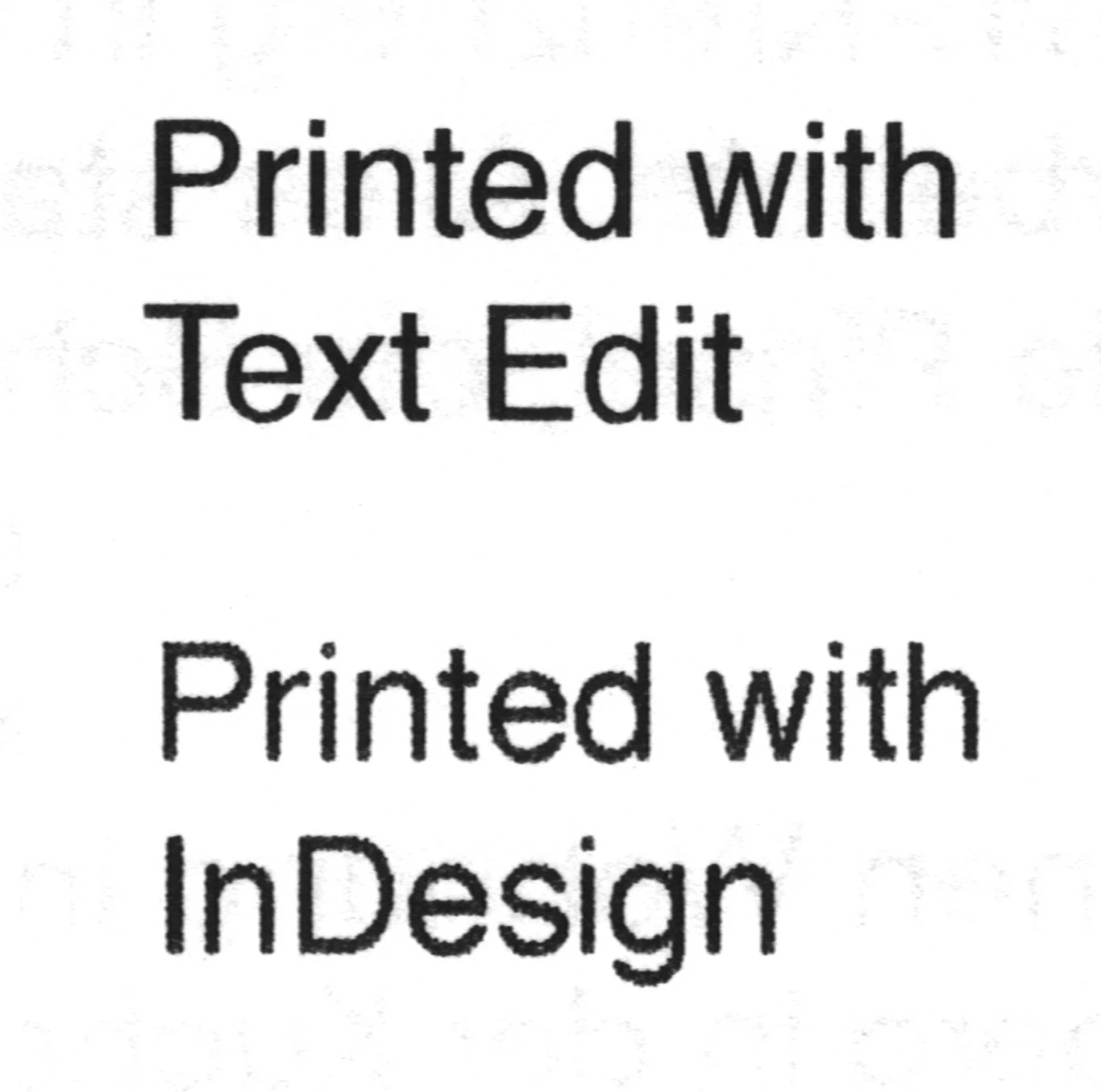
I've been struggling with a problem for some while now. I bought a new b/w laser printer (Brother DCP-L2530DW) and every time I print from an Adobe application (ID, AI, Acrobat....) all the type gets printed very fuzzy (see attached image).

So far, neither Brother’s nor Adobe’s support could help me resolve this issue. Maybe anyone had the same problem before?

macOS 10.12.6

CC 2019
    6 replies

    rob day
    Community Expert
    Community Expert
    January 29, 2019

    The InDesign version looks like it has a halftone screen. Try setting your Appearance of Black>Printing/Exporting preference to Output All Blacks as Rich Black:

    Participant
    January 29, 2019

    Thanks but I already had these exact settings enabled.

    Community Expert
    January 29, 2019

    Can you try this from acrobat?

    hammer0909
    Community Expert
    Community Expert
    January 29, 2019

    Here's something to try in an attempt to isolate the problem. Export the InDesign file as a PDF. Is the type fuzzy in the PDF? Print to your printer from the PDF instead of the InDesign file. Still fuzzy? If so, it's something with your printer/driver. If not, it could be an InDesign setting.

    Participant
    January 29, 2019

    Same result when printing from a PDF unfortunately. The type never looks fuzzy on-screen though, only when printed.

    As I said, I only have the problem when printing from Adobe. TextEdit, Pages, etc. works fine. Not sure if it's a printer/driver issue then..

    Participant
    October 2, 2025

    Did you find a solution? We have a canon production printer and have the same issue. Our last printer never had this issue.

    Participant
    January 29, 2019

    Jeffrey_Smith​ Thanks for the tip! But I already tried every print setting including this one.

    Community Expert
    January 28, 2019

    Brother Printers send RGB composite data to printer. You can try from the print menu > Output > Select "Text as Black"

    BobLevine
    Community Expert
    Community Expert
    January 28, 2019

    I wonder if there’s not a rasterize everything option in the print driver that somehow got turned on.

    Steve Werner
    Community Expert
    Community Expert
    January 28, 2019

    It seems like it has to be the printer driver from Brother. I've seen no one else report this problem before.

    I've never used a Brother printer. I stick with HP.

    Participant
    August 23, 2021

    I have HP and am suffering from this same issue. I have tried to change things to no avail