
kaitd14071978
Participant
October 12, 2020
Answered

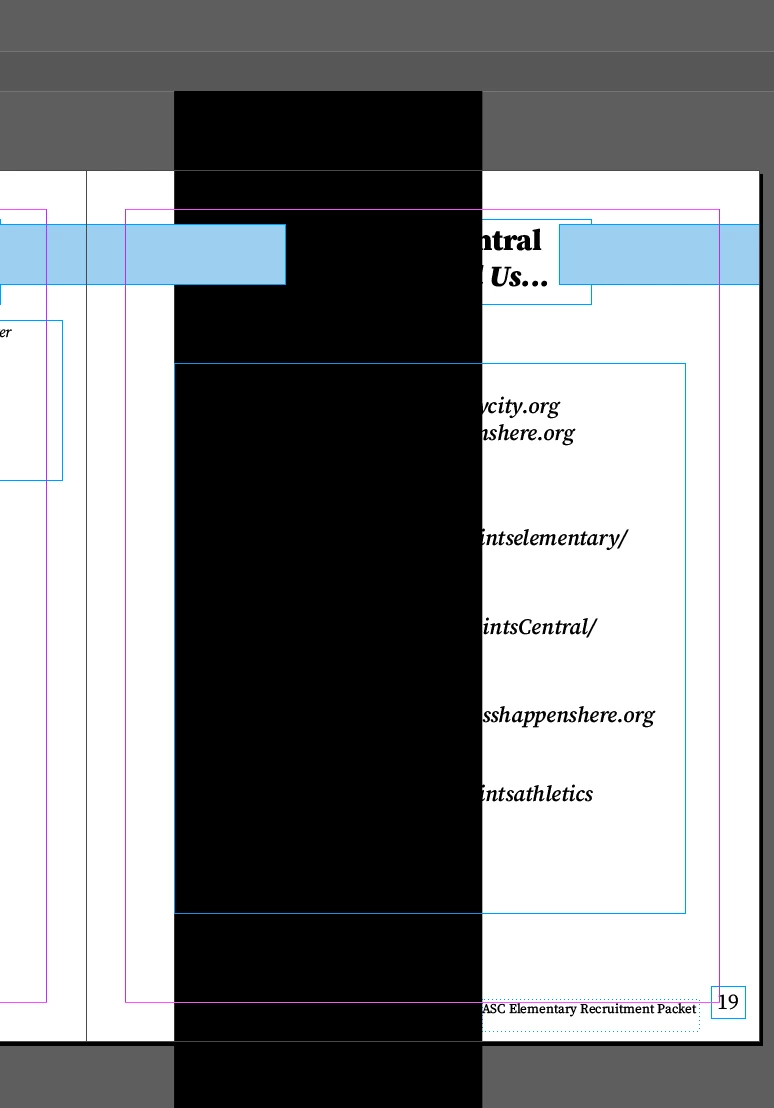
HELP: Random black boxes appeared on document that shouldn't be there.

  • October 12, 2020
  • 2 replies
  • 2014 views

I have been working on some documents and haven't had any problems with them at all. I went to open both of the documents and they have black boxes fixed to the page that I can't seem to get rid of. They weren't placed there and I try to copy and paste the pages, but it brings those boxes over with it. If I export the documents, they are still present. Any possible ways of troubleshooting this would be great!
This topic has been closed for replies.
Correct answer Laubender

My guess what happened:


Unwanted black bars on pages and pdf
mautime, Aug 28, 2020
https://community.adobe.com/t5/indesign/unwanted-black-bars-on-pages-and-pdf/td-p/11394994?page=1


Vote for fixing that bug in InDesign 15.1.2:

https://indesign.uservoice.com/forums/601180-adobe-indesign-bugs/suggestions/41275063-underline-with-variable-font


Regards,
Uwe Laubender

( ACP )

2 replies

LaubenderCommunity ExpertCorrect answer
Community Expert
October 13, 2020

My guess what happened:


Unwanted black bars on pages and pdf
mautime, Aug 28, 2020
https://community.adobe.com/t5/indesign/unwanted-black-bars-on-pages-and-pdf/td-p/11394994?page=1


Vote for fixing that bug in InDesign 15.1.2:

https://indesign.uservoice.com/forums/601180-adobe-indesign-bugs/suggestions/41275063-underline-with-variable-font


Regards,
Uwe Laubender

( ACP )

kaitd14071978
Participant
October 12, 2020

UPDATE: I have found other pages that helped troubleshoot this. The problem has been solved!


Geоrge
Legend
October 12, 2020

Tell us what you find and how you fix please. For the future readers!

Remember, never say you can't do something in InDesign, it's always just a question of finding the right workaround to get the job done. © David Blatner