
Participant
April 24, 2021
Answered

Help with creating a script to make renaming layer objects faster

  • April 24, 2021
  • 2 replies
  • 2047 views

Hello


As a frequent user of InDesign, I've been finding the limited functionality and slowness to rename objects within a layer a pain. Compared to other Adobe products like Premiere Pro, where you can press the spacebar to easily rename layers, InDesign is slow and painful.


I've reached out to the customer service support many times with no avail to help this issue. I was recently told that "For assistance with exact script, you should post your query on Adobe Support Community, an expert from Adobe Engineering Team should be able to help" so I'm looking for help here. 


With some research, I found multiple forums that support the idea that a script can be created to overcome the renaming issue. The scripts allow a batch rename of layers or objects within a layer all at once, so it doesn't need to be done manually. 

Here are some links to those forums:


In my case, I would like the objects within a layer to be easily renamed using the script.


In the screenshot below, you can see six objects with the name <One>. I would like the script to rename these layers to:

100

101

102

103

104

105

106
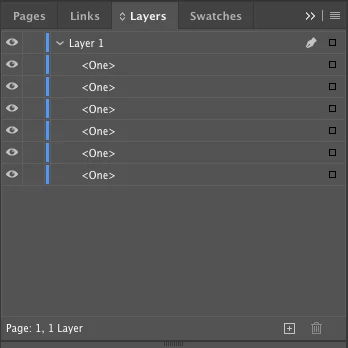


I am not a script writing guru, but can follow instruction well. Please help with this as it's a huge efficiency issue for me, as I can have hundreds of objects which I currently need to rename manually. The renaming of these objects is important as I frequently use buttons for interactive forms, so the "Set Tab Order..." function is crucial. It would be worlds easier if the script could rename these objects for me, so all I need to do is make sure they are placed in the correct order under the Layer.


Hopefully this makes sense, but please let me know if it doesn't as I can answer any required questions.


Please help me! Any assistance is greatly appreciated.


Thanks

Lou

Correct answer brian_p_dts

Renaming layer items just requires a triple click, but,

This will do it to every layer in the document, and only the top level page item in the document (ie won't change name of text frames that are grouped).

If you don't like that, change the first line to :

    var docLayers = [app.activeDocuments.layers.itemByName("Layer 1")];

I guess I'm an Adobe Engineering Expert now... 


var docLayers = app.activeDocument.layers.everyItem().getElements();
var aLayer, i, j, layerPageItems, numLPIs, count;
for (i = 0; i < docLayers.length; i++) {
   aLayer = docLayers[i];
   layerPageItems = aLayer.pageItems.everyItem().getElements();
   numLPIs = layerPageItems.length;
   count = 100;
   for (j = 0; j < numLPIs; j++) {
       layerPageItems[j].name = count + "";
       count++;
   }
} 


You're welcome.


2 replies

rob day
Community Expert
Community Expert
April 24, 2021

The items listed in a Layer are actually page items, so the list could change depending on the current active page. Sould the script handle page items on different pages—like Brian’s script— or would it only target the active page?

Participant
April 25, 2021

Ah yes, I see what you mean here. I've just been testing it out and can see that the script renames page items on different pages the same name:


Would it be possible to separate this so only the active page with its page items will be renamed?

I'm aiming to rename from 100 onwards for Page 1, from 200 onwards for Page 2 and so on. If different pages have the same page item names as each other, this sometimes causes problems when creating interactive forms with buttons and text fields.


@brian_p_dts apologies Brian, would you please be able to help with this if possible?


Participant
April 25, 2021

Actually, please ignore me!!


I've used the alternate script you provided in the initial post to resolve it.


This is where I got to in the end:


Once again, a huge thank you Brian @brian_p_dts. And thanks for the extra detail Rob! 


I'm hoping this will be the last of my chaotic posts!! 


brian_p_dts
Community Expert
brian_p_dtsCommunity ExpertCorrect answer
Community Expert
April 24, 2021

Renaming layer items just requires a triple click, but,

This will do it to every layer in the document, and only the top level page item in the document (ie won't change name of text frames that are grouped).

If you don't like that, change the first line to :

    var docLayers = [app.activeDocuments.layers.itemByName("Layer 1")];

I guess I'm an Adobe Engineering Expert now... 


var docLayers = app.activeDocument.layers.everyItem().getElements();
var aLayer, i, j, layerPageItems, numLPIs, count;
for (i = 0; i < docLayers.length; i++) {
   aLayer = docLayers[i];
   layerPageItems = aLayer.pageItems.everyItem().getElements();
   numLPIs = layerPageItems.length;
   count = 100;
   for (j = 0; j < numLPIs; j++) {
       layerPageItems[j].name = count + "";
       count++;
   }
} 


You're welcome.


Participant
April 25, 2021

Brian you are an absolute legend.


I copied your script to TextEdit, saved it in .jsx format (remembering to ensure there wasn't a sneaky .txt on the end too!), then added it into InDesign and it works like a charm. Honestly, I cannot thank you enough - this will save so much time for me!


Like magic!


YAY!