

Question
How to import some of the styles from the “B-Title1” paragraph style in Document B into “A-Title1” in Document A?
Sorry, the previous post was a bit messy and off-topic.
I sorted out my thoughts.
I want to collect all the commonly used styles in a B document (assuming the path is "D:/B.indd")
When I am working on A.indd, I need to obtain the "Paragraph Line Settings" for B1.
I want to get such an interface.
for example
Paragraph line
Paragraph background
Grep
There are two issues that I cannot implement at present:
How to access the style of B.indd without opening it.
After selecting one of the items, can the content of that item be displayed on the right side.
It's roughly like this:
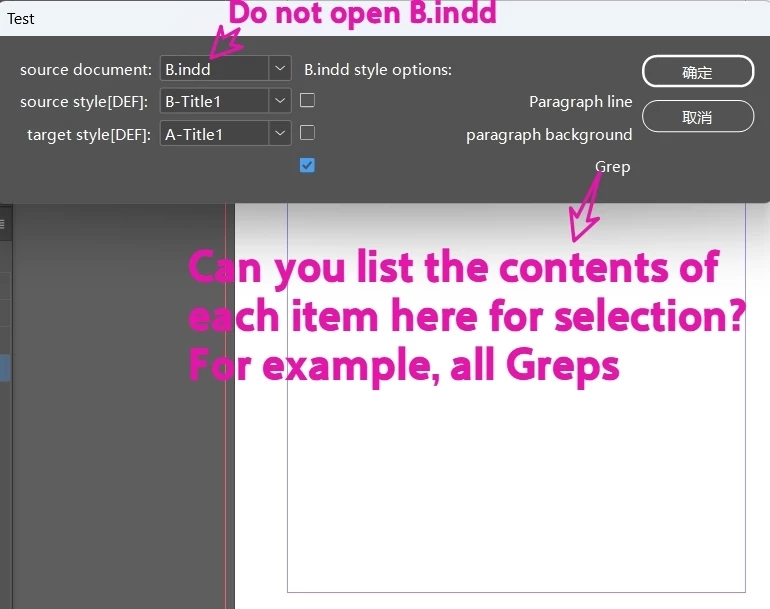
This is a piece of code copied from elsewhere.
/**
 * @name A的相邻段落样式B替换BNone
 */


//call the makeDialog function
makeDialog();

//$.writeln("[" + psl + "]")
function makeDialog() {
    //the dialog object
    var theDialog = app.dialogs.add({ name: "Test ", canCancel: true });

    //note this would not get grouped styles
    with (theDialog.dialogColumns.add()) {

        staticTexts.add({ staticLabel: "source document:" });
        staticTexts.add({ staticLabel: "source style[DEF]: " });
        staticTexts.add({ staticLabel: "target style[DEF]:" });

    }

    //note this would not get grouped styles
    with (theDialog.dialogColumns.add()) {
        //an array of style names for each dropown
        listA = []
        for (var i = 1; i < app.activeDocument.allParagraphStyles.length; i++) {
            listA.push(app.activeDocument.allParagraphStyles[i].name)
        };
        styleA = dropdowns.add({ stringList: listA, selectedIndex: 0, minWidth: 80 });

        listB = []
        for (var j = 1; j < app.activeDocument.allParagraphStyles.length; j++) {
            listB.push(app.activeDocument.allParagraphStyles[j].name)
        };
        styleB = dropdowns.add({ stringList: listB, selectedIndex: 0, minWidth: 80 });

        listBN = []
        for (var k = 1; k < app.activeDocument.allParagraphStyles.length; k++) {
            listBN.push(app.activeDocument.allParagraphStyles[k].name)
        };
        styleBN = dropdowns.add({ stringList: listBN, selectedIndex: 0, minWidth: 80 });
    }

    //
    with (theDialog.dialogColumns.add()) {

        staticTexts.add({ staticLabel: "B.indd style options:" });
        O_All = checkboxControls.add({ checkedState: false, minWidth: 20 });
        O_All = checkboxControls.add({ checkedState: false, minWidth: 20 });
        O_All = checkboxControls.add({ checkedState: false, minWidth: 20 });
    }

    with (theDialog.dialogColumns.add()) {
        staticTexts.add({ staticLabel: "" });
        staticTexts.add({ staticLabel: "Paragraph line" });
        staticTexts.add({ staticLabel: "paragraph background" });
        staticTexts.add({ staticLabel: "Grep" });

    }
    var res = theDialog.show();
    if (res == true) {
        //get the name or each dropdow choice
        //main()
    } else {
        theDialog.destroy();
    }
}


 AdChoices