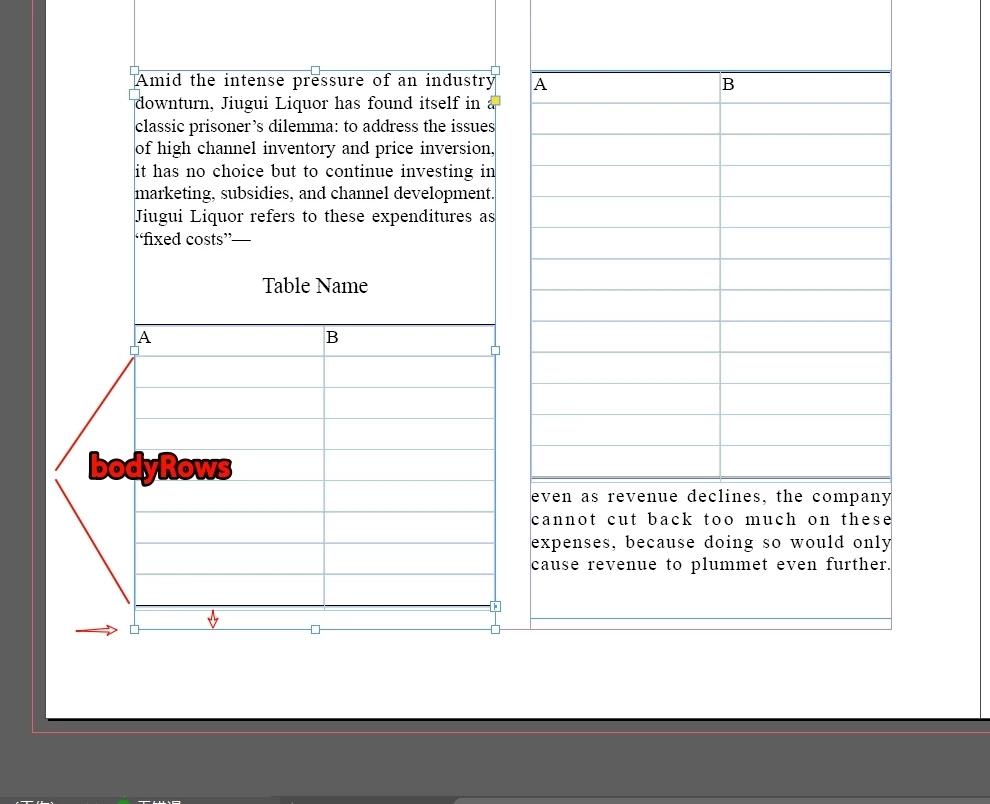
Hi @dublove, this isn’t as straightforward as we would like.
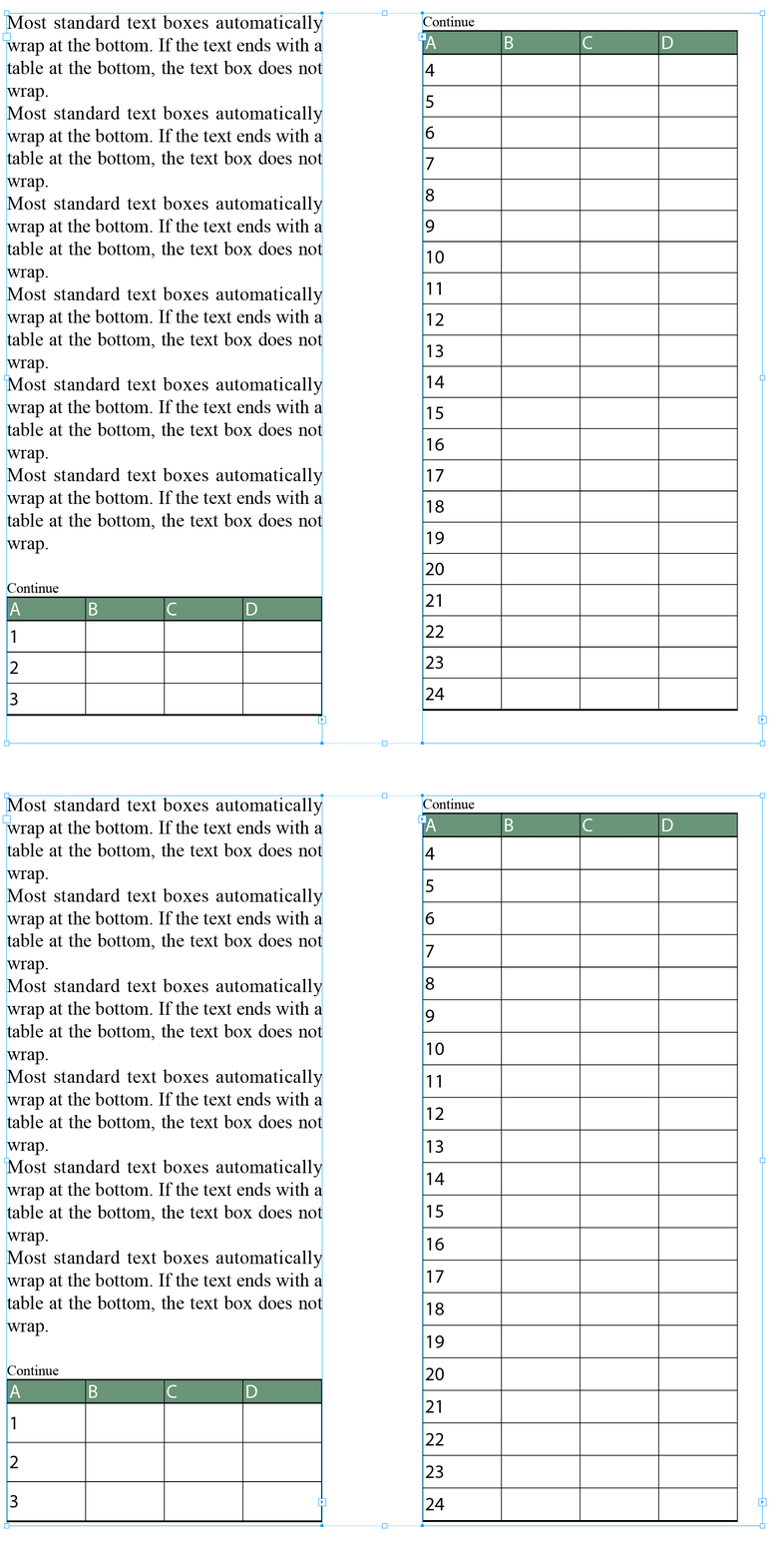
I’ve written a script that does it on the test file from your related question and it works, but you will see there are some complications, and the code runs a bit slow because it is testing the cell heights after each scaling test. Still it does the job I think.
— Mark
Before and after running script
/** * @file Expand Table Rows To Fill Frame.js * * @author m1b * @version 2026-05-05 * @discussion https://community.adobe.com/questions-671/how-to-quickly-adjust-the-bodyrow-to-align-to-the-textframe-bottom-1554513 */ function main() {
var doc = app.activeDocument; var items = APPLY_TO_WHOLE_THREAD ? getAllThreadedFrames(doc.selection) : doc.selection;
if (APPLY_TO_WHOLE_THREAD && IGNORE_LAST_FRAME) items.pop();
for (var i = 0; i < items.length; i++) expandTableRowsToFillFrame(items[i], true);
}; app.doScript(main, ScriptLanguage.JAVASCRIPT, undefined, UndoModes.ENTIRE_SCRIPT, 'Expand Rows To Fill Frame');
/** * Scales the rows of the last table in text frame * to their maximum, without overflowing. * @author m1b * @version 2026-05-04 * @param {TextFrame} textFrame - the target text frame. * @param {Boolean} [onlyBodyRows] - whether to scale only body rows (default: true). */ function expandTableRowsToFillFrame(textFrame, onlyBodyRows) {
if (tf === textFrame) { // found one! frameRows.push(row); frameHeights.push(row.height); }
else if (frameRows.length) // no need to keep looking break;
}
// now we have the rows we want to target var lastRow = frameRows[frameRows.length - 1];
// find an upper bound where rows overflow the frame var low = 1; var high = 2;
while (scaleRows(high)) high *= 2;
// binary search for the largest scaleFactor that keeps rows in-frame var iterations = 50; var precision = 0.001; while (high - low > precision && iterations--) {
var mid = (low + high) / 2; if (scaleRows(mid)) low = mid; else high = mid; }
// apply the best scale scaleRows(low);
/** * Scales original height rows by `scaleFactor`, and returns true, when the frameRows still fit in frame. * @param {Number} scaleFactor - multiply the original heights by this. * @returns {Boolean} */ function scaleRows(scaleFactor) {
for (var i = 0; i < frameRows.length; i++) if (RowTypes.BODY_ROW === frameRows[i].rowType) frameRows[i].height = frameHeights[i] * scaleFactor;
// if it fits, return true return getParentTextFrame(lastRow, false) === textFrame;
};
};
/** * Return a row's parent text frame. * * Notes: * * (1) Getting the parent text frame of an overset cell is a * challenge because there are no insertion points. Here I * add a zero-width space as the first character so at least * the first insertionPoint will now reside in the text frame. * * (2) Another complication is a bug where indesign will * display the incorrect height for an autogrowing, overflowing * cell, and place the cell in the wrong parent text frame. * (See explanation here: https://community.adobe.com/t5/indesign-discussions/how-can-get-parenttextframe-of-a-cell-was-overflow/m-p/14030313 * * (3) If your use case is such that returning `undefined` when the * cell|row is overset is acceptable, then pass `false` to the * `evenWhenCellIsOverset` parameter. This will be much faster. * * @author m1b * @version 2025-04-05 * * @param {Cell|Row} row - an Indesign Table Row or Cell. * @param {Boolean} [evenWhenCellIsOverset] - whether to find the parent text frame of an overset cell (default: true). * @returns {TextFrame} */ function getParentTextFrame(row, evenWhenCellIsOverset) {
if (!row.isValid) return;
if ( false === evenWhenCellIsOverset && row.hasOwnProperty('texts') ) // the quick way; will return `undefined` if the cell is overset return row.texts[0].parentTextFrames[0];
if (row.constructor.name == 'Cell') row = row.rows[0];
var cells = row.cells; var rowTextFrameIDs = {}; var rowTextFrame; var parentTextFrames = row;
// find the text frames of the row while ( !parentTextFrames.hasOwnProperty('parentStory') || undefined == parentTextFrames.parent ) parentTextFrames = parentTextFrames.parent;
if (!parentTextFrames.hasOwnProperty('parentStory')) return;
// insert zero-width space to expose first // insertion point in case where cell is overset cell.insertionPoints[0].contents = '\u200B';
if (cell.insertionPoints[0].parentTextFrames.length > 0) // store the parent frame index of this cell rowTextFrameIDs[cell.insertionPoints[0].parentTextFrames[0].id] = true;
// clean up cell.characters[0].remove();
}
// match it to the *last-most* parentTextFrame to ensure // that the entire row returns the same (correct) text frame parentFrameLoop: for (var j = parentTextFrames.length - 1; j >= 0; j--) { if (rowTextFrameIDs[parentTextFrames[j].id] == true) { rowTextFrame = parentTextFrames[j]; break parentFrameLoop; } }
if ( rowTextFrame != undefined && rowTextFrame.isValid ) return rowTextFrame;
};
/** * Returns all text frames in items, and all text frames threaded with those. * @author m1b * @version 2026-05-04 * @param {*} items - the items to inspect. * @returns {Array<TextFrame>} */ function getAllThreadedFrames(items) {
var frames = []; var unique = {};
for (var i = 0; i < items.length; i++) {
var item = items[i];
if ( 'TextFrame' !== item.constructor.name || unique[item.id] ) continue;
frames.push(item); unique[item.id] = true;
var next = item.nextTextFrame; var prev = item.previousTextFrame;
while ( prev && prev.isValid ) { if (!unique[prev.id]) { frames.push(prev); unique[prev.id] = true; } prev = prev.previousTextFrame; }
while ( next && next.isValid ) { if (!unique[next.id]) { frames.push(next); unique[next.id] = true; } next = next.nextTextFrame; }
}
return frames;
};
Edit 2026-05-04: fixed bug where script didn’t target every text frame in a thread. Added two constants to configure the process.
Hi @dublove, this isn’t as straightforward as we would like.
I’ve written a script that does it on the test file from your related question and it works, but you will see there are some complications, and the code runs a bit slow because it is testing the cell heights after each scaling test. Still it does the job I think.
— Mark
Before and after running script
/** * @file Expand Table Rows To Fill Frame.js * * @author m1b * @version 2026-05-05 * @discussion https://community.adobe.com/questions-671/how-to-quickly-adjust-the-bodyrow-to-align-to-the-textframe-bottom-1554513 */ function main() {
var doc = app.activeDocument; var items = APPLY_TO_WHOLE_THREAD ? getAllThreadedFrames(doc.selection) : doc.selection;
if (APPLY_TO_WHOLE_THREAD && IGNORE_LAST_FRAME) items.pop();
for (var i = 0; i < items.length; i++) expandTableRowsToFillFrame(items[i], true);
}; app.doScript(main, ScriptLanguage.JAVASCRIPT, undefined, UndoModes.ENTIRE_SCRIPT, 'Expand Rows To Fill Frame');
/** * Scales the rows of the last table in text frame * to their maximum, without overflowing. * @author m1b * @version 2026-05-04 * @param {TextFrame} textFrame - the target text frame. * @param {Boolean} [onlyBodyRows] - whether to scale only body rows (default: true). */ function expandTableRowsToFillFrame(textFrame, onlyBodyRows) {
if (tf === textFrame) { // found one! frameRows.push(row); frameHeights.push(row.height); }
else if (frameRows.length) // no need to keep looking break;
}
// now we have the rows we want to target var lastRow = frameRows[frameRows.length - 1];
// find an upper bound where rows overflow the frame var low = 1; var high = 2;
while (scaleRows(high)) high *= 2;
// binary search for the largest scaleFactor that keeps rows in-frame var iterations = 50; var precision = 0.001; while (high - low > precision && iterations--) {
var mid = (low + high) / 2; if (scaleRows(mid)) low = mid; else high = mid; }
// apply the best scale scaleRows(low);
/** * Scales original height rows by `scaleFactor`, and returns true, when the frameRows still fit in frame. * @param {Number} scaleFactor - multiply the original heights by this. * @returns {Boolean} */ function scaleRows(scaleFactor) {
for (var i = 0; i < frameRows.length; i++) if (RowTypes.BODY_ROW === frameRows[i].rowType) frameRows[i].height = frameHeights[i] * scaleFactor;
// if it fits, return true return getParentTextFrame(lastRow, false) === textFrame;
};
};
/** * Return a row's parent text frame. * * Notes: * * (1) Getting the parent text frame of an overset cell is a * challenge because there are no insertion points. Here I * add a zero-width space as the first character so at least * the first insertionPoint will now reside in the text frame. * * (2) Another complication is a bug where indesign will * display the incorrect height for an autogrowing, overflowing * cell, and place the cell in the wrong parent text frame. * (See explanation here: https://community.adobe.com/t5/indesign-discussions/how-can-get-parenttextframe-of-a-cell-was-overflow/m-p/14030313 * * (3) If your use case is such that returning `undefined` when the * cell|row is overset is acceptable, then pass `false` to the * `evenWhenCellIsOverset` parameter. This will be much faster. * * @author m1b * @version 2025-04-05 * * @param {Cell|Row} row - an Indesign Table Row or Cell. * @param {Boolean} [evenWhenCellIsOverset] - whether to find the parent text frame of an overset cell (default: true). * @returns {TextFrame} */ function getParentTextFrame(row, evenWhenCellIsOverset) {
if (!row.isValid) return;
if ( false === evenWhenCellIsOverset && row.hasOwnProperty('texts') ) // the quick way; will return `undefined` if the cell is overset return row.texts[0].parentTextFrames[0];
if (row.constructor.name == 'Cell') row = row.rows[0];
var cells = row.cells; var rowTextFrameIDs = {}; var rowTextFrame; var parentTextFrames = row;
// find the text frames of the row while ( !parentTextFrames.hasOwnProperty('parentStory') || undefined == parentTextFrames.parent ) parentTextFrames = parentTextFrames.parent;
if (!parentTextFrames.hasOwnProperty('parentStory')) return;
// insert zero-width space to expose first // insertion point in case where cell is overset cell.insertionPoints[0].contents = '\u200B';
if (cell.insertionPoints[0].parentTextFrames.length > 0) // store the parent frame index of this cell rowTextFrameIDs[cell.insertionPoints[0].parentTextFrames[0].id] = true;
// clean up cell.characters[0].remove();
}
// match it to the *last-most* parentTextFrame to ensure // that the entire row returns the same (correct) text frame parentFrameLoop: for (var j = parentTextFrames.length - 1; j >= 0; j--) { if (rowTextFrameIDs[parentTextFrames[j].id] == true) { rowTextFrame = parentTextFrames[j]; break parentFrameLoop; } }
if ( rowTextFrame != undefined && rowTextFrame.isValid ) return rowTextFrame;
};
/** * Returns all text frames in items, and all text frames threaded with those. * @author m1b * @version 2026-05-04 * @param {*} items - the items to inspect. * @returns {Array<TextFrame>} */ function getAllThreadedFrames(items) {
var frames = []; var unique = {};
for (var i = 0; i < items.length; i++) {
var item = items[i];
if ( 'TextFrame' !== item.constructor.name || unique[item.id] ) continue;
frames.push(item); unique[item.id] = true;
var next = item.nextTextFrame; var prev = item.previousTextFrame;
while ( prev && prev.isValid ) { if (!unique[prev.id]) { frames.push(prev); unique[prev.id] = true; } prev = prev.previousTextFrame; }
while ( next && next.isValid ) { if (!unique[next.id]) { frames.push(next); unique[next.id] = true; } next = next.nextTextFrame; }
}
return frames;
};
Edit 2026-05-04: fixed bug where script didn’t target every text frame in a thread. Added two constants to configure the process.
It is a bit complicated and a bit slow, or perhaps the approach could be optimized. Here’s how I’m currently handling it: I use two scripts and set two increments: add1 = 0.1 mm add2 = 0.2 mm I run them as needed. newHeight = old + add1 newHeight = old + add2
Get the height of the text frame You need the total height available for the table. Get the height of the table content Measure the current table height (sum of all rows). Calculate the difference extraSpace = textFrame.height - table.height Distribute the extra space to the rows Usually added to the last row (or proportionally across all rows). Set the new row height Adjust the .height property of the row(s) to fill the frame.
var doc = app.activeDocument;
var tf = app.selection[0]; // select your text frame first

if (tf.constructor.name == "TextFrame") {
    var table = tf.tables[0]; // assumes only one table in the frame
    var tableHeight = table.height;
    var frameHeight = tf.geometricBounds[2] - tf.geometricBounds[0]; // bottom - top

    var extraSpace = frameHeight - tableHeight;

    if (extraSpace > 0) {
        // Add extra space to last row
        var lastRow = table.rows[table.rows.length - 1];
        lastRow.height = lastRow.height + extraSpace;
    }

    alert("Table aligned to bottom!");
} else {
    alert("Please select a text frame with a table first.");
}
This might require working through the document page by page.
How do I determine the following values: 1. The height of the original selection (h1). 2. The height of the potential target (h2). 3. The number of rows (rowSel).
I need to repeatedly adjust the minimum row height: h = h2 / rowSel.
We can assume that a 0.5mm gap between the bottom border of the table on this page and the text box is the desired result.




 AdChoices