

haim6130
Inspiring
July 31, 2017
해결됨

How to reduce the size of all the capitalized letters in a text frame?

  • July 31, 2017
  • 2 답변들
  • 1714 조회

Hi!

I need to reduce the size of all the capitalized letters in 1 point.

I'm using Adobe CS5.

How can I do this?

Thanks!

    이 주제는 답변이 닫혔습니다.
    최고의 답변: rob day

    I'm using Adobe CS5.

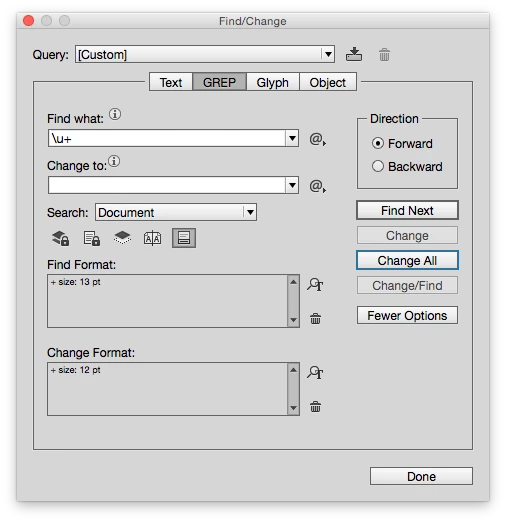
    I can't check CS5, but in CC this Grep search finds any uppercase letter set to 13pt and changes it to 12pt.
    2 답변

    Jeff Witchel, ACI
    Community Expert
    Community Expert
    July 31, 2017

    Building on what Rob suggested, you can build this into a Nested GREP Paragraph Style to apply a Character Style to all caps in a paragraph to make those cap one point smaller.

    In the screenshot below, I'm using a GREP Style to apply a Bold Red Character Style to all Caps in paragraphs with the GREP Style applied.

    haim6130
    haim6130작성자
    Inspiring
    August 2, 2017

    Okay... No doubt that the last solution that you showed here (with the GREP style) is way more effective and fast.

    But, how can I make this GREP style to be default? so every paragraph I'll open, will automatically be with this GREP style?

    Thanks Geniuses!

    rob day
    Community Expert
    Community Expert
    August 2, 2017

    But, how can I make this GREP style to be default? so every paragraph I'll open, will automatically be with this GREP style?

    You would have to set it in your default Paragraph Style, which unless you change it would be [Basic Paragraph]. The default text frame Object Style specifies a paragraph style.

    Bill Silbert
    Community Expert
    Community Expert
    July 31, 2017

    Short of a scripted solution I can only think of one way to do this which may sound a little cumbersome but for a large document might still be a time saver. See screen shot below:

    Using Find/Change (Command/Control-F) put in both the find and change fields a capital "A". Make sure that the AA icon below those fields is checked so that the Find/Change is set for Case Sensitive. Click on the icon for the File Format: (highlighted here in red) and in the Basic Character Formats section of the Find Format Settings dialog enter the size that the type is now. Repeat these steps for the Change Format: section and enter the size you want the upper case letters to be. Then hit Change All. All of the capital As in the document will be changed. Next change the A in Find what and Change to: to B and without changing anything else hit Change All. Repeat this for the remaining 24 letters of the alphabet. If there are no hits on any particular letter that's because there probably aren't any Xs or Zs or whatever in the document. Hope this works for you.

    An added thought is that you might want to create a character style that is the smaller size and also apply that in the change format so that if you need to change this globally again you can. The only problem with that would occur if there are any changes in content but then that problem would apply whatever you do.

    haim6130
    haim6130작성자
    Inspiring
    July 31, 2017

    Thanks a lot!

    Without a script it seems the easier way. Thanks!

    rob day
    Community Expert
    rob dayCommunity Expert답변
    Community Expert
    July 31, 2017

    I'm using Adobe CS5.

    I can't check CS5, but in CC this Grep search finds any uppercase letter set to 13pt and changes it to 12pt.