



leo.r
Community Expert
Community Expert
July 24, 2017
질문

Iconized palettes don't respond to clicks (CC 2017/Mac)

  • July 24, 2017
  • 2 답변들
  • 696 조회

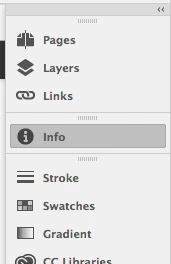
Palettes in iconized state stopped responding to mouse clicks (see screenshot).

I have to either expand them all, or detach a panel from the group to be able to use them.

I did a brief search and it looks like other users also have this issue - but I didn't find any solution.

I didn't have this problem in previous InDesign versions.

Any ideas?

Thanks for any help,

Leo
    이 주제는 답변이 닫혔습니다.

    2 답변

    Inspiring
    July 25, 2017

    Hi Leo

    Have the same problem, has nothing to do with prefs. I can load Indesign from a fresh Mac cold start and this happens, if I quit and relaunch Indesign they start working again. It's sporadic.

    I've noticed when this happens, if I 'undock' my collapsed palettes from the side of the screen they respond again.

    leo.r
    Community Expert
    leo.rCommunity Expert작성자
    Community Expert
    July 25, 2017

    Thanks JointyJr,

    I submitted this issue as a bug.

    Leo

    amaarora
    Inspiring
    July 24, 2017

    Hi,

    You can try if cleaning cache and preferences help..

    1. Close InDesign

    2. Clean cache and preferencesTroubleshooting 101: Replace, or "trash" your InDesign preferences

    3. Restart InDesign

    Also, ensure that you do not have any other application like (Chrome, Mozilla) etc opened when you restart InDesign.

    -Aman

    leo.r
    Community Expert
    leo.rCommunity Expert작성자
    Community Expert
    July 25, 2017

    Thanks Aman,

    But unfortunately I don't have much positive to report back.

    I tried both methods - manually remove data files, as well as with the keystroke combo on launch.

    As a result I experience total mess which I'm not even sure how to describe.

    If I create my own empty workspace, some palettes just don't show up when I select them from the Window menu: for example, Info and Links (the ones that I need most, of course). Some other do show up.

    If I try to select a pre-defined workspace, the result is unpredictable: some workspaces do show up, and with others InDesign just blinks and doesn't show any palettes.

    When I do manage to show a workspace, some iconized palette groups respond to mouse clicks - but some don't. The rightmost palette group never respond to mouse clicks.

    For many years of working with InDesign never saw anything like this.

    Cheers,

    Leo