Participant
May 3, 2017
Answered

Indented paragraph question [topic edited for brevity]

  • May 3, 2017
  • 3 replies
  • 491 views

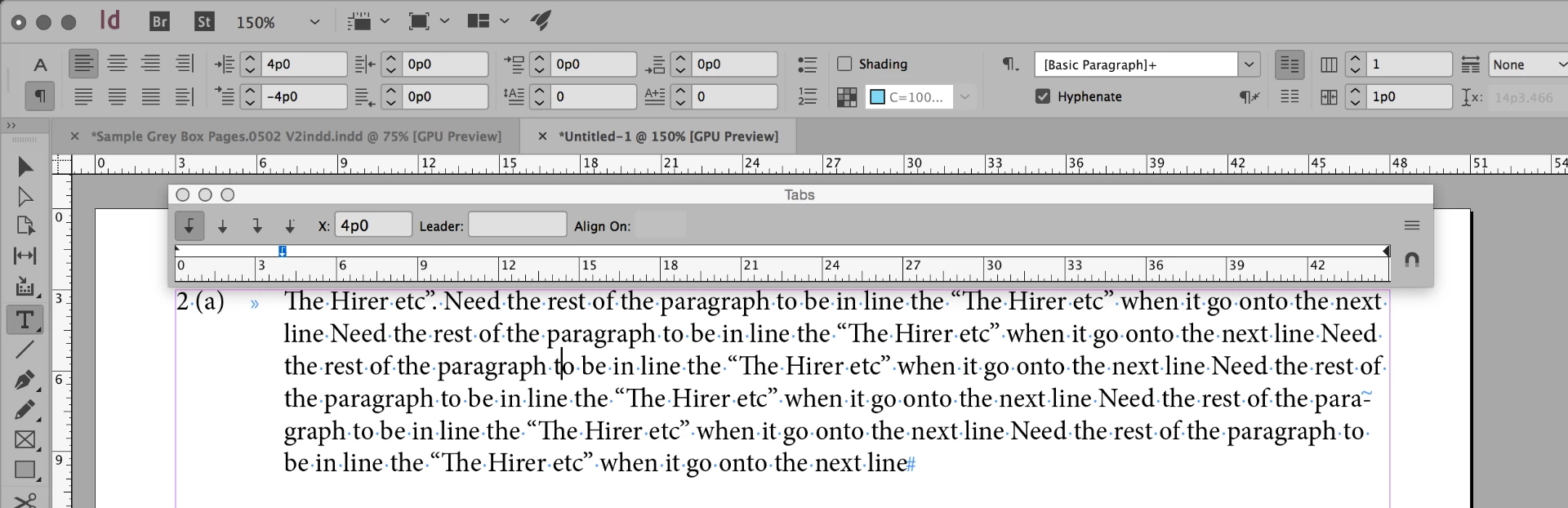
​Never been able to solve this problem, now I have it again. Typing Terms and Conditions, need a paragraph tabbed under the first line eg: "2 (a) The Hirer etc". Need the rest of the paragraph to be in line the "The Hirer etc" when it go onto the next line

[moving from Lounge to InDesign by moderator]
    This topic has been closed for replies.
    Correct answer jane-e

    It's pretty much the same whether you are in InDesign, Illustrator, or Word:

    1. Press Tab after the close paren    )

    2. Set a Left Indent and note the number, in this case it is 4p0

    3. Set a Left Tab at the exact same number, in this case it is also 4p0

    Note1: that number can vary, but the two have to match

    Note2: the first line indent can vary as well to pull it away from the margin

    3 replies

    Bill Silbert
    Community Expert
    Community Expert
    May 12, 2017

    When creating a paragraph with a hanging indent such as this (essentially a "bullet" paragraph") it is far more stable to do it by setting a left indent for the entire paragraph and then a negative first line indent of the same amount. Then a tab placed after the right parens (or whatever constitutes the "bullet") will automatically take on the established left indent. There is no need to use the tab ruler at all.

    This method also makes it easier to adjust the indent globally either with Find/Change or from within a Paragraph Style.

    jane-e
    Community Expert
    jane-eCommunity ExpertCorrect answer
    Community Expert
    May 3, 2017

    It's pretty much the same whether you are in InDesign, Illustrator, or Word:

    1. Press Tab after the close paren    )

    2. Set a Left Indent and note the number, in this case it is 4p0

    3. Set a Left Tab at the exact same number, in this case it is also 4p0

    Note1: that number can vary, but the two have to match

    Note2: the first line indent can vary as well to pull it away from the margin

    Eternal Warrior
    Inspiring
    May 4, 2017

    +1 to jane-e​ answer.

    Would consider this the correct answer unless the OP can shed further light or post screenshots if they require more specific answers.

    John T Smith
    Community Expert
    Community Expert
    May 3, 2017

    The Lounge Forum is not for technical help, please provide the name of the program you are using so your message may be moved to the correct program forum... A program would be InDesign or Illustrator or ???