
Participant
May 11, 2021
Answered

InDesign 16.2.1 showing red bar on workspace

  • May 11, 2021
  • 32 replies
  • 26939 views

Can't open more than one file in Indesign, get weird red or blue banner/line and when I scroll down the image lags and can't select certain files.

In my job, I have to get out multiple language files and it is easier to work in batches. How can I solve this as it is slowing down my work time!



{Renamed by MOD}
This topic has been closed for replies.
Correct answer Srishti Bali

Hi all,


Sorry to hear that the issue is not yet fixed for some of you. We are still investigating this and need you help with a few more details. 


  • Please share system information file by following these steps. 
  • Exact version of InDesign in which you can replicate this behavior. 
  • Is this issue happening with both GPU preview and CPU mode?
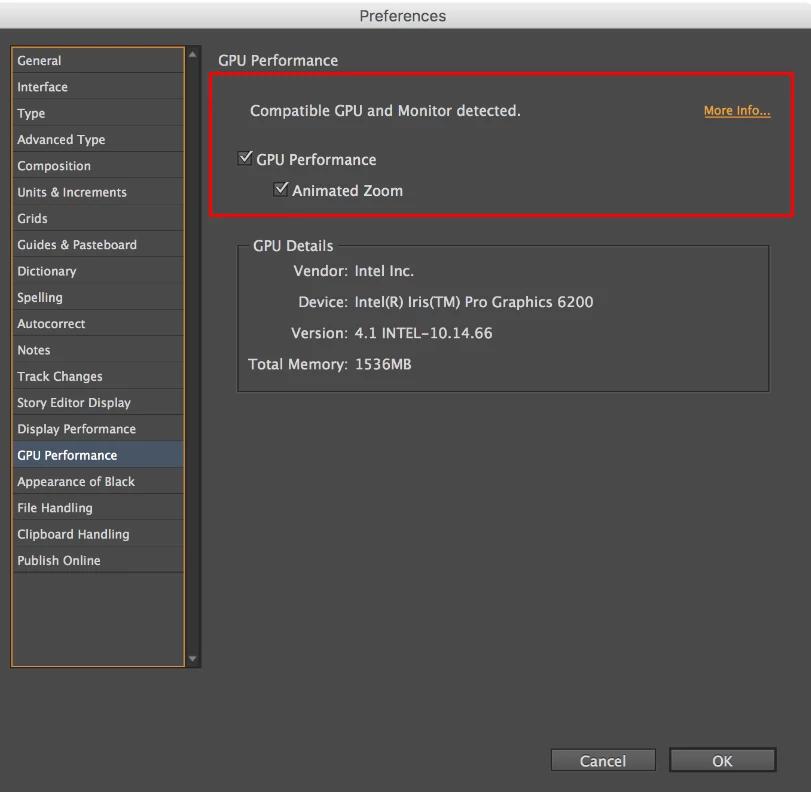
  • Screenshot of the “GPU Performance” from InDesign > Preferences >  GPU Performance like this:
  • Are you using external monitor(s)? If yes, with which port and cable combination it is connected.
  • During our investigation, we found that this is generally happening on the machines which are powered by eGPU. Do you have eGPU connected to your machine?
  • A small video demonstrating the issue could be really helpful.
  • Sample .indd document where the issue is reproducible.


All this information will help us replicate this issue and help you accordingly.


Regards!

32 replies

Participant
August 17, 2021

I am using ID version 16.3.2
I am still having the issue regardless of if GPU is checked on or off. 
I do not have anything external connected to my machine. 

Screenshot attatched.

Srishti Bali
Community Manager
Community Manager
August 30, 2021

@alainap19303143 We're extremely sorry to hear this. I have sent you a DM for some more details, please check. 

Srishti Bali
Community Manager
Srishti BaliCommunity ManagerCorrect answer
Community Manager
August 4, 2021

Hi all,


Sorry to hear that the issue is not yet fixed for some of you. We are still investigating this and need you help with a few more details. 


  • Please share system information file by following these steps. 
  • Exact version of InDesign in which you can replicate this behavior. 
  • Is this issue happening with both GPU preview and CPU mode?
  • Screenshot of the “GPU Performance” from InDesign > Preferences >  GPU Performance like this:
  • Are you using external monitor(s)? If yes, with which port and cable combination it is connected.
  • During our investigation, we found that this is generally happening on the machines which are powered by eGPU. Do you have eGPU connected to your machine?
  • A small video demonstrating the issue could be really helpful.
  • Sample .indd document where the issue is reproducible.


All this information will help us replicate this issue and help you accordingly.


Regards!

Participant
August 4, 2021
I am running it on a 15” MacBook Pro with an internal hard drive. Nothing
external Is connected.
Srishti Bali
Community Manager
Community Manager
August 17, 2021

Thanks for confirming, @alainap19303143. We need a few more details to investigate this. Please share the other details asked in my response above so that we can replicate the issue and fix it accordingly. 

Srishti Bali
Community Manager
Community Manager
July 14, 2021

Hi all,


Fix for this issue is available in our latest update of InDesign (16.3.2) on Mac. Please update InDesign to the latest available update via Creative Cloud App and share your observations with us.


Regards,

Srishti

Participant
July 16, 2021

Hello - I have 16.3.2 and still get this red bar issue.  Turning off GPU Perf is really not ideal.  Any word on when a better fix is coming?

thanks

Nancy

Srishti Bali
Community Manager
Community Manager
July 21, 2021

Hi there, 


Sorry to hear this. I have sent you a DM for details, please check.


Regards,

Srishti

Julie Nau
Participant
July 13, 2021

I'm having an issue with InDesign where solid blue or red bars suddenly appear on my document across the entire width of the window. At the same time these suddenly appear I'm not able to select text frames or edit them. To fix the problem I exit out of the document and re-open it. Sometimes this fixes it completely and other times the same problem occurs again within a couple of minutes. It happens across all documents - not just one. Anyone else having this issue? I have tried rebooting/restarting my computer and that doesn't fix it for long - just a temporary fix.

BobLevine
Community Expert
Community Expert
July 13, 2021
Turn off GPU performance and keep an eye out for the 16.3 update which is now rolling out.
Julie Nau
Participant
July 13, 2021

Thanks for your speedy reply. I'll give it a try.

Participant
July 8, 2021

Dear Community, 


since 2 months ago I have strange artefacts when I resize (with resize tool z or change the percentage) my projekts in InDesign. As seen in the picture part of the screen becomes red and parts of the document is displayed in strange ways. E.g. the green and white stripes should be only green and so on. 

Do you have any ideas? I can't work like this anymore.


I had to gray out some party becouse it s work for a customer. 


I am using Mac OS Catalina on a 2019 16" Macbook Pro with the latest version of InDesign available. 

Graphic acceleration is turned on. 


Thank you so much. 

Participant
July 8, 2021

I also tried reinstalling InDesing. Didn't help.

Participant
July 6, 2021

Hallo Zusammen,


hat jemand eine Idee wie der Fehler, siehe Bild/Anhang, wieder beseitigt werden kann?

Dieser Fehler taucht ein paar mal die Woche auf, auch nach einem Neustart ist es nicht immer besser.

Wird das gespeichert sind glücklicherweise diese Fehler nicht mit dabei.

Diese Dateien selber sind also nicht fehlerhaft.

Das Phenomen ist vergleichbar mit einer Fernwartungssitzung wenn die Verbindung zu schlecht ist, dann sieht manchmal zwei Bildschichten halb transparent über einander, der tatsächliche Bildinhalt ist aber OK.


mac OS und die Adobe Anwendungen sind soweit auf neuem Stand.


Die Hardware wurde vom Apple Support bereits gecheckt, alles bestens.

Der Fehler tritt nur im InDesign auf, sonst niergends.


Sieht nach einer Art grafischen Zwischenspeicher Problem in der Bilddarstellung/Pufferung aus. Oder ein inDesign Benutzerprofil Problem?


Hat wer eine Idee was man da machen kann, ausser einer Neuinstallation?

Gibt es in inDesign die Möglichkeit einer temporären Protokollierung?


Vielen Dank und beste Grüsse.

Derek Cross
Community Expert
Community Expert
July 6, 2021

Try unticking GPU Performance under the GPU Performance tab in InDesign preferences, then close then open InDesign.

Participating Frequently
June 30, 2021

Since a few weeks, I've got big problems working with InDesign. Whilst working, it often has display problems showing the content – I have big red colour background areas/boxes (as seen on top of the screenshot), other coloured areas in my document enlarge whilst scrolling or show errows (see screenshot), and in this case I also can't activate items like text boxes and others correctly with my cursor anymore.

I guess it mainly occures if my working space window is not placed full screen.

Does anyone know these problems as well? Do I have to deinstall everything or what should I do?

Community Expert
June 30, 2021

It's a known bug. 

Check for InDesign updates. If there are none then go to your INDesign preferences and turn of GPU Performance.

Participating Frequently
June 30, 2021

I've already checked for updates but there are none in my update-box. Do you know the right name for CPU performance in german?

valéried99020062
Participating Frequently
June 29, 2021

Bonjour,

J'ai depuis plusieurs jours un problème d'affichage : des bandes rouges apparaissent sur les bords (voir image ci-dessous)

avez-vous déjà eu ce problème ?

Merci par avance pour vos retours !


Derek Cross
Community Expert
Community Expert
June 29, 2021

Try turning off GPU Performance found under the GPU Performance tab in InDesign preferences.

valéried99020062
Participating Frequently
June 29, 2021

Merci Derek pour votre message rapide,

effectivement les bandes rouges disparaissent… Mais j'aime utiliser le zoom animé…

Y a t-il pas d'autres moyens ?


Merci à vous


laure A
Participant
June 21, 2021

 I've been getting these strange streaks while working in InDesign

BobLevine
Community Expert
Community Expert
June 21, 2021

Turn off GPU Performance and keep an eye out for 16.3 update.

Participant
June 17, 2021

We have persitant red rendering over 3/4 of the working area in the actual Imac screen - on the attached cinema display all is good. About to move offices and will wipe the macs anyway but would rather know why! Extremely irritating... Screenshot form bothe screen below.


BobLevine
Community Expert
Community Expert
June 17, 2021
Known issue which has been fixed in 16.3 which is currently being rolled out.

In the meantime, turn off GPU Performance.
Participant
June 17, 2021

Completely fixed and in record time, could have been trying to resove that forever.