
Participant
May 11, 2021
Answered

InDesign 16.2.1 showing red bar on workspace

  • May 11, 2021
  • 32 replies
  • 26939 views

Can't open more than one file in Indesign, get weird red or blue banner/line and when I scroll down the image lags and can't select certain files.

In my job, I have to get out multiple language files and it is easier to work in batches. How can I solve this as it is slowing down my work time!



{Renamed by MOD}
This topic has been closed for replies.
Correct answer Srishti Bali

Hi all,


Sorry to hear that the issue is not yet fixed for some of you. We are still investigating this and need you help with a few more details. 


  • Please share system information file by following these steps. 
  • Exact version of InDesign in which you can replicate this behavior. 
  • Is this issue happening with both GPU preview and CPU mode?
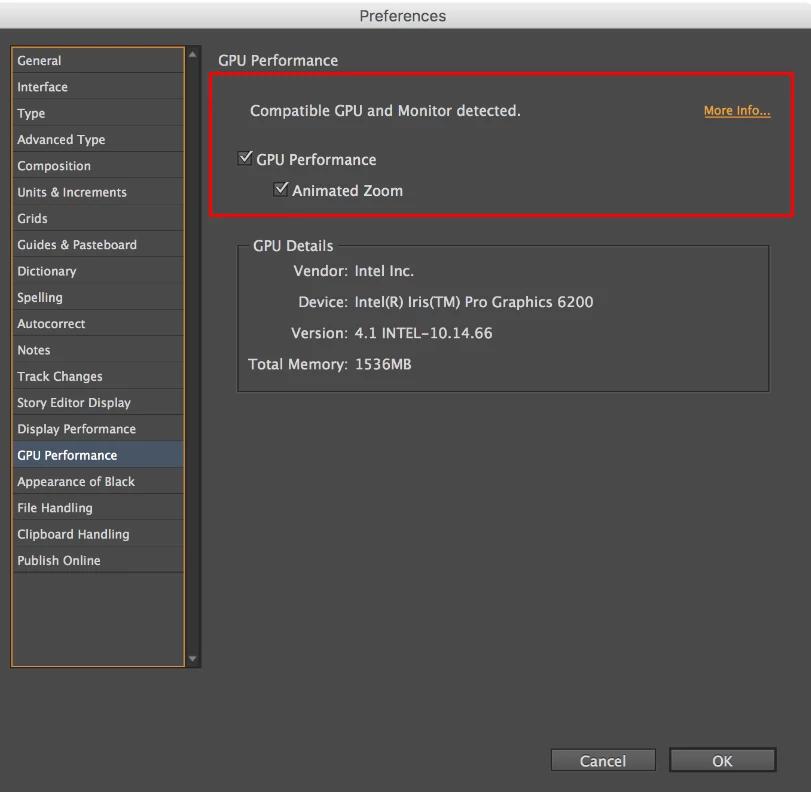
  • Screenshot of the “GPU Performance” from InDesign > Preferences >  GPU Performance like this:
  • Are you using external monitor(s)? If yes, with which port and cable combination it is connected.
  • During our investigation, we found that this is generally happening on the machines which are powered by eGPU. Do you have eGPU connected to your machine?
  • A small video demonstrating the issue could be really helpful.
  • Sample .indd document where the issue is reproducible.


All this information will help us replicate this issue and help you accordingly.


Regards!

32 replies

johns87702332
Participating Frequently
June 16, 2021

Hi all,


I've got a bizarre issue happening within InDesign v16.2.1. When I have one document open, and then open another, I get a static red strip appearing at the top of the page window (see screengrab), and my mouse cursor starts to go opposite. So, if I move my mouse to the right, the cursor goes left. 


I've recently upgraded to BigSur 11.2.3,  InD 16.2.1, and a Logitech MX Keys keyboard in the same week. It may be one or the other or a mix of all. It only affects Indesign - nothing else. Quitting InDesign is the only cure.


I've reinstalled InDesign twice, but it still happens. I think it may be a memory issue. Does anyone else have these same issues or know of any fixes?


Thanks

John


Derek Cross
Community Expert
Community Expert
June 16, 2021

Try unticking GP Performance under the GPU Performance tab in InDesign preferences.

J E L
Community Expert
Community Expert
June 16, 2021

I'm thinking this solution should be a sticky at the top of the forum, lol! 

Community Expert
June 16, 2021

This issue should be fixed with the upcoming InDesign 16.3:

https://helpx.adobe.com/indesign/kb/fixed-issues.html


User experience improvements
When GPU is enabled in InDesign, the document display is affected on opening in an external screen.

https://indesign.uservoice.com/forums/601180-adobe-indesign-bugs/suggestions/43587417-red-stripes-in-indesign-document


Regards,
Uwe Laubender

( ACP )

R. Pupkin
Participating Frequently
June 15, 2021

Hello all!


A mysterious red bar is appearing on files left open in my work tabs since updating to 16.2.1


Once a new/previous file is opened all files left in the tabs become corrupt, they are unable to be worked on with a red bar appearing in the window. I have to close and reopen files to continue working on them, thus only able to work on one file at a time.


Does anyone know why this is happening?


Please help its driving me crazy!!


Thanks!

Brad @ Roaring Mouse
Community Expert
Community Expert
June 15, 2021

Known bug. Turn off GPU Performance in preferences for now.

R. Pupkin
Participating Frequently
June 15, 2021

Thanks, I'll give it a go.

Participant
June 14, 2021

When will all the bugs be fixed in the new update? Sometimes a red bar appears and the cursor becomes Inaccurate. The only way to fix it is to quit Indd.

vladan saveljic
Inspiring
June 14, 2021

try to turn off "GPU performance"

Srishti Bali
Community Manager
Community Manager
June 3, 2021

Thanks for sharing the details. We are currently working on this issue. For further updates, please upvote this issue here ( https://indesign.uservoice.com/forums/601180-adobe-indesign-bugs/suggestions/43480557-red-bar-black-screen-or-corrupt-stripes-and-previ ). 

In the meantime, please turn off GPU performance from InDesign Preferences (CMD+K > Performance) and stay tuned for updates.


Regards!

Participant
June 3, 2021

Hi all,


I've had some issues with InDesign 2021 where the screen either inside or outside the window goes yellow or red/blue randomly (see images). It doesn't seem to happen with 'GPU performance' switched off, but obviously that isn't ideal.


It has happened on both macOS Catalina and Big Sur.


I've tried removing the software and reinstalling, including removing preferences, but that doesn't fix it.


SPECS:

iMac (Retina 5K, 27-inch, Late 2015)

Processor:  3.3 GHz Quad-Core Intel Core i5

Memory:  24 GB 1867 MHzDDR3

Graphics:  AMD Radeon R9 M395 2 GB


Has anyone had similar problems with this software / computer / graphics card?

Thanks in advance.

jmlevy
Community Expert
Community Expert
June 3, 2021

It doesn't seem to happen with 'GPU performance' switched off, but obviously that isn't ideal.

Yes, it is a known bug when GPU performance is turned on.

Community Expert
June 1, 2021

Hello DERJUNG,

disable GPU Preview.


Regards,
Uwe Laubender

( ACP )

Participant
June 1, 2021

Same issue here. It only happens when I have multiple files open in a tabbed window within the latest version of InDesign. Mac OS 11.4 (Big Sur). The problem temporarily goes away if I resize the window within InDesign. But it returns when I switch between the multiple files (tabbed within one window). Turning on the application frame seems to solve it for now.

stepheng43874600
Participant
May 30, 2021

Indesign 16.2.1

Big Sur 11.4

Macbook Pro 2018; 2.2 i7; Radeon Pro 555x

As I scroll down through pages they smear and corrupt on gpu preview, doesn't happen on CPU preview.

Has only started on 16.2.1

BobLevine
Community Expert
Community Expert
May 30, 2021

Known issue and discussed to death already. Please read the other discussions on this topic.

In the meantime, as you've already discovered, turn off GPU Performance while Adobe works on a fix.

Participating Frequently
May 27, 2021

I'm running Big Sur 11.4 on a 2017 MacBook Pro, using InDesign CC version 16.2.1. I've uninstalled/reinstalled application, turned off GPU as suggested and am still getting these color bars - HELP!

Very disrupting to work flow, have to restart InDesign every time - Adobe, you need to fix this!


Community Expert
May 27, 2021

Uninstalling rarely does a good job. 

You should use the Cleaner Tool 

https://helpx.adobe.com/creative-cloud/kb/cc-cleaner-tool-installation-problems.html


Before you open any documents - ensure you turn off GPU Performance.

If it persists, check the setting with the Document open and see if it's on or off.

Participating Frequently
May 27, 2021

Eugene Tyson, thank you for the cleaner tool suggestion - here's hoping it's the fix.