
Participant
May 11, 2021
Answered

InDesign 16.2.1 showing red bar on workspace

  • May 11, 2021
  • 32 replies
  • 26939 views

Can't open more than one file in Indesign, get weird red or blue banner/line and when I scroll down the image lags and can't select certain files.

In my job, I have to get out multiple language files and it is easier to work in batches. How can I solve this as it is slowing down my work time!



{Renamed by MOD}
This topic has been closed for replies.
Correct answer Srishti Bali

Hi all,


Sorry to hear that the issue is not yet fixed for some of you. We are still investigating this and need you help with a few more details. 


  • Please share system information file by following these steps. 
  • Exact version of InDesign in which you can replicate this behavior. 
  • Is this issue happening with both GPU preview and CPU mode?
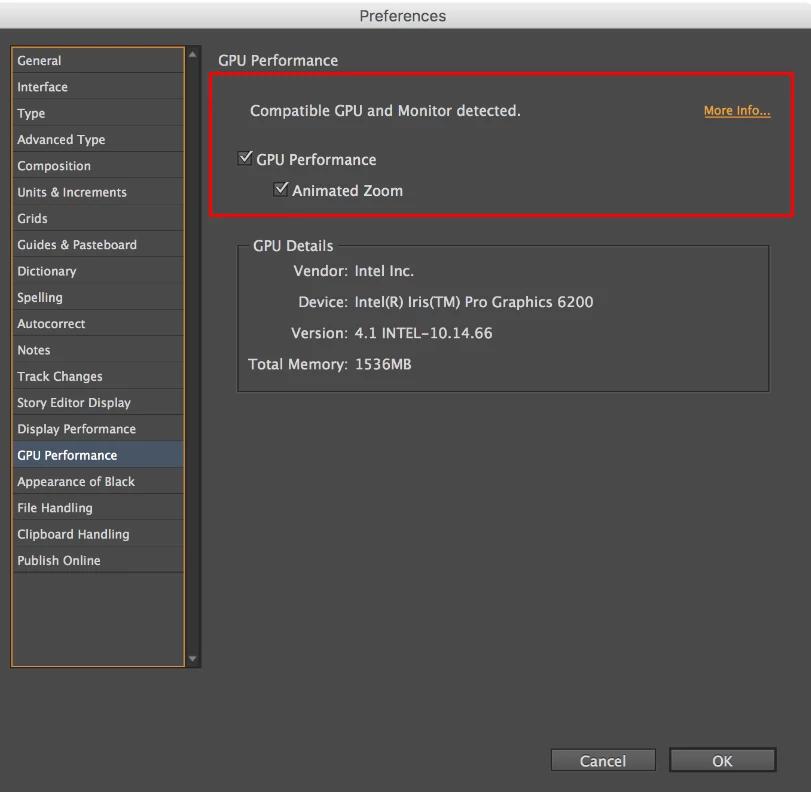
  • Screenshot of the “GPU Performance” from InDesign > Preferences >  GPU Performance like this:
  • Are you using external monitor(s)? If yes, with which port and cable combination it is connected.
  • During our investigation, we found that this is generally happening on the machines which are powered by eGPU. Do you have eGPU connected to your machine?
  • A small video demonstrating the issue could be really helpful.
  • Sample .indd document where the issue is reproducible.


All this information will help us replicate this issue and help you accordingly.


Regards!

32 replies

Participant
May 26, 2021

Hi, I'm running latest CC version of InDesign and Mac OS Big Sur 11.3.1 (see image attached for full spec).

I keep getting red and or blue shapes appearing mainly around the edges but often diagonal and full screen, they disappear when you toggle window - but sometimes a restart is needed.I've made no changes and am working ona job that started a month ago without these issues. Can anyone explain whats going on and how it might be fixed?


Thanks in advance


Geоrge
Legend
May 26, 2021
Remember, never say you can't do something in InDesign, it's always just a question of finding the right workaround to get the job done. © David Blatner
Inspiring
May 21, 2021

Hi folks,

do you also have since the latest Indesign update 16.2.1 so nice red bars in your workspace. I'm working with my Mac Pro on Big Sur 11.3.1 and I'm getting these display errors....
So for now I can only advise not to update further.
here is the link for a video example:
https://youtu.be/ue8ae5jfd3A

BobLevine
Community Expert
Community Expert
May 21, 2021

Disable GPU Performance

joffrey_fe
Participating Frequently
May 21, 2021

Hi,


I got issue while using ID : some red areas appears randomly on screen (sometimes there are blue) and I got everything shifted (see video and screenshot attached)


The only way to solve this issue is to close all the documents and reopened them 😕😕

This is annoying…


Anybody here know how to fix this ?


I work on MacPro (late 2013 / macOS v 11.3.1)


Thanks a lot

Eric Dumas
Community Expert
Community Expert
May 21, 2021

Can you confirm that your display drivers are up to date?

joffrey_fe
Participating Frequently
May 21, 2021

Hello, yes everything is up to date

Participant
May 20, 2021

Hi,


Recently I've been getting this red bar that stretches across the top of my documents, and whenever it appears the document starts smearing. I've had a search but couldn't find anything that looked like the same issue. I've tried deleting my preferences but that didn't work. A short term fix is to re-open the same document (whilst it is already open), and it goes, but will come back eventually, but not neccesarily on the same document.


Specs:

iMac (2015)

Big Sur 11.3.1

Indesign 16.2.1

Any ideas?


Thanks

Willi Adelberger
Community Expert
Community Expert
May 20, 2021

It is a screen only issue, it is in my opinion a bug. If you rebuild the screen, click twice “w” it should appear. You don't need to worry on this issue. Send a bug report to show Adobe that it is an important issue for you.

Ashutosh_Mishra
Inspiring
May 17, 2021

Hi All,


We're sorry to hear about your experience. Product team is aware about this issue & working to fix this. I'd request you all to upvote & add your comments on this UserVoice post(https://indesign.uservoice.com/forums/601180-adobe-indesign-bugs/suggestions/43404303-gpu-preview-br...) & stay tuned for updates.

We appreciate your patience in the meantime.


Regards,

Ashutosh

Participant
May 16, 2021

I have the same problem, that after a few minutes, after I switched between different tabs in InDesign, I get this weird red banner at top of the canvas. If so, I cannot select certain elements in the layout. However, resizing the window frame solves it for the moment. 

This keeps on appearing since the recent InDesign update – I’m working on an iMac with macOS 11.3.1 (Big Sur).


Geоrge
Legend
May 17, 2021

Second man with the same strange line. Please connect to Adobe Support Chat and show them. 

Remember, never say you can't do something in InDesign, it's always just a question of finding the right workaround to get the job done. © David Blatner
Participant
May 17, 2021

Good to here that I’m not the only one. However, I cannot contact Adobe directly through my account, as it is a corporate account (from my company) and all feedback goes through our system admin. I will contact them and hopefully Adobe will become aware of this bug …

Participant
May 16, 2021

I updated my InDesign yesterday and now my book spread has this blue and red spashes of colour all over it and I can no longer work on my books. What is happening? Anyone else? Only using opentype fonts and one on Adobe's site.

Community Expert
May 16, 2021

Turn off the GPU performance

Go to the InDesign Preferences

greenstreet35
Participant
June 16, 2021

Working just fine when unchecking the GPU-box as suggested 👍

Ashutosh_Mishra
Inspiring
May 13, 2021

Hi there,


Sorry to hear about your experience. Would you mind sharing the version of the OS? Are you using an external monitor or eGPU?

This information would help us assist you accordingly.


Regards,

Ashutosh

Cindy5DA9Author
Participant
May 13, 2021

Hi Ashutosh,

My machine is new and I have had it for for 4 months.  It's MacOS Big Sur. No external monitor.

Geоrge
Legend
May 13, 2021
Remember, never say you can't do something in InDesign, it's always just a question of finding the right workaround to get the job done. © David Blatner
Steve Werner
Community Expert
Community Expert
May 13, 2021

Make sure you've downloaded to latest update of InDesign 2021 to 16.2.1 (now available from the Creative Cloud desktop app).

Cindy5DA9Author
Participant
May 13, 2021

Thanks Steve, it was up to date but I uninstalled it and reinstalled it just incase. Still have the same problem.