Participant
May 11, 2021 2:48 PM UTC
Answered

InDesign 16.2.1 showing red bar on workspace

Can't open more than one file in Indesign, get weird red or blue banner/line and when I scroll down the image lags and can't select certain files.

In my job, I have to get out multiple language files and it is easier to work in batches. How can I solve this as it is slowing down my work time!



{Renamed by MOD}

    This topic is closed to new replies. Start a new post to keep the conversation going.
    Srishti_Bali
    Srishti_BaliCorrect answer
    Legend
    Aug 4, 2021 8:38 PM UTC

    Hi all,


    Sorry to hear that the issue is not yet fixed for some of you. We are still investigating this and need you help with a few more details. 


    • Please share system information file by following these steps. 
    • Exact version of InDesign in which you can replicate this behavior. 
    • Is this issue happening with both GPU preview and CPU mode?
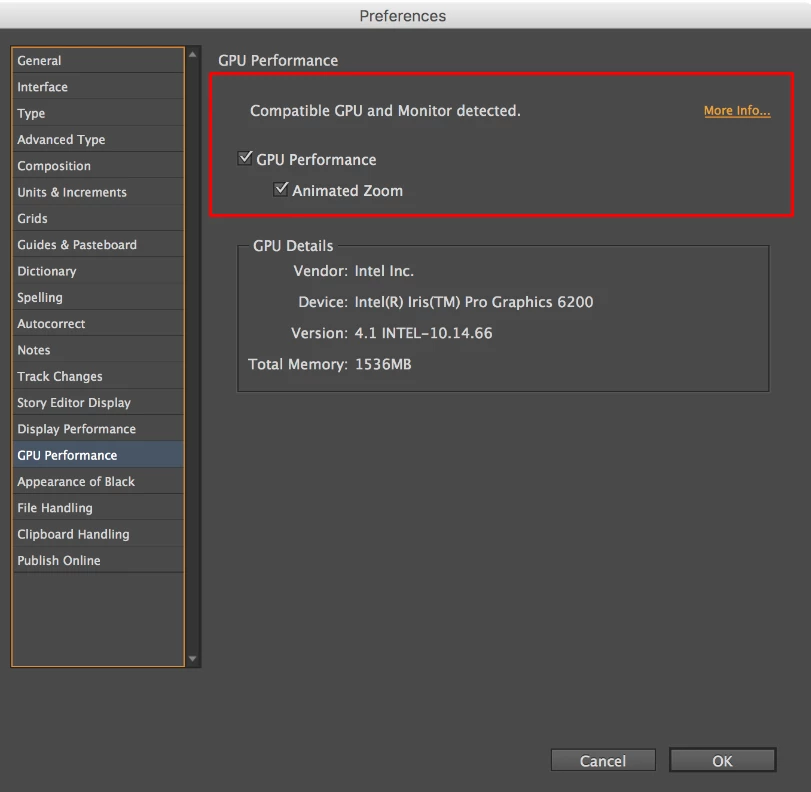
    • Screenshot of the “GPU Performance” from InDesign > Preferences >  GPU Performance like this:
    • Are you using external monitor(s)? If yes, with which port and cable combination it is connected.
    • During our investigation, we found that this is generally happening on the machines which are powered by eGPU. Do you have eGPU connected to your machine?
    • A small video demonstrating the issue could be really helpful.
    • Sample .indd document where the issue is reproducible.


    All this information will help us replicate this issue and help you accordingly.


    Regards!

    117 replies

    Participant
    May 26, 2021 9:16 AM UTC

    Hi, I'm running latest CC version of InDesign and Mac OS Big Sur 11.3.1 (see image attached for full spec).

    I keep getting red and or blue shapes appearing mainly around the edges but often diagonal and full screen, they disappear when you toggle window - but sometimes a restart is needed.I've made no changes and am working ona job that started a month ago without these issues. Can anyone explain whats going on and how it might be fixed?


    Thanks in advance


    Translate
    Geоrge
    Legend
    May 26, 2021 9:26 AM UTC
    Remember, never say you can't do something in InDesign, it's always just a question of finding the right workaround to get the job done. © David Blatner
    DERJUNG
    Inspiring
    May 21, 2021 11:14 AM UTC

    Hi folks,

    do you also have since the latest Indesign update 16.2.1 so nice red bars in your workspace. I'm working with my Mac Pro on Big Sur 11.3.1 and I'm getting these display errors....
    So for now I can only advise not to update further.
    here is the link for a video example:
    https://youtu.be/ue8ae5jfd3A

    Translate
    Srishti_Bali
    Legend
    May 21, 2021 3:44 PM UTC

    Hi there,


    So sorry to hear about this trouble. This has been reported by a few other users as well. In most of the cases we have found users are using eGPU and external monitors.

    I would request if you could share a few more details like:

    • Operating System
    • Are you using any eGPU and external monitor?
    • Does turning on Appliation Frame (Window > Appliation Frame) helps resolving the issue?
    • What all applications are running in the background?
    • Does turning off GPU performance as suggested by Bob helped resolving the issue?


    For further updates, please upvote this issue here ( https://indesign.uservoice.com/forums/601180-adobe-indesign-bugs/suggestions/43404303-gpu-preview-broken-gpu-performance-not-working ). 


    We're here to help!


    Regards,

    Srishti 

    Translate
    DERJUNG
    Inspiring
    May 25, 2021 2:50 PM UTC

    i mean "can not" be changed or be disabled in safari browser. Also forget to attach an image that is showing the bar in free flow tabbed windows.


    again. first did not work.

    Translate
    joffrey_fe
    Participating Frequently
    May 21, 2021 8:25 AM UTC

    Hi,


    I got issue while using ID : some red areas appears randomly on screen (sometimes there are blue) and I got everything shifted (see video and screenshot attached)


    The only way to solve this issue is to close all the documents and reopened them 😕😕

    This is annoying…


    Anybody here know how to fix this ?


    I work on MacPro (late 2013 / macOS v 11.3.1)


    Thanks a lot

    Translate
    Eric Dumas
    Community Expert
    Community Expert
    May 21, 2021 8:49 AM UTC

    Can you confirm that your display drivers are up to date?

    Translate
    joffrey_fe
    Participating Frequently
    May 21, 2021 9:12 AM UTC

    Hello, yes everything is up to date

    Translate
    Participant
    May 20, 2021 9:49 AM UTC

    Hi,


    Recently I've been getting this red bar that stretches across the top of my documents, and whenever it appears the document starts smearing. I've had a search but couldn't find anything that looked like the same issue. I've tried deleting my preferences but that didn't work. A short term fix is to re-open the same document (whilst it is already open), and it goes, but will come back eventually, but not neccesarily on the same document.


    Specs:

    iMac (2015)

    Big Sur 11.3.1

    Indesign 16.2.1

    Any ideas?


    Thanks

    Translate
    Willi Adelberger
    Community Expert
    Community Expert
    May 20, 2021 10:03 AM UTC

    It is a screen only issue, it is in my opinion a bug. If you rebuild the screen, click twice “w” it should appear. You don't need to worry on this issue. Send a bug report to show Adobe that it is an important issue for you.

    Translate
    Ashutosh_Mishra
    Inspiring
    May 17, 2021 7:03 PM UTC

    Hi All,


    We're sorry to hear about your experience. Product team is aware about this issue & working to fix this. I'd request you all to upvote & add your comments on this UserVoice post(https://indesign.uservoice.com/forums/601180-adobe-indesign-bugs/suggestions/43404303-gpu-preview-br...) & stay tuned for updates.

    We appreciate your patience in the meantime.


    Regards,

    Ashutosh

    Translate
    Participant
    May 16, 2021 10:33 PM UTC

    I have the same problem, that after a few minutes, after I switched between different tabs in InDesign, I get this weird red banner at top of the canvas. If so, I cannot select certain elements in the layout. However, resizing the window frame solves it for the moment. 

    This keeps on appearing since the recent InDesign update – I’m working on an iMac with macOS 11.3.1 (Big Sur).


    Translate
    Geоrge
    Legend
    May 17, 2021 7:29 AM UTC

    Second man with the same strange line. Please connect to Adobe Support Chat and show them. 

    Translate
    Remember, never say you can't do something in InDesign, it's always just a question of finding the right workaround to get the job done. © David Blatner
    Participant
    May 17, 2021 11:53 AM UTC

    Good to here that I’m not the only one. However, I cannot contact Adobe directly through my account, as it is a corporate account (from my company) and all feedback goes through our system admin. I will contact them and hopefully Adobe will become aware of this bug …

    Translate
    Participant
    May 16, 2021 4:54 AM UTC

    I updated my InDesign yesterday and now my book spread has this blue and red spashes of colour all over it and I can no longer work on my books. What is happening? Anyone else? Only using opentype fonts and one on Adobe's site.

    Translate
    Community Expert
    May 16, 2021 6:46 AM UTC

    Turn off the GPU performance

    Go to the InDesign Preferences

    Translate
    greenstreet35
    Participant
    Jun 16, 2021 10:59 AM UTC

    Working just fine when unchecking the GPU-box as suggested 👍

    Translate
    Ashutosh_Mishra
    Inspiring
    May 13, 2021 2:13 PM UTC

    Hi there,


    Sorry to hear about your experience. Would you mind sharing the version of the OS? Are you using an external monitor or eGPU?

    This information would help us assist you accordingly.


    Regards,

    Ashutosh

    Translate
    Cindy5DA9Author
    Participant
    May 13, 2021 2:19 PM UTC

    Hi Ashutosh,

    My machine is new and I have had it for for 4 months.  It's MacOS Big Sur. No external monitor.

    Translate
    Geоrge
    Legend
    May 13, 2021 12:40 PM UTC
    Remember, never say you can't do something in InDesign, it's always just a question of finding the right workaround to get the job done. © David Blatner
    Steve Werner
    Community Expert
    Community Expert
    May 13, 2021 12:01 PM UTC

    Make sure you've downloaded to latest update of InDesign 2021 to 16.2.1 (now available from the Creative Cloud desktop app).

    Translate
    Cindy5DA9Author
    Participant
    May 13, 2021 1:15 PM UTC

    Thanks Steve, it was up to date but I uninstalled it and reinstalled it just incase. Still have the same problem.

    Translate