
Participant
November 5, 2019
Answered

InDesign 2020 cant save file and gives error "already open"

  • November 5, 2019
  • 20 replies
  • 11791 views

When I finished a document in InDesign save it as a .pdf and try to opene it in Adobe Acrobat, the first time will open de document, the second time around I have to completely close both apps in order to get the document open again. it say's and I quote "Cannot save to the file ""name.pdf"", because it is already open".  does any body have a solution for it?

Thank you!
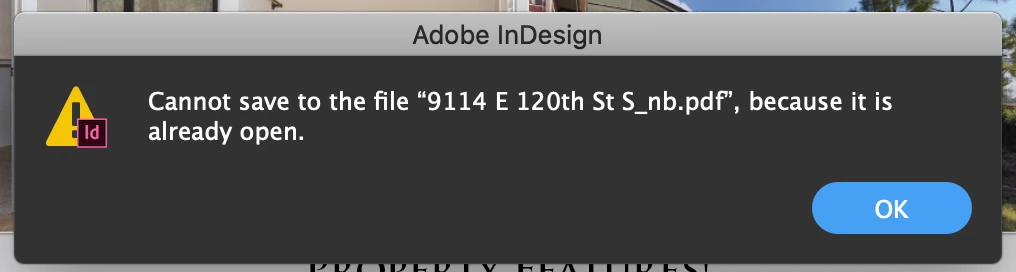


{Renamed by MOD}

Correct answer Laubender

Hi sml_design,

the bug fix is out now: Version 15.0.1.209 should be ready for install from your Adobe Creative Cloud Desktop App.


Fixed issues in InDesign
InDesign 2020 (version 15.0.1)

https://helpx.adobe.com/indesign/kb/fixed-issues.html


Regards,
Uwe Laubender

( ACP )


20 replies

Known Participant
September 6, 2023

this is still a problem. PLEASE fix it. 

Participant
June 13, 2023

It seems this issue has re-emerged. Getting the same message when trying to save of export from InDesign 2023 on our Macs to the Windows 11 server.


Specs

M1 Mac mini, MacOS Ventura 13.4

InDesign 2023 (Version 18.3)


This is completely breaking our workflow as we have to save locally to our Macs and then copy that to the file server.

Participant
July 11, 2023

Same issue here with InDesign 2023...

Mac OS Ventura

Mac Studio

sml_design
Participant
December 2, 2019

I am haveing the same issue. The only thing that works is if I quit InDesign and Acrobat, restart them both and then it allows me to save it. This did not start happening until we move to 2020. Not just my computer haveing this problem. 6 other people in my department that upgraded to 2020 having the same problem.

LaubenderCommunity ExpertCorrect answer
Community Expert
December 2, 2019

Hi sml_design,

the bug fix is out now: Version 15.0.1.209 should be ready for install from your Adobe Creative Cloud Desktop App.


Fixed issues in InDesign
InDesign 2020 (version 15.0.1)

https://helpx.adobe.com/indesign/kb/fixed-issues.html


Regards,
Uwe Laubender

( ACP )


Participating Frequently
January 7, 2021

Hi, I'm on version 16.0.1 and I still have the issue. Opening and closing the pdf worked once only. The problem is still there even after rebooting InDesign.

Community Expert
November 25, 2019

Hi ergordon_work,

I think, you'll be notified if you either comment that bug report at Adobe InDesign Feedback or you vote there for fixing the bug:

https://indesign.uservoice.com/forums/601180-adobe-indesign-bugs/suggestions/38963116-indesign-2020-won-t-overwrite-pdf


Regards,
Uwe Laubender

( ACP )

buns04
Participant
November 26, 2019

Same problem here...saving from Mac OS Mojave to a Windows server. My solution was to switch my connection from a "smb" to a "afp" type of connection. No problems since the change! (See screenshot below)

amberc76038347
Participant
November 22, 2019

Still seeing this issue. Any solution yet??? 

judys3201960
Participant
November 25, 2019

I was told there is no solution yet 😞

Participant
November 25, 2019

Is there a way to be notified when there is a solution to this issue?

Participant
November 20, 2019

Having the same problem

Participating Frequently
November 19, 2019

Same issue here. Using Mojave 10.14.4. I thought quiting Acrobat would do it but nope. I have to delete the PDF before I can export it again. 

Participant
November 13, 2019

Same issue as well "can't... because it's already open." Have to close both Indesign and Adode DC the reopen the indesign file again and then export to PDF. Was excited to upgrade to Indesign 2020 this morning, but it made for a long day! Hopefully this will get fixed shortly!

Rene-007
Participating Frequently
November 13, 2019

I found a faster way to re-export a .pdf doc without clossing and reloading the apps, just keep a finder window open where you are saving your docs and just delete them before re-exporting, then re-export from InDesign, that will do the job. (without the hassle of closing and re opening the apps) in the meantime lets wait 'till this issue gets fix.

Let me know if it helps you at all.

Greetings ya' all

evang72824716
Participant
November 12, 2019

Having the same issue. Saving from a mac (Mojave 10.14.4) to a mac server.

Participant
November 8, 2019

I am having the same issue. It seems to only be an issie when working on a server. When exporting a PDF to the desktop not a problem.


adamk93229702
Known Participant
November 10, 2019

Same problem. OS 10.13.6 saving to Synology NAS. Says the file is already open even when Acrobat is closed. Crazy stuff, big time waster to have to quit both apps every time to overwrite file.

kathleenb39573263
Participant
November 11, 2019

Same issue only with indesign 2020. Saving to Ctera server. MacOS Mojave.

2019 did not have this issue.