



FEBREN
Inspiring
March 13, 2026
Answered

InDesign 2025/2026 freezing (not responding) with Paragraph Panel & multiple CEP HTML Engine instances, with possible file corruption

  • March 13, 2026
  • 3 replies
  • 309 views

Hello, in short, what it says on the title: InDesign 2025/2026 freezes (ends up as “not responding” in the Task manager) when interacting with the Paragraph Panel or with other, simple interactions; there are also multiple CEP HTML Engine instances that are generated, and there might be a possible file corruption, though I couldn’t verify that. More information below:

SOFTWARE
InDesign 2026 (21.2).
Windows 10.

HARDWARE
CPU: AMD Ryzen 9 5900X 12-Core Processor 3.70 GHz.
GPU: NVIDIA GeForce RTX 3070 (8 GB).
RAM: 64 GB.
Storage:
(I installed Adobe apps on my D Drive),
233 GB SSD KINGSTON SA2000M8250G (C Drive, 70 GB of free space),
466 GB SSD KINGSTON SA2000M8500G (D Drive 155 GB of free space).

PROBLEM
Since late 2025 (I cannot pinpoint exactly from which version this started to happen) until now, the problem that I have been having is triple:

1. Merely invoking (trough the Window > Type & Tables > Paragraph), opening or selecting the Paragraph panel freezes the program (in the Task Manager it immediately appears as not responding by doing so). The resulting state lasts for various seconds or even a minute, making the program practically unusable, to the point of even closing the file taking roughly a minute, and closing the program requiring me to end the task with the Task Manager. Also, the program (and this program alone) got slow overall.

2. There appears to be an issue with the CEP HTML Engine that does not occur with every file, and sometimes it doesn't manifest even with the files that are possibly corrupted (se point 3): certain files cause a significant spike of multiple instances (sometimes even up to 23) of it being opened, whereas others did not cause this thing to appear in the task manager at all (though this happened only once). But in both cases, the program stops responding, even by simply opening them and doing nothing.

3. This, however, does not occur with every file. Instead, it occurs with specific files, but the particularly vexing aspect of this problem is that files that worked perfectly fine can start failing, even ones that aren't derived (duplicated) from the possibly corrupted ones. This generates an obvious uncertainty, since I do not know if a file, irrespective of it being brand new or old, will fail today, tomorrow, in a week or a in a month. And this happens even with incremental backups from back when they worked without any issues.

I have been unable to identify what triggers the issue. Also, this problem is particularly worrying, since big projects can become impossible to fix, so starting anew is not an acceptable option (by the way, copying the text in a new document doesn't break the new document, even after pasting it with formatting).

I don’t know what else to do.

ADDITIONAL CONTEXT
I have been using InDesign for quite a while without a single issue, and these files in particular have been working flawlessly, even after blackouts. They just spontaneously stopped working properly, and I have no apparent guarantee that it won’t happen with other files.

TROUBLESHOOTING ALREADY TRIED:
1. Turned Preflight off.
2. Restarted the program.
3. Reset preferences (Ctrl+Alt+Shift upon startup).
4. Updated drivers.
5. Reinstalled the program.
6. Creative Cloud Cleaner tool.
7. Revo Uninstaller (I deleted every single trace of Adobe from my system and reinstalled it all multiple times).
8. Saved the affected files as IDML and then back as INDD (I also tried packaging the INDD files). The problem persists even with the IDML files.
9. High CPU usage due to CEPHtmlEngine.
10. Opening the file in another computer (a laptop with similar specs; InDesign is installed in te C Drive in that one).
11. I downloaded Affinity just to see if it could handle the possibly corrupted files (in IDML), and it opened them just fine, without freezing, and without any performance issues whatsoever.

ADDITIONAL NOTES
Though I found some relevant variations of my problem in this forum, they all seem to be only partially relevant, for which I considered that it was preferable to open a new question thread. Nonetheless, I'll leave them for reference:
InDesign 2025 Freezing – CEPHtmlEngine.exe / libcef.dll Crash Issue
Paragraph and Character Styles very slow when making changes to an existing style, help!!
InDesign Freeze when Changing things in Paragraph Style
How to turn off CEP HTML Engine permanently?!
Multiple 'Adobe CEP HTML Engine' whenever using inDesign
Why so many processes of Adobe CEP HTML Engine running in background on Windows system.
High CPU usage due to CEPHtmlEngine
How to disable core CEP HTML Engine plugins (NOT 3rd party plugins)
What is the "Adobe CEP HTML Engine"? It`s using too much from my processor.

ATTACHMENTS
EXAMPLE FILE A (brand new, without issues).
EXAMPLE FILE B (possibly corrupted, it generates multiple CEP HTML Engine instances).
EXAMPLE FILE C (possibly corrupted, it initially did not generate CEP HTML Engine instances, but after testing it again, it did every time). I attached both the .indd and .idml.
Screenshots of the Task Manager.
 

    Correct answer FEBREN

    After two technical support sessions and further testing, there is a relatively simple workaround, though not an actual solution to the problem, which is to reconstruct the affected files* (files that, according to the second tech support agent, don’t actually seem to be corrupted at all, though that remains unconfirmed):

    First, the “solution”: moving pages from the problematic document to a new one

    Though part of the issue is that both newer and older files, including incremental backups, can be at risk of being affected, and that the number of files that worked flawlessly before and that now present issues is too high to blame it on occasional file corruption, it is quite fortunate that reconstructing them is a relatively quick process, including moving master pages, and preserving the threads between text frames of different pages. And though it is important to emphasize that the actual cause of the problem is still unknown, at least the following steps worked for being able to make usable copies of the problematic files, given that brand new files (that might, maybe, get corrupted in the future, as it happened with newer ones), as of now, have not presented issues.

    To do so, create a new document with the exact same measurements and margins based on the values in document setup, margins and columns, baseline grid settings, etc. Then, with both the new and old document open, move the master pages from the old document to the new one using the Move Pages command in the Pages panel before moving the pages with the actual contents of your original document.

    This does not guarantee that the problem won’t eventually manifest on the new, rebuilt files but, at least, the ones I tested this with present no issues so far.

    Second, latest tests and further context

    First tech support session. Accessing the %appdata% folder in File Explorer by typing %appdata% directly into the address bar and, after entering the Adobe folder, deleting the corresponding InDesign preferences folder, for some reason, “worked” just once; after freezing for one last time for around a minute, the file seemed to work properly, but this option, despite being reproduced exactly, step by step, did not work at all afterwards; reproducing this proposed solution didn’t have any effect at all.

    Second tech support session. The GPU acceleration wasn’t an issue, and the proposed solution was moving the pages but, apart from that, I was told that the reason why these files seem to be causing issues “is probably because of a known windows update issue”: given that Windows 10 has reached end of support, “the crucial updates that help the OS communicate with the app and tell it how to handle files, is not functioning properly [… and] the moment you open the same file elsewhere, it refreshes the cache and the processes and thus, the file opens easily afterwards”. Furthermore, I was told: “I honestly don't think your files are getting corrupted actually. More like the way they are handled is confusing the application due to the outdated OS”. The Adobe agent also checked in the live session, using Command Prompt, the KB Windows Update numbers, and kindly provided me with installers for previous versions of InDesign for me to test, later, if a rollback would work.

    Further testing

    Unfortunately, the rollback option did not work, not only because some files were newer than the versions in question, but also because older files (in relation to the tested versions) kept presenting issues.

    And after that, I tested the problematic files in Windows 11, on yet another computer, apart from the two that I already made tests with but that have Windows 10. It didn’t work, either. Technically, it could be posited that using W11 would prevent the issue from being further generated, but that kind of testing is beyond my current capabilities and time constraints, especially given that the problem at hand is of an unpredictable nature.

    Conclusion

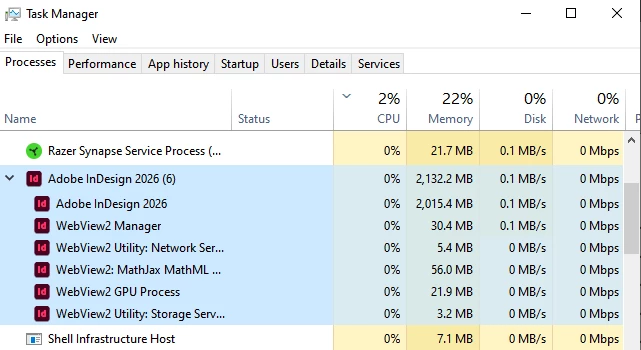
    I’ll consider this issue only sufficiently resolved, because though a workaround has been found, all of my initial questions remain unanswered, and the problem itself has not actually been fixed, but avoided. The only thing left that is important to mention is that I noticed, upon seeing the Task Manager with the rebuilt files open, that the CEP HTML Engine is nowhere to be seen:

    I hope this helps.

    * Push damaged pages into a new file (from Mike Witherell’s troubleshooting guide):

    https://community.adobe.com/questions%2D671/reset%2Dindesign%2Dpreferences%2Dand%2Dother%2Dtroubleshooting%2D867226


    3 replies

    FEBREN
    FEBRENAuthorCorrect answer
    Inspiring
    April 9, 2026

    After two technical support sessions and further testing, there is a relatively simple workaround, though not an actual solution to the problem, which is to reconstruct the affected files* (files that, according to the second tech support agent, don’t actually seem to be corrupted at all, though that remains unconfirmed):

    First, the “solution”: moving pages from the problematic document to a new one

    Though part of the issue is that both newer and older files, including incremental backups, can be at risk of being affected, and that the number of files that worked flawlessly before and that now present issues is too high to blame it on occasional file corruption, it is quite fortunate that reconstructing them is a relatively quick process, including moving master pages, and preserving the threads between text frames of different pages. And though it is important to emphasize that the actual cause of the problem is still unknown, at least the following steps worked for being able to make usable copies of the problematic files, given that brand new files (that might, maybe, get corrupted in the future, as it happened with newer ones), as of now, have not presented issues.

    To do so, create a new document with the exact same measurements and margins based on the values in document setup, margins and columns, baseline grid settings, etc. Then, with both the new and old document open, move the master pages from the old document to the new one using the Move Pages command in the Pages panel before moving the pages with the actual contents of your original document.

    This does not guarantee that the problem won’t eventually manifest on the new, rebuilt files but, at least, the ones I tested this with present no issues so far.

    Second, latest tests and further context

    First tech support session. Accessing the %appdata% folder in File Explorer by typing %appdata% directly into the address bar and, after entering the Adobe folder, deleting the corresponding InDesign preferences folder, for some reason, “worked” just once; after freezing for one last time for around a minute, the file seemed to work properly, but this option, despite being reproduced exactly, step by step, did not work at all afterwards; reproducing this proposed solution didn’t have any effect at all.

    Second tech support session. The GPU acceleration wasn’t an issue, and the proposed solution was moving the pages but, apart from that, I was told that the reason why these files seem to be causing issues “is probably because of a known windows update issue”: given that Windows 10 has reached end of support, “the crucial updates that help the OS communicate with the app and tell it how to handle files, is not functioning properly [… and] the moment you open the same file elsewhere, it refreshes the cache and the processes and thus, the file opens easily afterwards”. Furthermore, I was told: “I honestly don't think your files are getting corrupted actually. More like the way they are handled is confusing the application due to the outdated OS”. The Adobe agent also checked in the live session, using Command Prompt, the KB Windows Update numbers, and kindly provided me with installers for previous versions of InDesign for me to test, later, if a rollback would work.

    Further testing

    Unfortunately, the rollback option did not work, not only because some files were newer than the versions in question, but also because older files (in relation to the tested versions) kept presenting issues.

    And after that, I tested the problematic files in Windows 11, on yet another computer, apart from the two that I already made tests with but that have Windows 10. It didn’t work, either. Technically, it could be posited that using W11 would prevent the issue from being further generated, but that kind of testing is beyond my current capabilities and time constraints, especially given that the problem at hand is of an unpredictable nature.

    Conclusion

    I’ll consider this issue only sufficiently resolved, because though a workaround has been found, all of my initial questions remain unanswered, and the problem itself has not actually been fixed, but avoided. The only thing left that is important to mention is that I noticed, upon seeing the Task Manager with the rebuilt files open, that the CEP HTML Engine is nowhere to be seen:

    I hope this helps.

    * Push damaged pages into a new file (from Mike Witherell’s troubleshooting guide):

    https://community.adobe.com/questions%2D671/reset%2Dindesign%2Dpreferences%2Dand%2Dother%2Dtroubleshooting%2D867226


    Mike Witherell
    Community Expert
    Community Expert
    March 19, 2026

    More ideas here:


    Mike Witherell
    FEBREN
    FEBRENAuthor
    Inspiring
    March 20, 2026

    Thank you Mike! I’ll check your Troubleshooting Guide and will come back to you with an update.

    Abhishek Rao
    Community Manager
    Community Manager
    March 19, 2026

    Hi @FEBREN,


    Apologies for the delay, and I completely understand how frustrating this must be. Thank you for sharing all the detailed information and files, that really helps.

    I'm currently checking this further with our product team and will get back to you as soon as I have an update.

    In the meantime, could you please try isolating the issue by testing in Safe Mode and also in a new user account? This will help us determine if any background services or user-specific settings are contributing to the problem. You can follow these guides:
    Safe Mode: https://adobe.ly/4uEPf8M
    New user account: Manage User Accounts in Windows - Microsoft Support


    Please let me know how it goes, and I'll keep you posted from my end as well.

    Abhishek


    FEBREN
    FEBRENAuthor
    Inspiring
    March 20, 2026

    Thank you Abhishek! I’ll follow your advice and come back to you with an update.