

Mr. Met
Inspiring
February 28, 2026
Question

InDesign 21.2 Undo Greyed Out and History Panel Blank on macOS Tahoe and Ventura

  • February 28, 2026
  • 5 replies
  • 144 views

I installed Adobe 2026 on my imac. Now undo doesn’t work. It’s permanently grayed out. ID 21.2 on a Retina 5K running Ventura 13.7.8.


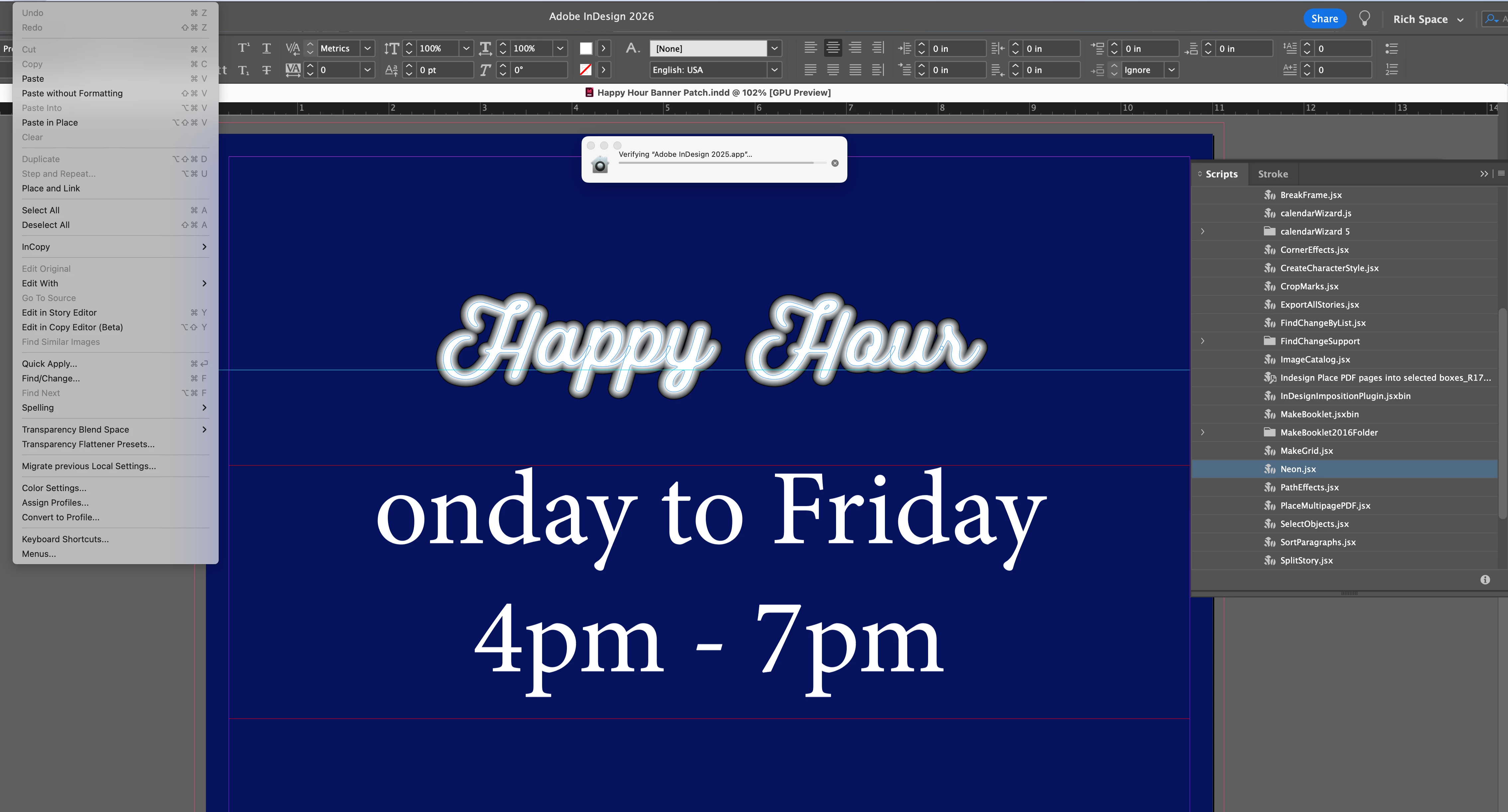
If you look at screen shot, I can’t undo the neon effect I made or undo the letter ‘M’ I deleted. 

I’m opening 2025 ID to see if that helps.
 

    5 replies

    Abhishek Rao
    Community Manager
    Community Manager
    March 6, 2026

    Hi everyone,


    Thank you for sharing the details and your observations. Since multiple users have now reported similar behavior with the Undo option being greyed out and the History panel appearing blank on macOS, I have shared this internally with the product team so they can review it further.

    I’m currently checking this with them and will update the thread as soon as I hear back with more information.


    Thank you for your patience while we look into this.

    Abhishek 

    Abhishek Rao
    Community Manager
    Community Manager
    March 9, 2026

    Hi everyone,


    Thank you for continuing to share your observations and details around this issue. I wanted to let you know that I’ve now logged a bug for this behavior with the product team, and they are currently investigating it further.

    The team is working on identifying the root cause and possible fix. I’ll keep this thread updated as soon as I have any new information to share.


    Thank you for your patience while we look into this.

    Abhishek

    Abhishek Rao
    Community Manager
    Community Manager
    March 2, 2026

    Hi ​@Mr. Met & ​@bongarjc ,


    Thanks for reaching out and sorry to hear that you experience this issue. First of all, please make sure you’re updated to the latest InDesign 21.2 build. The Undo issue was a known problem in earlier 21.0 builds and was resolved in 21.2 build. Ref: InDesign release notes

    As Mike suggested, I’d also recommend resetting InDesign preferences manually. Please follow the steps shown in this official guide and video (at the bottom) here:
    https://helpx.adobe.com/indesign/using/setting-preferences.html

    After resetting, test again and let me know if the Undo option continues to stay greyed out.

    If the issue still persists, please confirm whether this happens in all documents including a brand-new blank file, or only in specific files. Also let me know if this behavior is limited to InDesign or if you’re noticing similar issues in any other Adobe apps.


    Looking forward to your update so we can take this further.

    Abhishek

    Participating Frequently
    March 2, 2026

    as stated below, I have the latest install. In fact, I did not have this bug UNTIL the latest install. Not only is it happening in existing documents, but it would not even OPEN a blank new document until I forced quit InDesign and rebooted it. When testing in a blank file, I did not have the same issue. So far, only limited to InDesign docs

    Abhishek Rao
    Community Manager
    Community Manager
    March 3, 2026

    Hi ​@bongarjc,


    Thanks for confirming the details. Adding to the expert suggestion, since this is happening in existing documents and started after the update, just to help isolate this further, please test the behavior in Safe Mode on macOS. This helps rule out any third-party utilities or background services that might be interfering. Ref: https://support.apple.com/en-in/guide/mac-help/mh21245/mac

    It would also be helpful to test in a new local admin user account on your Mac. This allows us to check whether the issue is tied to your current user profile. Ref: https://support.apple.com/en-in/guide/mac-help/mh15191/mac

    If the issue still persists even in Safe Mode and under a new admin account, the next step would be to completely remove InDesign and reinstall it cleanly using the Creative Cloud Cleaner tool. Please close all Adobe applications first, then use the Creative Cloud Cleaner tool to remove Creative Cloud Desktop, CCLibrary, and CoreSync from here:
    https://adobe.ly/4mkYJCc

    After that, reinstall the Creative Cloud Desktop application from here:
    https://adobe.ly/43fQrCS

    Once reinstalled, download InDesign again and test the Undo behavior before installing any additional plugins or scripts.


    Please let me know how it goes after trying these steps, and we’ll take it forward based on what you observe.

    Abhishek

    Participating Frequently
    March 2, 2026

    This is also happening to me—21.2, Tahoe 26.3, M1 mac 32 GB. I’ve tried all the hacks: reset preferences, clean and restart mac, this is a MAJOR bug and is seriously impacting my workload on deadline. Not sure if it is a Tahoe or Adobe problem. Also having major lagging problems with bluetooth mouse, and had to switch to a wired mouse.

    leo.r
    Community Expert
    Community Expert
    March 2, 2026

    Just to make sure: Are your Undo/Redo menus grayed out? Also, what do you see in the History panel?

    Participating Frequently
    March 2, 2026

    yes, undo is greyed out, and History panel is effectively blank 

    Mr. Met
    Mr. MetAuthor
    Inspiring
    March 2, 2026

    I rebooted a couple times and it seems to be working now. But eventually, it happens again. Got a new iMac which I’m still in process of setting up so hopefully that will solve it. Thx.

    jane-e
    Community Expert
    Community Expert
    March 2, 2026

    @Mr. Met wrote “I can’t undo the neon effect”


    Did you apply the neon effect with the Neon.jsx script that is highlighted in your scripts panel? What are the steps in the script?


    image of scripts panel


    Jane


    Mike Witherell
    Community Expert
    Community Expert
    March 1, 2026

    Hi Met,

    Have you tried resetting InDesign?

    Mike Witherell