

Mr. Met
Inspiring
February 28, 2026
Answered

InDesign 21.2 Undo Greyed Out and History Panel Blank on macOS Tahoe and Ventura

  • February 28, 2026
  • 11 replies
  • 906 views

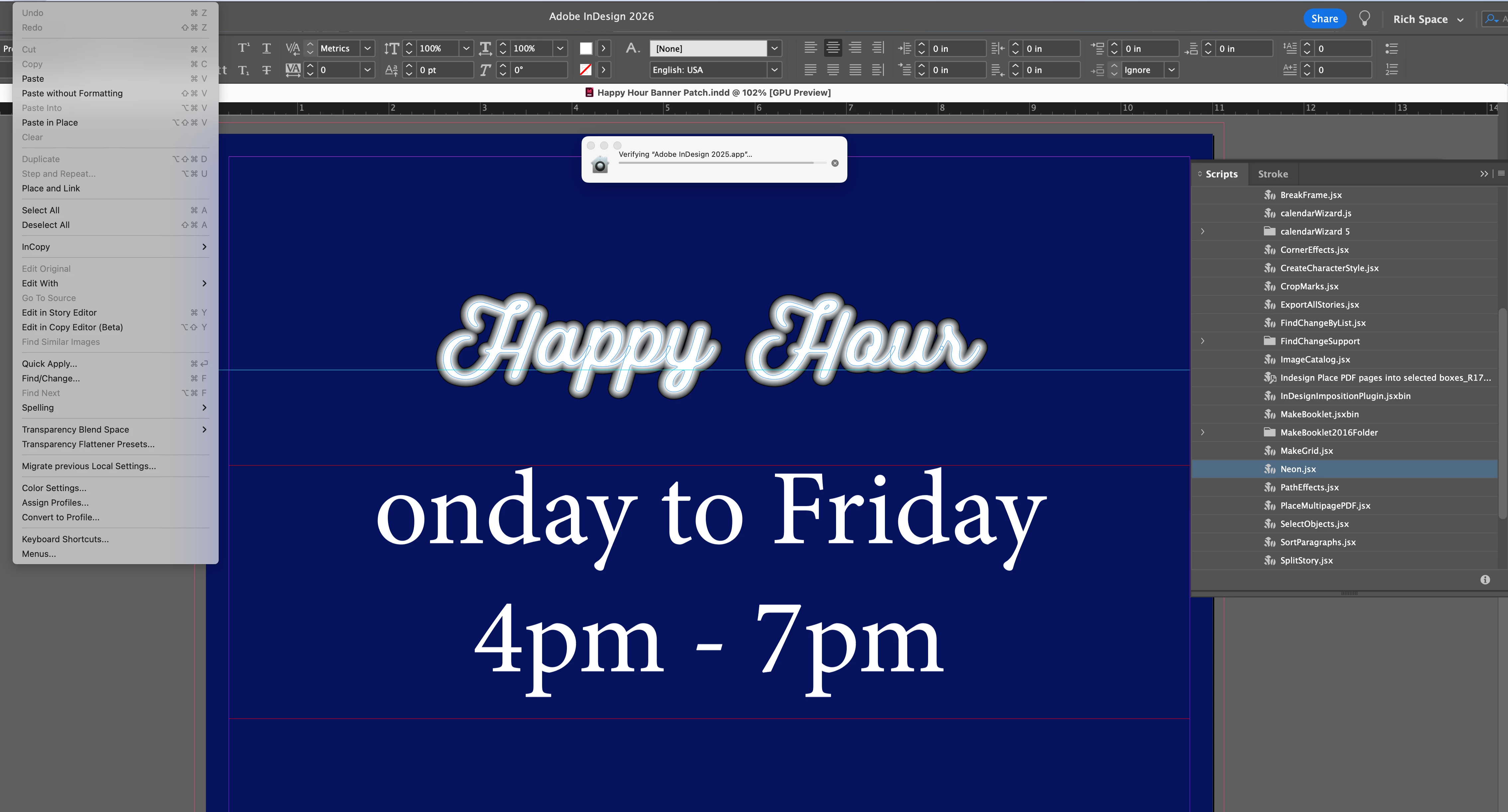
I installed Adobe 2026 on my imac. Now undo doesn’t work. It’s permanently grayed out. ID 21.2 on a Retina 5K running Ventura 13.7.8.


If you look at screen shot, I can’t undo the neon effect I made or undo the letter ‘M’ I deleted. 

I’m opening 2025 ID to see if that helps.
 

    Correct answer Sanyam Talwar

    I tried to reproduce the issue using InDesign v21.3.0.060 on macOS, but I wasn’t able to replicate it. Could you please check if the issue occurs on the InDesign 2026(v21.3.0.060) as well as the InDesign PreRelease build(v21.4.0.049)?

    Additionally, it would be very helpful if you could share the following details with us at sharewithID@adobe.com:

    Memory Pressure (important)

    • Open Activity Monitor → go to the Memory tab
    • Check the Memory Pressure graph at the bottom:
      • Green: System is performing well
      • Yellow: Some memory pressure
      • Red: High memory contention (this is where issues may occur)

    Collecting Logs via Terminal with InDesign v21.3.0.060

    1. Launch InDesign via Terminal
    2. Open Terminal
    3. Drag and drop the InDesign executable into Terminal:
      /Applications/Adobe\ InDesign\ 2026/Adobe\ InDesign\ 2026.app/Contents/MacOS/Adobe\ InDesign\ 2026
    4. Open History Panel (Window → History)
    5. Start working on a new or existing document
    6. When you notice the Undo/Redo issue, monitor the logs in Terminal and share them with us

    Workaround on macOS

    • Reverting to v21.1.0 appears to resolve the issue
    • Restarting InDesign or system may temporarily restore functionality
       

    <marking as best answer for better visibility on the thread>

    11 replies

    Mike Witherell
    Community Expert
    Community Expert
    March 1, 2026

    Hi Met,

    Have you tried resetting InDesign?

    Mike Witherell