



Mr. Met
Inspiring
February 28, 2026
Answered

InDesign 21.2 Undo Greyed Out and History Panel Blank on macOS Tahoe and Ventura

  • February 28, 2026
  • 51 replies
  • 1449 views

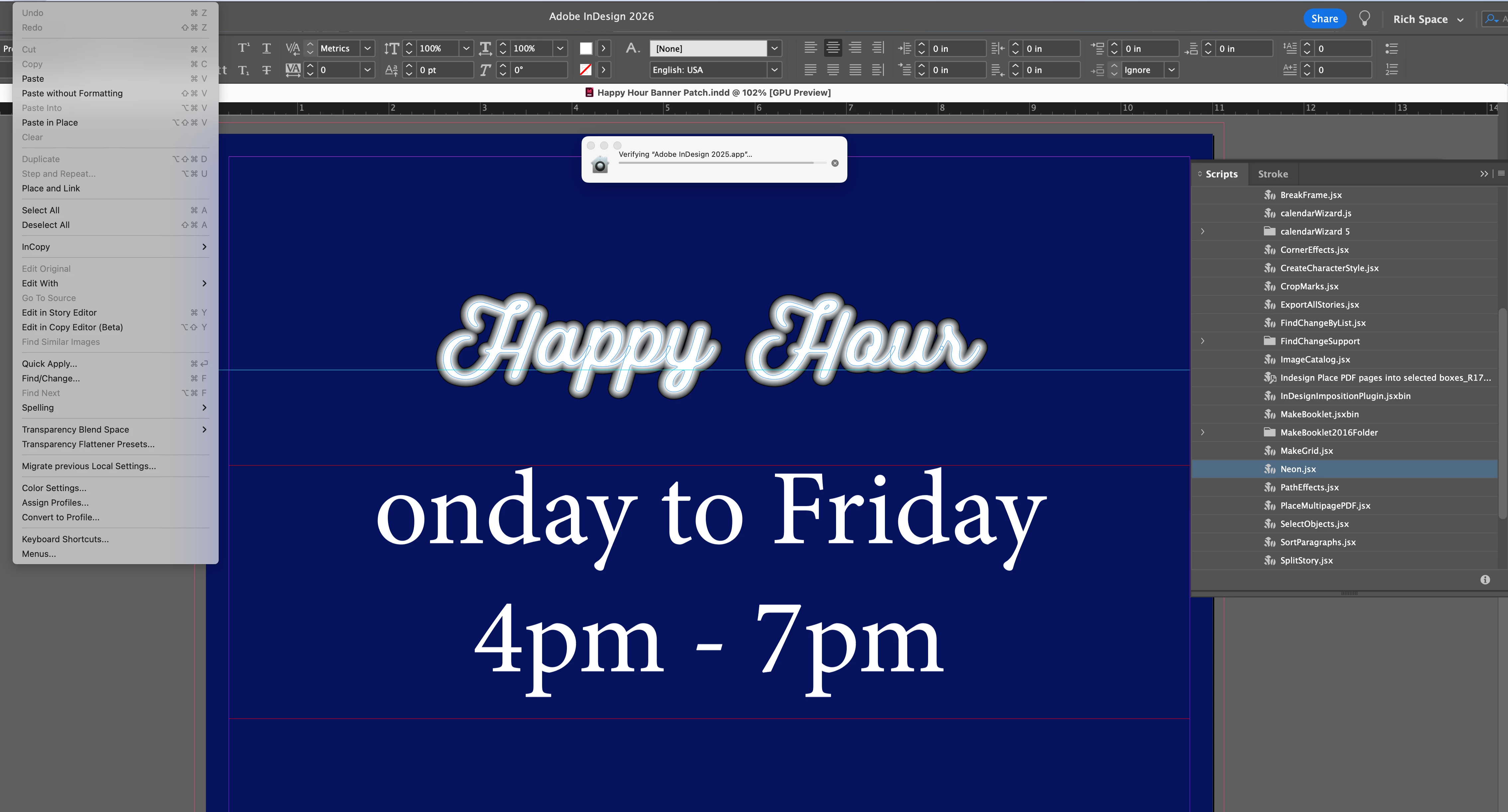
I installed Adobe 2026 on my imac. Now undo doesn’t work. It’s permanently grayed out. ID 21.2 on a Retina 5K running Ventura 13.7.8.


If you look at screen shot, I can’t undo the neon effect I made or undo the letter ‘M’ I deleted. 

I’m opening 2025 ID to see if that helps.
 

    Correct answer Sanyam Talwar

    I tried to reproduce the issue using InDesign v21.3.0.060 on macOS, but I wasn’t able to replicate it. Could you please check if the issue occurs on the InDesign 2026(v21.3.0.060) as well as the InDesign PreRelease build(v21.4.0.049)?

    Additionally, it would be very helpful if you could share the following details with us at sharewithID@adobe.com:

    Memory Pressure (important)

    • Open Activity Monitor → go to the Memory tab
    • Check the Memory Pressure graph at the bottom:
      • Green: System is performing well
      • Yellow: Some memory pressure
      • Red: High memory contention (this is where issues may occur)

    Collecting Logs via Terminal with InDesign v21.3.0.060

    1. Launch InDesign via Terminal
    2. Open Terminal
    3. Drag and drop the InDesign executable into Terminal:
      /Applications/Adobe\ InDesign\ 2026/Adobe\ InDesign\ 2026.app/Contents/MacOS/Adobe\ InDesign\ 2026
    4. Open History Panel (Window → History)
    5. Start working on a new or existing document
    6. When you notice the Undo/Redo issue, monitor the logs in Terminal and share them with us

    Workaround on macOS

    • Reverting to v21.1.0 appears to resolve the issue
    • Restarting InDesign or system may temporarily restore functionality
       

    <marking as best answer for better visibility on the thread>

    51 replies

    Participant
    July 17, 2026

    I’m using 21.4.1 - this absoultely needs to be fixed as a top priority - not being able to undo make the software unusable

    nik.m
    Community Manager
    Community Manager
    July 20, 2026

    Hi Matt, the team is working on a fix for this. 

    Please share the logs requested in the response from Sanyam along with a video. These would help us investigate things in more detail.

    Meanwhile, please try the workarounds suggested in the reply. 


    Thanks, 

    Nikunj 

    Participant
    July 21, 2026

    i have the same now, undo is grayed out. apple M1 sequoia 15.7.4.

    Participant
    July 9, 2026

    Is there a fix for this please? Using 21.4.1 and Mac OS Tahoe 26.5.1, and Undo/Redo functions are greyed out and unusable as per other user’s reports.

    Participant
    July 9, 2026

    Further to this, I’m finding that the cursor constantly reflects the previous tool’s function rather than the active tool. I’m not an expert but this might reflect a general memory issue with this programme? Nothing already suggested in these threads fixes either of these issues for me. This is all very frustrating and is rendering this programme close to useless. Everything takes considerably longer than it should, and it is hard to use the active functions.

    Participant
    July 9, 2026

    If anyone has any suggestions please, please share.

    Adobe please fix this ASAP.

    kyle_2357
    Participant
    June 30, 2026

    HOnestly Adobe … WTF????  I’m experiencing ALL sorts of bugs in your software.
    Unable to move grouped objects, unable to undo …. some fairly simple stuff that no longer works.
    Its completely UNEXCEPTABLE. You guys are dropping the ball. I’m sick of work arounds too.
    Resetting preferences is not acceptable. (It also didnt work) Its annoying having to set up a workflow all over. None of your subscribers should have to put up with this. Stop releasing untested software.
    Get the basics right -- and FIX it !!!! 

    leo.r
    Community Expert
    Community Expert
    June 30, 2026

    Unable to move grouped objects


    It sounds like a bug in InDesign 21.4 that was fixed in 21.4.1. Is your InDesign updated? Also, what’s your operating system version?


    Resetting preferences is not acceptable. (It also didnt work) Its annoying having to set up a workflow all over.


    In general, I agree that resetting preferences can be a lousy solution, especially if should be done regularly. Some of the settings can be restored if you export them before the reset via the User Settings menu. I’m not sure if all settings can be restored this way as I didn’t have to reset them for years, fortunately.

    Participant
    July 9, 2026

    I’m using 21.4.1 and it hasn’t fixed the bugs

    rick_0306
    Participant
    June 25, 2026

    Absolute disgrace that a simple and core function as undo just does not work in 2026. God, Adobe is really the lowest of the low.

    leo.r
    Community Expert
    Community Expert
    June 25, 2026

    What are your versions of InDesign and macOS?

    rick_0306
    Participant
    June 25, 2026

    Hey!
    Indesign 21.4.1 
    Sonoma 14.6.1

    karenc13107848
    Participant
    June 16, 2026

    I am seeing this same bug in the latest install of InDesign 21.4, on Mac 26.5.1 (25F80), 16GB. This is a HUGE deal, please fix. Also when I try to move multiple items in Indesign it only moves 1, I have to group to get them to work. What happened? I am losing so much time, it is driving me nuts. I’ve just reinstalled InDeisgn and it still doesn't work even in a new file !!!!!!!!!  Seems if you were seeing this on previous versions you would have fixed by now. It is such an infuriating bug. And I’m losing so much time. HELP!

    leo.r
    Community Expert
    Community Expert
    June 16, 2026

    Also when I try to move multiple items in Indesign it only moves 1, I have to group to get them to work. What happened?


    A known bug in InDesign 21.4. Revert to InDesign 21.3 until it’s fixed (hopefully, soon):


    Sanyam TalwarCommunity ManagerCorrect answer
    Community Manager
    April 21, 2026

    I tried to reproduce the issue using InDesign v21.3.0.060 on macOS, but I wasn’t able to replicate it. Could you please check if the issue occurs on the InDesign 2026(v21.3.0.060) as well as the InDesign PreRelease build(v21.4.0.049)?

    Additionally, it would be very helpful if you could share the following details with us at sharewithID@adobe.com:

    Memory Pressure (important)

    • Open Activity Monitor → go to the Memory tab
    • Check the Memory Pressure graph at the bottom:
      • Green: System is performing well
      • Yellow: Some memory pressure
      • Red: High memory contention (this is where issues may occur)

    Collecting Logs via Terminal with InDesign v21.3.0.060

    1. Launch InDesign via Terminal
    2. Open Terminal
    3. Drag and drop the InDesign executable into Terminal:
      /Applications/Adobe\ InDesign\ 2026/Adobe\ InDesign\ 2026.app/Contents/MacOS/Adobe\ InDesign\ 2026
    4. Open History Panel (Window → History)
    5. Start working on a new or existing document
    6. When you notice the Undo/Redo issue, monitor the logs in Terminal and share them with us

    Workaround on macOS

    • Reverting to v21.1.0 appears to resolve the issue
    • Restarting InDesign or system may temporarily restore functionality
       

    <marking as best answer for better visibility on the thread>

    carrie68633120
    Participant
    April 17, 2026

    Just adding that my Undo is also grayed out/not working but History is not blank. It shows earlier moves but if I try to go back and select something, it moves me back to the starting place a second later (ie, I can’t functionally select an older version). Also, it doesn’t update when I use the app, almost as if it’s “maxed out” after only working a few minutes.  (I had previously reset preferences and Undo worked briefly after that.)

    Mac 26.3.1 with Indesign 21.2

    carrie68633120
    Participant
    April 17, 2026

    Just adding that I thought I had the latest Indesign but did not!  I’ve updated to 21.3 and so far, so good.

    Participant
    April 14, 2026

    This is still a bug - Undo is a pretty essential function. And force quitting / restarting to be able to undo is absolutely bonkers. Please get this fixed.

    leo.r
    Community Expert
    Community Expert
    April 14, 2026

    What InDesign version are you running?

    Participant
    April 14, 2026

    21.3

    Kate25599251igbk
    Participant
    March 11, 2026

    Flagging issues with this too, just for the product team’s notice. 

    Abhishek Rao
    Community Manager
    Community Manager
    March 6, 2026

    Hi everyone,


    Thank you for sharing the details and your observations. Since multiple users have now reported similar behavior with the Undo option being greyed out and the History panel appearing blank on macOS, I have shared this internally with the product team so they can review it further.

    I’m currently checking this with them and will update the thread as soon as I hear back with more information.


    Thank you for your patience while we look into this.

    Abhishek 

    Abhishek Rao
    Community Manager
    Community Manager
    March 9, 2026

    Hi everyone,


    Thank you for continuing to share your observations and details around this issue. I wanted to let you know that I’ve now logged a bug for this behavior with the product team, and they are currently investigating it further.

    The team is working on identifying the root cause and possible fix. I’ll keep this thread updated as soon as I have any new information to share.


    Thank you for your patience while we look into this.

    Abhishek

    Sara Weingartner
    Participant
    March 11, 2026

    FYI, the greyed out UNDO and REDO is also happening with OS Sequoia 15.7.4
