Known Participant
November 10, 2016
Answered

InDesign CC 2017 slow

  • November 10, 2016
  • 63 replies
  • 80483 views

I am having issues with InDesign CC 2017 being extremely slow. If I click on a font the beachball just spins... I tried working in it for a few hours but it is killing me and went back to the previous version.

I use Suitcase Fusion and turned off Typekit. I am running Mac OS Sierra.

Is anyone else having this issue? I can't find any complaints online.

Thank you
    This topic has been closed for replies.
    Correct answer SEEKAY

    Hello all,

    This has worked for me - cheers

    El Capitan 10.11.6

    iMac (27-inch, Mid 2011)

    3.4 GHz Intel Core i7

    16 GB 1333 MHz DDR3

    SSD

    AMD Radeon HD 6970M 2048 MB

    63 replies

    Participant
    November 11, 2016

    I too am having the same issues with lag. I went to Preferences, unchecked both the Type Contextual Controls and this has NOT addressed my lag.

    Participant
    November 14, 2016

    This was really weird... after I tried the options stated above - and I restarted - I was having the same issue. However, after about 2 hours, all of a sudden, InDesign seems to have fixed itself. So "YAH"

    Participant
    November 11, 2016

    I am having the same issue using Windows 10. I turned off the Type Contextual Controls. I closed InDesign and re-opened. Still no improvement. Using the type tool, it take several seconds for the screen to display what I typed. This happens on existing documents and a new blank document.

    Any other suggestions or hot fixes for this?

    Monica Singh
    Adobe Employee
    Adobe Employee
    November 17, 2016

    Hi Gwen,

    Thanks for confiming. I have to investigate this further.

    Can you please share with me a sample  file with which you are facing this issue.

    You may share using dropbox/or other file sharing service, or mail me directly at monsingh@adobe.com

    This would be a great help.

    Regards,

    Monica Singh

    InDesign Team

    Participating Frequently
    November 17, 2016

    A sample file doesn't make sense. This issue even ccoures by making a new document.

    Monica Singh
    Adobe Employee
    Adobe Employee
    November 10, 2016

    Hi Vicky

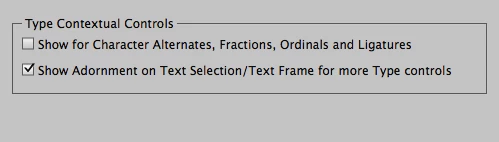
    Can you please try to uncheck the below mentioned preferences and see if it works for you.

    To disable the preference go to InDesign--> Preferences-->Advanced Type

    And uncheck the following two preferences.

    It should work.

    Please share with me your file with which you are facing the issue, if in case it did not work.

    Regards,

    Monica Singh

    Glahachan
    Participating Frequently
    November 10, 2016

    Edit:

    Sorry, I have the problem any more.

    At first I think it is better, but no it isn't.

    And it is noch really possible to work.

    Christina

    Hello,

    I had the same problem as Vicky.

    Thanks for this tip. Now it is faster. Thanks a lot.

    Christina