Known Participant
November 10, 2016
Answered

InDesign CC 2017 slow

  • November 10, 2016
  • 63 replies
  • 80483 views

I am having issues with InDesign CC 2017 being extremely slow. If I click on a font the beachball just spins... I tried working in it for a few hours but it is killing me and went back to the previous version.

I use Suitcase Fusion and turned off Typekit. I am running Mac OS Sierra.

Is anyone else having this issue? I can't find any complaints online.

Thank you
    This topic has been closed for replies.
    Correct answer SEEKAY

    Hello all,

    This has worked for me - cheers

    El Capitan 10.11.6

    iMac (27-inch, Mid 2011)

    3.4 GHz Intel Core i7

    16 GB 1333 MHz DDR3

    SSD

    AMD Radeon HD 6970M 2048 MB

    63 replies

    ananggadipa
    Participating Frequently
    November 15, 2016

    Same here, using el capitan on 5K imac late 2015, cc2017.

    when I move any object, the respon is very slow, like 2 second delay from first click.

    Participant
    November 22, 2016

    Exactly the same thing i get!  Very annoying especially knowing I'm on a kick ass mac, not good Adobe!  need a fix asap. 

    Susan Loncar Design
    Known Participant
    November 15, 2016

    I'm having the rainbow beach ball of death too. Every five or so words I type, it hangs. Last night, I was on chat with Adobe support twice, and they "fixed" the issue, but after my working a little more on my document, the problem is back and worse than ever. Now it hangs for 20-30 seconds minimum. I'm running it on an iMac with plenty of memory and hard drive space and Sierra 10.12.1. It's impossible to get anything done. Very frustrated!

    Susan Loncar Design
    Known Participant
    November 15, 2016

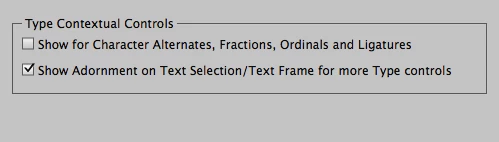
    And Monica, I did try unchecking the two boxes you indicate, but it made no difference whatsoever.

    November 15, 2016

    Same here. Installed 2015 and I was able to convert back to old versions with no issues from what I can tell. Thanks Adobe!

    Participant
    November 14, 2016

    I was having the same problem. My Mac was beachballing whenever I selected a chunk of type for formatting. Turning off those settings did the trick. Thanks!

    Participant
    November 14, 2016

    Still having the issue of slowness when typing.  I uninstalled InDesign CC 2017 and installed 2015.  While doing so, I had the program re-set preferences back to defaults.  Again, I am running on Windows 10.  InDesign is the only program I am having this issue with. 

    jokaroither
    Participant
    November 14, 2016

    the same here - CC 2017 almost useless - downgrading is no option.

    we guess the problem came along with sierra - no big troubles before.

    Glahachan
    Participating Frequently
    November 14, 2016

    I put CC2015 back, too...

    please let us know, if you fix cc2017.

    merom
    Participating Frequently
    November 13, 2016

    How can we downgrade to the 2016 version? Never had this problem before the update. It's now PAINFUL to get work done with InDesign

    Known Participant
    November 14, 2016

    Through creative cloud app. You can download previous versions. I put CC 2015 back on my machine for InDesign only.

    merom
    Participating Frequently
    November 14, 2016

    Thank you - got it. So far, that looks like it will work!

    Bon courage,

    Merom

    merom
    Participating Frequently
    November 13, 2016

    I am having this same problem also - it is impossible to work in InDesign 2017 - how do I downgrade back to 2016 so I can get work done - this program is impossible to use!! I tried this same fix and it does not really help.

    Participant
    November 12, 2016

    I'm having the same problems! There is more "beach ball time" than "work time". Even if I do the simplest work...

    Participant
    November 11, 2016

    I'm having the same issue, it is almost impossible to move around a document. The Type Contextual Controls did not change the lag or the number of times I am staring at the beach ball trying to execute simple commands.