Known Participant
November 10, 2016
Answered

InDesign CC 2017 slow

  • November 10, 2016
  • 63 replies
  • 80483 views

I am having issues with InDesign CC 2017 being extremely slow. If I click on a font the beachball just spins... I tried working in it for a few hours but it is killing me and went back to the previous version.

I use Suitcase Fusion and turned off Typekit. I am running Mac OS Sierra.

Is anyone else having this issue? I can't find any complaints online.

Thank you
    This topic has been closed for replies.
    Correct answer SEEKAY

    Hello all,

    This has worked for me - cheers

    El Capitan 10.11.6

    iMac (27-inch, Mid 2011)

    3.4 GHz Intel Core i7

    16 GB 1333 MHz DDR3

    SSD

    AMD Radeon HD 6970M 2048 MB

    63 replies

    Participating Frequently
    November 25, 2016

    Here's another question. Is anyone here working on a server?

    I'm working on a brand new iMac at work (it was top spec in April), it has 64mb ram and is running on Mac OS Sierra.

    i am the only one using a Mac in my office (it's an architects) and I have to work from their Windows server.

    Since i upgraded to 2017, InDesign is painfully slow and like you guys, I get the beachball every time I change the slightest thing. Sometimes I have to wait at least 5 mins before I think about force quitting because sometimes, when I make a change and the screen freezes, 5 minutes later the change eventually happens, then I can save.

    Its totally unworkable. I'm at home now so I can't try the uninstalling and reinstalling But I hope that works.

    Participating Frequently
    November 28, 2016

    We are working on a (file-)server as well - on a Mac Server.
    But this is not the origin of this problem. Try to edit a file locally saved on your PC > still the Beachball Problem.
    Maybe it's Extensis Suitcase 7. I was not able to fix this problem by deactivating the plugin on Windows machines.

    Participant
    November 23, 2016

    Hello all,

    I had the same issue with indesign running so slow for over a week. Unable to work!!!!!

    I tried all the things supposed here an in other forums - nothing worked. I recognized for me, that the more sites (or text) the documents have the slower gets indesign. One page documents with less text: slow. More text with up to 100 sites - no chance to work - only "Beachball-working".

    So the problem seemed to come from text? I suspected the new Suitcase Fusion 7 - I disabled the suitcase fusion plugin for auto-activation in indesign: No problems any more. Indesign works like I know and (often) love it!

    Maybe I can help someone with this tipp. For me it solved the problem!

    Regards,

    Jason

    Participant
    November 23, 2016

    We use Suitcase Fusion 7 as well, will have to try to turn off auto activate and see if that helps. Anyone else using SF7?

    Known Participant
    November 23, 2016

    I use Suitcase Fusion 7 as well! I started this discussion. I will check too, then at least we finally know who to complain to!

    Participating Frequently
    November 23, 2016

    Same problem here

    Participating Frequently
    November 23, 2016

    We have downgraded to CC2015 as well - 2017 is not usable.
    Re-Installing CC2017 does not fix the problem.

    Participant
    November 21, 2016

    I just wanted to add that I am having the same beach ball problem as many have mentioned in this thread. The simplest actions, like applying a paragraph style or moving a box causes long wait times. I even tried a fresh install on my entire OS thinking that might help. My file is 256 pages and utilizes a lot of vector art, but even changing the art to typical view doesn't help. When I create an IDML and open it on my laptop which has InDesign CC suddenly everything works at a normal speed.

    I should also note that the computer running the excruciatingly slow InDesign 2017 has a 4 GHz Intel Core i7 processor with 32 GB 1600 MHz DDR3 memory.  The computer that is working fast with InDesign CC has 2.3 GHz and only 16 GB memory and is 2 years older.

    It seems to me that there is something wrong with the application.

    Participant
    November 18, 2016

    hey I think Adobe fixed it. After deinstalation of InDesign 2017 I found a new version of ID2017 (Build 12.0.081) in my creative cloud. And also a new update of ID2015.

    After installing  the new ID 2017 every works fine for me. Since the last 3 hours I can work without seeing the spinning ball, and without freezings of my desktop. Hope this was it for my ... 'til now everything works smooth and fast as it should be.

    the permanent troble shootings the last days costs me hours of frustrating work...

    MacOs Sierra 10.12.1 / MacBook pro 16 GB RAM, 500 SSD HD

    Participating Frequently
    November 18, 2016

    Our Version is build 12.0.081

    Maybe re-installation is a way of fixing it.

    Participant
    November 18, 2016

    I reinstalled before but it didn't help. permanently freezings and crashes,

    The update (Buildt 12.0.081) this morning fixed it. I hope so ... as said, til than I can work as I'm accustomed to it

    Glahachan
    Participating Frequently
    November 16, 2016

    I had change back to cc2015. Here I had the same Problem. So I think i can use the lastest version (cc2017) because there is the same problem.

    Now I have no problems until now. But I'm not sure.

    Maybe somebody can test it, too?

    I get an E-mail form the Adobe Engineering Team.

    Participating Frequently
    November 16, 2016

    Yep having the same issue!!!! Adobe sucks and has very bad customer service.

    Inspiring
    November 16, 2016

    Also having the beachball of slowness every few times I select type and it is driving me crazy. The suggested fix makes no difference.

    Come on Adobe at least acknowledge there is an issue! Oh thats right you have us locked in anyway so who cares!

    Running in an iMac 27" 2014 with Yosemite 10.10.5 Plenty of RAM nd HD space. Running Suitcase Fusion 6'

    November 15, 2016

    I am having the same issue now. It's irresponsible to expect the user to suffer and miss their work deadlines as a result of Adobe not testing this critical issues like this thoroughly. I'm not an expert and I don't know what the real problem is, but I'm on a work computer, not a personal computer and am not allowed to update to Sierra until they update internal software. If that was required, it should have been explained prior to the update. I'm going to attempt to install the prior version of InDesign, had to do the same thing with Dreamweaver yesterday. Serious fail here. Product launch deadlines seem to have impacted judgement here. I hope they fix this quickly.

    Known Participant
    November 15, 2016

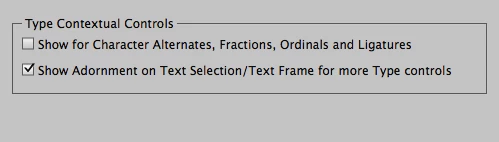
    Same issue - I am still back in Yosemite 10.0.5. So far so good on the tip about turning off Type Contextual controls. Nope - Didn't Work.