Known Participant
November 10, 2016
Answered

InDesign CC 2017 slow

  • November 10, 2016
  • 63 replies
  • 80483 views

I am having issues with InDesign CC 2017 being extremely slow. If I click on a font the beachball just spins... I tried working in it for a few hours but it is killing me and went back to the previous version.

I use Suitcase Fusion and turned off Typekit. I am running Mac OS Sierra.

Is anyone else having this issue? I can't find any complaints online.

Thank you
    This topic has been closed for replies.
    Correct answer SEEKAY

    Hello all,

    This has worked for me - cheers

    El Capitan 10.11.6

    iMac (27-inch, Mid 2011)

    3.4 GHz Intel Core i7

    16 GB 1333 MHz DDR3

    SSD

    AMD Radeon HD 6970M 2048 MB

    63 replies

    Participating Frequently
    December 7, 2016

    Same problems here. Lost 3 days production (and maybe a costumer), lots of stress. Downgraded to Bugs Bunny CC2015, still missing the speed of the good old Indesign CS4. Very disappointing.

    Peter

    Participant
    December 5, 2016

    Message from Adobe Chat Support:

    eyalz64555549
    Participant
    December 7, 2016

    I'm facing the same problem, but 2015 is also very slow, not as much as 2017, but still...

    any setting I can change?

    Glahachan
    Participating Frequently
    December 7, 2016

    I'm facing the same problem, too! But 2015 is also very slow, same as CC2017

    any setting I can change?

    I don't use any font manager.

    When we get a solution?????

    Participating Frequently
    December 5, 2016

    I have had this horrible beach-balling in InDesign 2015, 2016 and 2017. Each time I had hoped for a fix, and each time WORSE.

    I do not have any font extension programs or plug-ins in InDesign.

    This happens in any new document (or old), as soon as there are a few pages.. It seems to go along with another idiotic bug, the "adding 10 pages automatically" so it definitely has to do with screen redraw or reflow somehow, but changing those settings does nothing.

    It happens on BACKSPACING, selecting text, EDITING. If just straight typing it will proceed. You can actually type during the beach-balling, but the text does not show up till the 15 to 30 second (or longer) spinning.

    I cant believe I pay $60 a month for software where the bugs are not fixed for YEARS.

    If you do a Google search, this problem has been widespread for at least three...

    OH.. lets not forget the "file is damaged" error that shows up every few days, forcing a restart of the program so that I can open other InDesign documents.

    I will be submitting all the details as requested, and directly to Adobe support, as this is just not a usable program. Quite shameful.

    Inspiring
    December 15, 2016

    fact same issues for me too

    Inspiring
    December 3, 2016

    Every time I update InDesign, I regret! New versions are always full of bugs. I too have the same problem in Windows 7. This 2017 version is sooooooooooooooooooooo slow that makes it unusable. I'll downgrade.

    kaustubh
    Adobe Employee
    Adobe Employee
    December 1, 2016

    Hi All

    Just adding to Sumit and Monica's comments here. We may be able to suggest more specific workarounds if we have more information and success in reproducing your scenarios at our end. So, requesting you to help out by sharing any useful information you can.

    Thanks

    Kaustubh

    InDesign team

    Participating Frequently
    December 1, 2016

    Summary:

    • Indesign is slow
    • (Nearly?) all users with this problem are using Suitcase Fusion for Font Management
    • Deactivating the plug-in solved the problem for Mac users
    • Complete deinstalling InDesign and re-installing InDesign 2017solved the problem for us on all devices (WIN 10)
    Known Participant
    December 1, 2016

    Deactivating Suitcase Fusion auto activation did not solve the problem for me. Neither did reinstalling InDesign 2017. Neither did removing older version of Suitcase auto activation from old version folders.

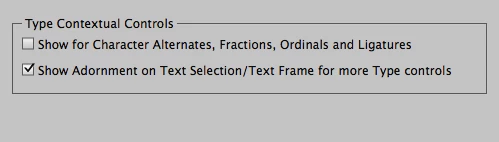
    The only work around is to turning off "Type Contextual Tools". Slowness fixed but am super sad not to use those after being at Adobe Max.

    Sumit_Garg
    Adobe Employee
    Adobe Employee
    November 30, 2016

    Hi All ,

    Thanks for sharing your valuable feedback regarding InDesign Performance.  Based on your feedback, it seems you guys facing various performance related issues inside InDesign.

    We need your support in order to work on these slowness issues, and for possible workarounds.

    Please fill below mentioned data as much as possible. This will help us in isolating real issues and make InDesign's performance experience better.

    ·         Sample Document(Please attach a packaged document for analysis)

    You can upload your document on dropbox OR creative cloud for sharing.

    ·         Earlier Version status(Please mention Yes/No)Same issue was being observed in earlier version of InDesign.

    ·         Which area OR feature where slowness is being observed(e.g typing, export, movement etc.)

    ·         Any Known steps(Step that led to slowness)

    ·         Platform detail(Using Windows/Mac e.g. Windows10, Mac10.12.1)

    ·         Machines Configuration (details like RAM, CPU etc)

    ·         Video recording(If possible screen recording showing slowness )

    ·         External Plugin OR Font System(e.g Suitcase Fusion)

    ·         Workspace file

    (Please do share workspace file corresponding to your workspace. Workspace files are present at)

    MAC: "/Users/[USERNAME]/Library/Preferences/Adobe InDesign/Version [Number]/[Your Locale]/Workspaces/"

    Win: "C:\Users\[USERNAME]\AppData\Roaming\Adobe\InDesign\Version [Number]\[Your Locale]\Workspaces\"

    ·         Any other extra information

    Eagerly waiting for your responses.

    Note: I have also send mails to some of you for this data, please do reply back via email if possible.

    Thanks

    - Sumit

    (Adobe InDesign Team)

    Inspiring
    November 30, 2016

    It looks like an issue with font management plugins. I use FontExplorer X Pro and uninstalling the plugin cured the problem. It would be interesting to see if everybody having the problems is using a plugin for type or anything else.

    Participating Frequently
    January 31, 2017

    I have been having inconsistent problems with ID 2017, slowness and other issues. And I *think* it's related to my use of FontAgent Pro and its auto-activation plugins. It would seem from reading this forum that *any* of these font management plugins present some problems for ID 2017 (although I had plenty of similar problems with 2015 release).

    Participating Frequently
    November 29, 2016

    We uninstalled InDesign 2017 and re-installed it (without Suitcase Plugin).
    It works so far.

    If it still works, I will re-install it on all devices.

    Participant
    November 29, 2016

    Signed up for the forum over at Extensis, and poking around found this that may help:

    These issues are usually caused by an older or incorrect plug-in version being installed in your Adobe plug-ins folders. Please try the following steps to see if it can be resolved: 

    • Close all Adobe applications
    • Then locate and remove ALL the previous version(s) of the Extensis plug-ins from the following location(s): Application/[Adobe Application Name]/Plug-ins/Extensions/ExtensisFont....
    • Restart your computer

    Once they have been successfully removed, open the Suitcase Fusion application and select the Suitcase Fusion drop-down menu in the upper left corner next to the Apple menu. Then select Manage Plug-ins. Select the Adobe versions of the plug-ins you would like installed and click Done. Now launch your Adobe application(s) and see if everything is working as intended.

    Maybe we could try this, and maybe with a reinstall this is what is getting fixed?

    Participant
    November 29, 2016

    InDesign 2017 was so slow to the point of being impossible to work with today. I used it yesterday and it was fine. I googled the issue and came upon this thread. Downgraded to 2015 and no further issues but I want to confirm what people say that the 2017 version became impossible to use.

    Participant
    November 28, 2016

    My copy is working now.  I did downgrade to 2015 (which didn't help).  But then saw the post that uninstalling and installing did work.  I did uninstall and reinstall 2017 and the program has been working for me.

    Participant
    November 28, 2016

    I am also having the same problem.

    Could Adobe react before we all have a nervous breakdown.