Known Participant
November 10, 2016
Answered

InDesign CC 2017 slow

  • November 10, 2016
  • 63 replies
  • 80483 views

I am having issues with InDesign CC 2017 being extremely slow. If I click on a font the beachball just spins... I tried working in it for a few hours but it is killing me and went back to the previous version.

I use Suitcase Fusion and turned off Typekit. I am running Mac OS Sierra.

Is anyone else having this issue? I can't find any complaints online.

Thank you
    This topic has been closed for replies.
    Correct answer SEEKAY

    Hello all,

    This has worked for me - cheers

    El Capitan 10.11.6

    iMac (27-inch, Mid 2011)

    3.4 GHz Intel Core i7

    16 GB 1333 MHz DDR3

    SSD

    AMD Radeon HD 6970M 2048 MB

    63 replies

    jppostma
    Participant
    January 30, 2017

    Please fix this Adobe! We have deadlines... My boss is going to kill me haha.
    Tried all the solutions here, none worked. Can't turn auto-save off, I thought of that first.

    2015 won't let me convert the document, so I'm stuck!

    Participating Frequently
    January 31, 2017

    Again out of the blue CS2017 letting me down. All CPU power goes to Indesign doing nothing.

    MacBook Pro blowing like a drone…

    Fly away…

    Participant
    January 30, 2017

    Using an iMac 10.12.1 and ID CC 12.0.0.81.

    I noticed that the external drive which I use for 'Time Machine' was making more noise when the wheel was spinning (which was happening a lot even on small files), so I turned the external drive off and have not had the problem again. Hope this helps someone else on this thread.

    ethanm34569603
    Participant
    January 26, 2017

    I was having the same issue where simple app use would beachball every few seconds, and Jayajaya108's advice about turning off the Wifi did the trick.

    jonm83822942
    Participant
    January 26, 2017

    Does anyone here work on Windows 7 Enterprise machines with Security Products installed? I'm currently troubleshooting on my end and after removing some security products, I've seen a huge increase in performance.

    Participant
    January 22, 2017

    I have similar issue, but not exactly the same. I have many documents which work fine and one which just "stopped cooperation" today. When I open the "problematic one" and try to type, then after each key press I need to wait for 1-2 seconds for the letter to appear on the screen.

    That document is a translation I do. First 8 pages out of 24 went smooth with absolutely no issues, but since today morning I'm having the issue with this document.

    In between, I reinstalled the InDesign to change the language version, but I doubt that can be a reason, especially that only this document works extremly slow. All other documents I tried work normally. Any idea what I can do? I really need to make that translation asap.

    Participating Frequently
    January 23, 2017

    you may have already done so, but try exporting an IDML file, open it, relink images etc and ave over the original. You'll notice the file size will come down. This has been an issue for years where files (often ones used over and over) become bloaty with unnecessary stuff. Always seems to help when I do it.

    Participating Frequently
    January 24, 2017

    Hi Chris,

    I think I' ve found tackeled problem: a imported pdf illustration caused the slowing-down problems. Resulting in freezing Indesign and very slow building up "print-preview" more than an our. After crashing the program always started up with "preflight". Also resulting in waiting for several ours…

    Thanks for help and suggestions!

    Greetings, Peter

    ubishere
    Inspiring
    January 14, 2017

    Why is the InDesign GPU Performance enhancement only for Retina displays?

    Photoshop and Illustrator both have this option and it doesn't require a retina display to function.

    Could this new coding for the GPU being added be one of the causes for the the slow screen redraw issue as per the earlier video link I posted.

    Perhaps Adobe can make the next version of ID have the GPU enhancement work on  2560 x 1440 monitors as well, or any monitor come to that.

    Maggot7
    Participant
    January 15, 2017

    Just logging in one more complaint on this issue... slow performance in ID, spinning beach ball with the simplest task. Pretty much same as everyone on this thread.

    On a brand new fully spec'd MacBook Pro... and also had the issue on my previous 2011 MacBook Pro.

    Hope a fix is coming soon.

    Glahachan
    Participating Frequently
    January 11, 2017

    Hello Adobe,

    is here a fix from you now???

    I pay every month and I get a not working product!!!

    To work with it is noch really possible!

    Please give us a statement!!!!

    Participant
    January 12, 2017

    I'm also having the same issues. When I first start a new document, InDesign works smoothly. As I add more type, images, pages, the slower it gets–lag time between each mouse click. Please send us a fix soon. I never had this issue on previous versions. I pay every month for a subscription and every month, I get more & more frustrated!

    Participating Frequently
    January 12, 2017

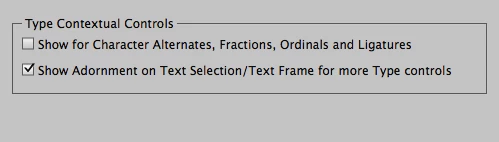
    This was happening to me. Turn off plug ins for suitcase (within suitcase itself - auto activation), uncheck two open type options in indesign preferences as mentioned in other answers and don't use cc cloud storage.

    also, try turning off page thumbnails in pages menu panel and turn off preflighting.

    One other culprit is live redraw in indesign preferences. Turn that to never and turn live scrolling off too. These all eat processor up.

    these tricks have worked a treat for me. Good luck

    Participating Frequently
    December 17, 2016

    this was happening to me and driving me nuts. Go into suitcase and turn off auto activation. Also turn off the two check boxes in advanced type in indesign prefs as detailed in this thread. I suspect its extensis. As soon as i turned it on it was like the proverbial off a shovel.

    Cellofello86
    Participant
    December 15, 2016

    I have issues with inDesign lag on every level. Any time I scroll from one page to the next, it freezes for a few seconds and the beachball spins. My best guess is that the program has to "redraw" all of my strokes on fonts, outlined text, and compound objects before it can show it on-screen. Adding a drop shadow or any other effect to an object is laborious and slow, as it has to "think" before drawing the effect into the document. I have display performance set to "typical" instead of "high quality", and of course I have overprint preview turned off. Neither of these make a difference in the lag. There is also a delay when entering text.

    In general, the program is slow about everything. The only time I don't have this problem is if I'm creating a document the size of a 3x5 card, with one image and two small text boxes. On my typical designs (2 page, 60-80 items in the "Layers" dialogue) it lags like nobody's business. I have the most current iOS (Sierra 10.12.1) and the most current CC update (2017). Frustrating to pay so much for a subscription only to trudge through my work like I'm on a 15 year old computer.

    hopeful_character16B8
    Participant
    December 9, 2016

    I do not run any plug-ins for InDesign. My display performance is set to Typical. I uninstalled 2017 and installed 2015. I did not keep any application preferences when I did the uninstall. I am still having the same beachball problem. I did notice something today. I created a new document in InDesign 2015. It was working fine until I saved the document. After that initial save everything went right back to the same problem everyone is having. After I closed all files I was able to click around the menus without issue. I repeated the process. I created a new file, put some shapes and text on it (everything was running normal), and then saved the file. After the save everything went bad again. I guess it runs fine as long as you have no saved files open (haha). I am using a Mac Pro (2015). OSX El Capitan 10.11.6, 3.5GHz Core Intel Xeon E5, 16GB Memory, AMD FirePro D500 3072 MB.

    Sidenote:

    I am not having this issue running InDesign 2017 on my Macbook Pro (2016). OSX El Capitan 10.11.6, 2.8 GHz Intel Core i7, 16GB Memory, AMD Radeon R9 M370X 2048MB.