
Participating Frequently
October 20, 2017
Answered

InDesign CC 2018 Crashing: "The network connection was lost for the file"

  • October 20, 2017
  • 28 replies
  • 14463 views

I recently made the update to Adobe InDesign from CC 2017 (12.1.0) to CC 2018 (13.0) and immediately started having issues.

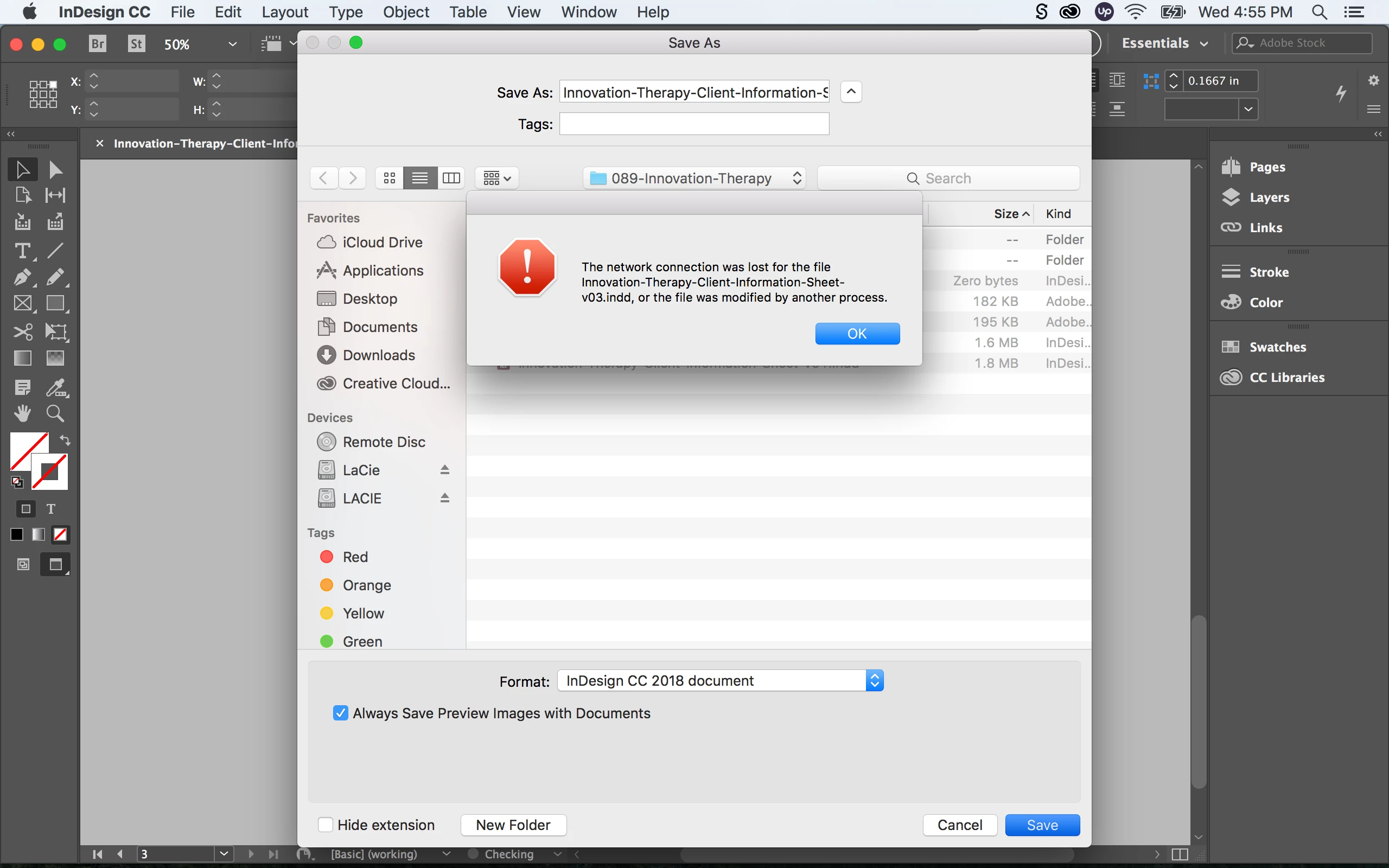
When I open up a pervious InDesign document from my LaCie external hard drive and re-save (Save As) the file, InDesign crashes with the following error: “The network connection was lost for the file _____.indd, or the file was modified by another process”

Followed by another error message: “Error: Adobe InDesign is shutting down. A serious error was detected. Please restart InDesign to recovery work in any unsaved InDesign documents.”

If I re-save the same document on my desktop or internal hard drive I have no issues. It seems like re-saving a document from the external hard drive to the external hard drive is causing major issues with the new InDesign update. Any one having similar experiences with this? Are there any fixes?

Here are my specs:

OS X El Capitan Version 10.11.6

MacBook Pro (Retina, 13-inch, Early 2015)

Processor: 3.1 GHz Intel Core i7

Memory: 16 GB 1867 MHz DDR3

Graphics: Intel Iris Graphics 6100 1536 MB
    Correct answer SanyamTalwar

    Hi,

    We believe we have a fix available for the same. Can you follow the steps mentioned in the following KB document - https://helpx.adobe.com/indesign/kb/crash-save-as-nas-server.html and confirm if it resolves your issue?

    Regards

    Sanyam Talwar

    InDesign Engineering Team

    28 replies

    lkh@GD
    Participant
    November 30, 2017

    I am having the exact same problem as well--iMac with High Sierra, CC 2018, trying to save an InDesign file to a network server. I have saved just fine to a network server for the last 10 years with only occasional (couple times a year, max) issues. Right after I updated to CC 2018, InDesign crashes when saving. It does work saving to the desktop, but that is NOT a good standard production work-around! Interesting to note that I do not have any problems saving Illustrator, Photoshop (both also CC2018), as well as Excel, PowerPoint, or Word files to the network. Adobe: please help us!

    Participant
    November 30, 2017

    up

    Participant
    November 21, 2017

    I Open an INDD file from file server (the server is on the same LAN) and i save the file.

    I see the message "The network connection lost ....

    After I click on OK and Indesign crashed.

    Thanks

    markj91983281
    Participant
    November 21, 2017

    Bugger!

    Do you have bridge installed and if so, do you use it.

    I don't use it normally but I updated it with the the last round of updates and opened it while I was messing round with indesign preference file

    My bridge showed a couple of duplicates of a network share where I usually save my work (where I was getting same crash as you)

    Maybe update and open bridge and see what shares are available or look for anything odd

    Then try the delete InDesign.plist again

    Bit random I know but It was annoying me not working off server. 3 other macs here had no issue

    osxmarky
    Participating Frequently
    November 21, 2017

    Nope still goosed!!! deleted Bridge... all its pref files... plus re-deleted com.adobe.InDesign.plist .... still crashes!!!! (sigh)

    Kevin Stohlmeyer
    Community Expert
    Community Expert
    November 21, 2017

    Word of advice - Adobe never recommends saving directly to a mounted external drive (or server) as a general practice.

    Try saving locally and dragging the file to your drive.

    Think of it like a garden hose, you are pumping water too fast for the tiny hose to keep up so it can't keep up.

    ID is writing files faster than your drive can take.

    markj91983281
    Participant
    November 21, 2017

    I deleted com.adobe.InDesign.plist  from user/preferences and restarted InDesign and problem has gone (at least for now)

    osxmarky
    Participating Frequently
    November 21, 2017

    Hi bud!... just tried your hint.... nope still crashes for me, thanks though! it was worth a shot!...

    Cheers Mark

    Participant
    November 17, 2017

    Had same problem, InDesign had another update today, still same problem. This is a major problem for us when we can't save to the server, even when you save to the desktop then copy to server, when you go to open the copied file it gives same message about every 5th to 6th time. VERY frustrating when you are on a deadline, Adobe this need to be fixed SOON!!!!!

    Going to go back to Quark if not!!!!

    Participant
    November 17, 2017

    Very disappointed to see that this bug still exists after the Nov 17 update.

    osxmarky
    Participating Frequently
    November 17, 2017

    New update this morning... installed and..... issue still not resolved, crashed just the same as before....  Adobe argggg!!

    November 9, 2017

    Same problem. I have a small external 2.5" hdd connected to my fritzbox router and access via smb. Indesign CC 2018 crashes whenever i try to save a file onto the network storage. This is so frustrating -.- hope they will fix this very soon, the workaround (saving locally then moving the files) really is driving me crazy.

    khtwo
    Participant
    November 3, 2017

    Horrific.  I thought it was just me.  Every time I try to save over an indd doc, it asks to save as 2018 and then freezes.  Also, after working in InDesign as I always have, my cursor changes to this weird block that phases and I can't do anything.  It requires me to not only Force Quit, I also have to restart my iMac.  I, too, just upgraded to High Sierra and Adobe CC 2018.  Really cuts into production time and deadlines.  Please FIX!