
Participating Frequently
October 20, 2017
Answered

InDesign CC 2018 Crashing: "The network connection was lost for the file"

  • October 20, 2017
  • 28 replies
  • 14463 views

I recently made the update to Adobe InDesign from CC 2017 (12.1.0) to CC 2018 (13.0) and immediately started having issues.

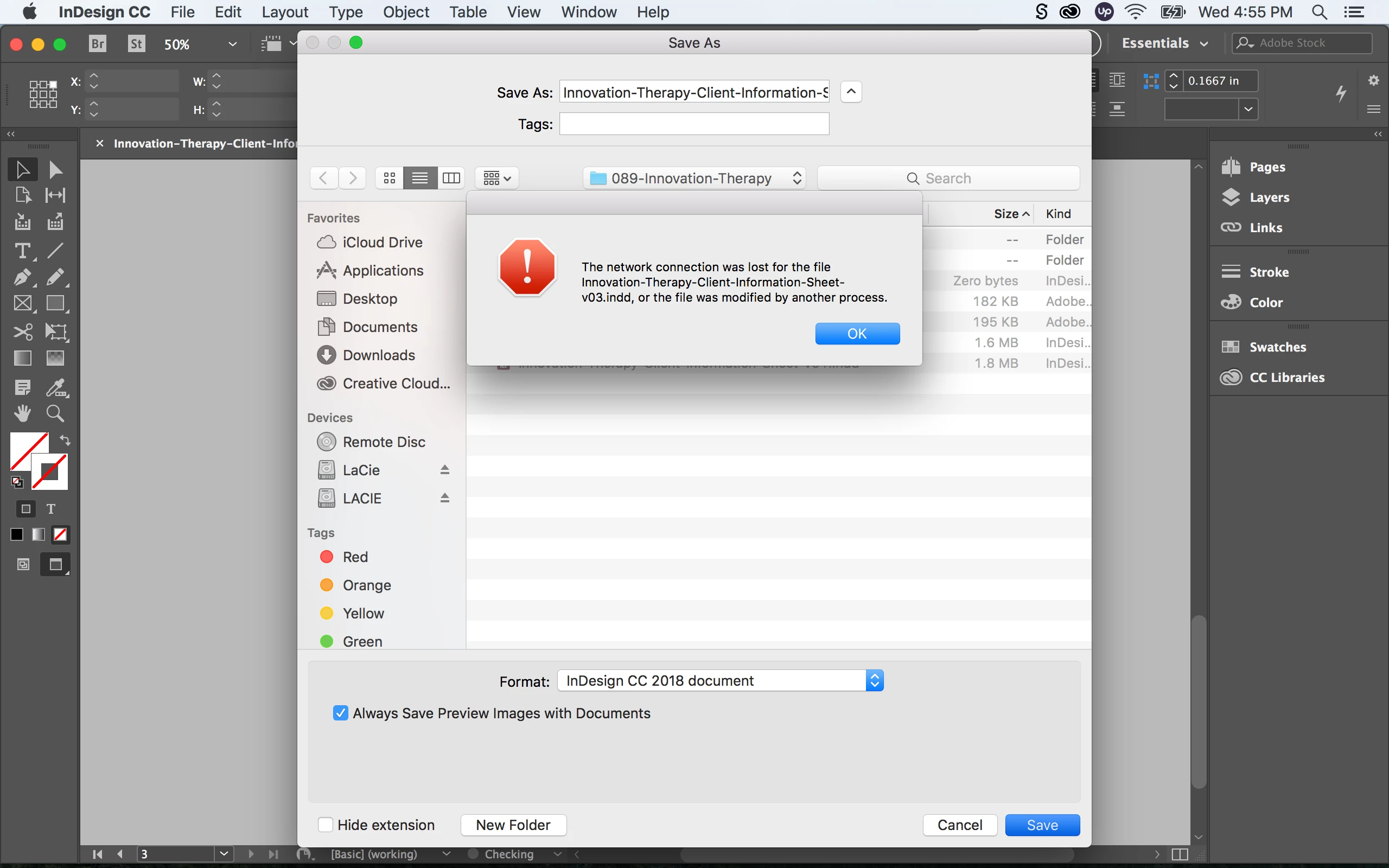
When I open up a pervious InDesign document from my LaCie external hard drive and re-save (Save As) the file, InDesign crashes with the following error: “The network connection was lost for the file _____.indd, or the file was modified by another process”

Followed by another error message: “Error: Adobe InDesign is shutting down. A serious error was detected. Please restart InDesign to recovery work in any unsaved InDesign documents.”

If I re-save the same document on my desktop or internal hard drive I have no issues. It seems like re-saving a document from the external hard drive to the external hard drive is causing major issues with the new InDesign update. Any one having similar experiences with this? Are there any fixes?

Here are my specs:

OS X El Capitan Version 10.11.6

MacBook Pro (Retina, 13-inch, Early 2015)

Processor: 3.1 GHz Intel Core i7

Memory: 16 GB 1867 MHz DDR3

Graphics: Intel Iris Graphics 6100 1536 MB
    Correct answer SanyamTalwar

    Hi,

    We believe we have a fix available for the same. Can you follow the steps mentioned in the following KB document - https://helpx.adobe.com/indesign/kb/crash-save-as-nas-server.html and confirm if it resolves your issue?

    Regards

    Sanyam Talwar

    InDesign Engineering Team

    28 replies

    lkh@GD
    Participant
    November 2, 2017

    Same problem here, too! I'm on iMac with High Sierra & CC 2018. I can't save to our company's server without the "network connection was lost" error & InDesign crashing. It is fine if I save to my computer's hard drive. Interestingly enough, I noticed that I was able to save from Photoshop CC 2018 to the network. Adobe: PLEASE fix this soon!

    Participant
    November 1, 2017

    Same problem. Since updating to CC 2018 overwriting existing INDesign documents and saving new files to a Synology 415+ server crashes the application every time. The file is created, but a relaunch is then needed. Having to save the desktop and drag files over. Need a fix for this, and soon!

    Participant
    October 27, 2017

    Same problem in our office. InDesign crashes when trying to Save As. It creates the new file on the server and saves the info, but crashes before it gets back to InDesign. Deleting the temp file and re-opening the Save As file seems to work and retain everything. Definitely not ideal workflow since you have to restart InDesign EVERY time you save as, but at least the data is saved. I hope Adobe can resolve this issue soon.

    Participant
    October 26, 2017

    Same problem here for everyone in the office. Saving to our NAS crashes the program.

    Known Participant
    October 25, 2017

    I just had a remote session with Adobe support and they know about the crashes and told me that they are working on a solution for the next update. Up till then it's back to Indesign 2017 or working locally.

    osxmarky
    Participating Frequently
    October 25, 2017

    Yes we're having the same problem saving indesign files to our mac mini server... we have to save the file onto local desktop and drag the doc over onto the server were the original file is located... its a work around but if you forget... indesign just crashes!!!....

    Known Participant
    October 25, 2017

    Same problem here with Qnap NAS via SMB and OS X Sierra.

    Worked fine before the update, now I get this crash every couple of times I try to save something

    SanyamTalwar
    SanyamTalwarCorrect answer
    Participating Frequently
    January 10, 2018

    Hi,

    We believe we have a fix available for the same. Can you follow the steps mentioned in the following KB document - https://helpx.adobe.com/indesign/kb/crash-save-as-nas-server.html and confirm if it resolves your issue?

    Regards

    Sanyam Talwar

    InDesign Engineering Team

    osxmarky
    Participating Frequently
    January 10, 2018

    Hi everyone... this fix seems to work great on our system here.... phew!!!!!! back to normal again!!!!

    RaviKiran
    Adobe Employee
    Adobe Employee
    October 20, 2017

    Are you saving the document (Save As) to the same external hard drive or to a different external hd? Your screenshot suggests that you have two LaCie drives mounted.

    Participating Frequently
    October 20, 2017

    Yeah, I'm saving to the same external hard drive (same file location just with an updated file name).