Participant
August 4, 2021
Answered

InDesign crashing while opening a file

  • August 4, 2021
  • 2 replies
  • 282 views

I'm on the latest version of InDesign. It is currently crashing any time I try to open a file. Does anyone have any tips? Thanks 
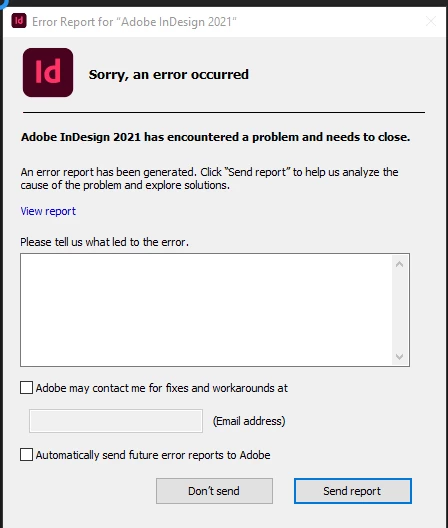
 

{Renamed by MOD}

This topic has been closed for replies.
Correct answer Anshul_Saini

Hi there,


Sorry about the crashing. I know that's really frustrating. Could you please share a few more details like:

  • OS and exact version of InDesign
  • Does a crash happen while opening a specific document? Could you please share a sample document with us? You can upload it to the Creative Cloud (https://helpx.adobe.com/in/creative-cloud/help/share.html) and share the download link.
  • Where are you trying to open a file (Network Drive/ System HDD/ Shared Folder on System/ External HDD)?
  • When did this issue start happening? Are there any recent changes made to your system? For example, any antivirus, system updates, or web extensions installed recently.
  • Upload and share crash report by following these steps ( https://helpx.adobe.com/in/indesign/kb/submit-crash-reports.html ).
    While submitting the crash report, please use the same email address you are signed in on this community. This will help us find the crash report and help accordingly.


Also, please try the steps shared on this page (https://community.adobe.com/t5/indesign/resolve-slow-performance-and-unexpected-behavior-of-indesign/td-p/11487287) and share your observations with us.


We are here to help, just need more info?


Thanks & Regards,

Anshul Saini

2 replies

Anshul_Saini
Community Manager
Anshul_SainiCommunity ManagerCorrect answer
Community Manager
August 4, 2021

Hi there,


Sorry about the crashing. I know that's really frustrating. Could you please share a few more details like:

  • OS and exact version of InDesign
  • Does a crash happen while opening a specific document? Could you please share a sample document with us? You can upload it to the Creative Cloud (https://helpx.adobe.com/in/creative-cloud/help/share.html) and share the download link.
  • Where are you trying to open a file (Network Drive/ System HDD/ Shared Folder on System/ External HDD)?
  • When did this issue start happening? Are there any recent changes made to your system? For example, any antivirus, system updates, or web extensions installed recently.
  • Upload and share crash report by following these steps ( https://helpx.adobe.com/in/indesign/kb/submit-crash-reports.html ).
    While submitting the crash report, please use the same email address you are signed in on this community. This will help us find the crash report and help accordingly.


Also, please try the steps shared on this page (https://community.adobe.com/t5/indesign/resolve-slow-performance-and-unexpected-behavior-of-indesign/td-p/11487287) and share your observations with us.


We are here to help, just need more info?


Thanks & Regards,

Anshul Saini

Community Expert
August 4, 2021

Did you fill out the report?

What did you write?


Regards,
Uwe Laubender

( ACP )