Participant
December 28, 2019
Answered

InDesign export error message

  • December 28, 2019
  • 16 replies
  • 38919 views

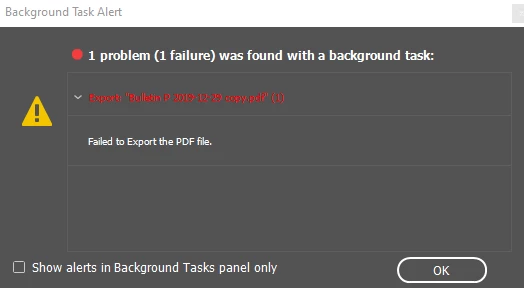
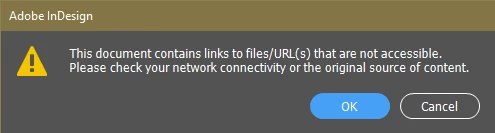
I am trying to export an InDesign file to PDF and am receiving two error messages.  First - "This document contains links to files/URL(s) that are not accessible.  Please check your network connectivity or the original source of content."  Second - Failed to Export the PDF file."  Preflight window there are no errors.  Links window are to the placed photos.  I can't find a URL or email address in the document that is not correctly associated under the hyperlinks window with the real URL or email address. I have read to export as a mark up file and have done that, but to no avail, continue to receive the error message.  Document is a two page bulletin to be emailed to a group.  Operating system is Windows 10 Pro. Creative Cloud just updated recently, automatically.
 

Thank you for your help,

Edith

Correct answer khtzoo

Are you on a mac or PC? It is all about the permissions on macs. Go to system preferences, security and privacy, privacy tab. Click the lock icon and login. In the full disk & access and files & folders, make sure all adobe programs are checked. If you can't do this which I couldn't at first, you will need to update your os. 

16 replies

Peter Villevoye
Community Expert
Community Expert
January 8, 2020

Is the document you're working in on your own local harddisk or somewhere on a server ?

Note: the hyperlinks (URLs, email adrdresses) are of no importance to creating the PDF.

The error is about linked files, which seem to be(come) inaccessible.

Peter Villevoye
Community Expert
Community Expert
January 7, 2020

Like being mentioned in the thread as referred by Ashutosh, placed PDF files can contain various kinds of faulty content, but also file restrictions.


Could you try creating a Package and see if all files are gathered correctly, so there are no mysteriously missing files ? Does Export still result in the same error ? If so, then could you try testing your file with e.g. half of the pages recursively, in order to close in on the troubling page and placed content ?

2foldstudio
Participating Frequently
January 8, 2020

@AshutoshRox and @Peter_Villevoye,

I'm not sure you are understanding the issue as your two comments above do not relate to the problems we are having. Please refer to the top of the post from Phili4.


I am using InDesign 2020 15.0.1 on OS Catalina. Every time I open an InDesign document, all images in the links panel are not properly linked (even though they show that they are). I have to relink every image each time I open an InDesign document (even if I opened it yesterday) in order to export as a pdf. I do not place PDF files into InDesign. All the files are jpegs or Adobe Illustrator files. This is happening to all my InDesign files, not just one. No errors in the preflight window and all images and text appear to be linked properly.


I get this error when exporting to a pdf, unless I've relinked all images again. 

"This document contains links to files/URL(s) that are not accessible. Please check your network connectivity or the original source of content." "Failed to Export the PDF file."  


I have deleted InDesign preferences and uninstalled and reinstalled InDesign with no luck. Not sure what to do here. Let us know if you have any solutions.


Thanks.

2foldstudio
Participating Frequently
January 8, 2020

Also, I forgot to mention that I receive the same error when trying to package the file. So, I can't package to see if any images are missing. I also can't export any of the pages of any of my documents. This problem is across the board on all of my InDesign files since upgrading to Catalina and InDesign 2020 15.0.1.

Ashutosh_Mishra
Inspiring
January 6, 2020

Hi All, I have found a similar discussion on https://community.adobe.com/t5/indesign/export-from-indesign-to-pdf-failed-cannot-place-this-file/m-p/10263947
Please check if the steps provided help you out. Let us know how it goes.


Thanks!

Ashutosh_Mishra
Inspiring
January 3, 2020

Hi Edith,


Sorry to hear about your experience. Would you mind sharing some more info like:
1. Version of InDesign.

2. Is it happening with a single document or with all of them?
3. Have you tried resetting the preferences of InDesign? (If not, please try following the steps on https://helpx.adobe.com/indesign/using/setting-preferences.html#restore_all_preferences_and_default_settings)

Please note that resetting preferences will remove all the custom settings and InDesign will launch with default settings. You can also take a backup of the folders in case you want to. Location is mentioned in the article. 


If this is happening with a single document, try to convert document to IDML and then try to export. Let us know how it goes.


Looking forward to your response.


Regards,

Ashutosh

2foldstudio
Participating Frequently
January 5, 2020

Hi,

I'm using InDesign 15.0.1. It's happening with all my InDesign documents (and there are a lot as I do layout design work every day). I tried resetting preferences but it didn't help, so I uninstalled InDesign and then reinstalled. So far, that seems to be working. I'm not sure if it's a Catalina and InDesign issue, but after installing, InDesign asks to access files from my desktop. We'll see how things go.


Thanks.


2foldstudio
Participating Frequently
January 6, 2020

Unfortunately, the re-install did not solve the issue. Every time I open an InDesign document, I can't export as a pdf because I get the same errors mentioned at the beginning of this thread: ("This document contains links to files/URL(s) that are not accessible. Please check your network connectivity or the original source of content."  Failed to Export the PDF file.") Within the links panel, all links are shown as linked. I have to relink all the images every time I open the document. This is a serious and inefficient problem!! Please help!


Note that this problem occured after installing InDesign 15.0.1 and upgrading to Mac OS Catalina. (I also tried installing InDesign 14.0 and have the same errors.)

2foldstudio
Participating Frequently
December 31, 2019

I am having the same exact issue since updating to InDesign 2020.

Participant
April 2, 2020

Me, too. How do I deal with this? I can't make a PDF right now.

khtzooCorrect answer
Participant
April 3, 2020

Are you on a mac or PC? It is all about the permissions on macs. Go to system preferences, security and privacy, privacy tab. Click the lock icon and login. In the full disk & access and files & folders, make sure all adobe programs are checked. If you can't do this which I couldn't at first, you will need to update your os. 

rob day
Community Expert
Community Expert
December 29, 2019

Links window are to the placed photos.


Are any of the Links CC Library assets? Have you checked that all have a Status of OK?

Phili4Author
Participant
December 29, 2019

Links are to the placed photos located on my external hard drive.  Nothing is from CC Libraries.  All links are "Status: OK".   All hyperlinks in the document are correctly associated under the hyperlinks window with the real URL or email address. 

Thank you,