
Participant
February 12, 2026
Question

InDesign Not Recognizing Calibri After Windows Update

  • February 12, 2026
  • 17 replies
  • 409 views

Hi,

Getting an issue with indesign and not recognising the calibri system font installed. 

From what I can see, there’s a new version of calibri with a latest windows update. V6.26 > V6.27.
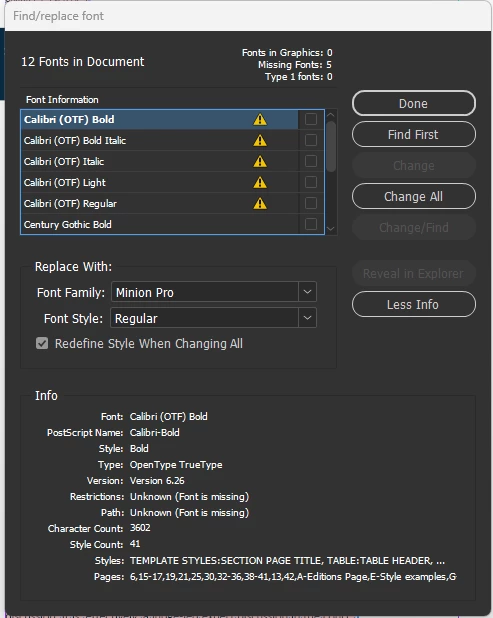
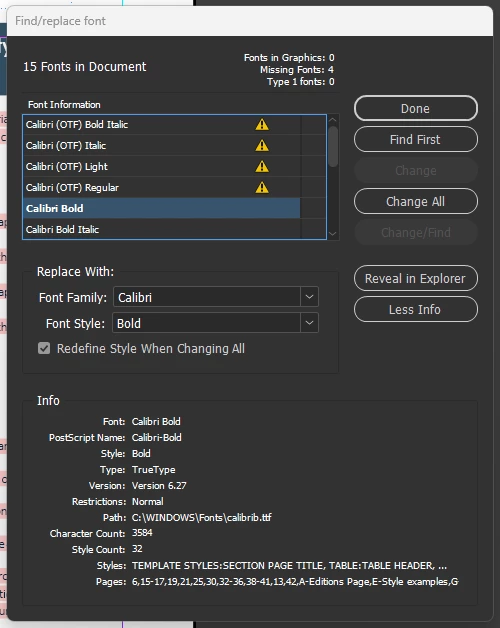


Myself and colleagues are effected, and this is spanning across a lot of our documents. Replacing the font does not fully solve the issue as any forms text fields will not update to the font box.
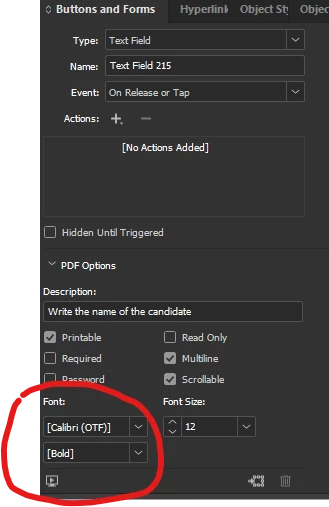


I’ve seen a similar post regarding this with the same issue on times new roman which is marked as resolved but it most certainly not.


FYI, installing calibri via adobe fonts does not work, we are getting a conflict likely due to it already being a system font.


We also running the latest version of indesign.


Any help on this?

    17 replies

    Participant
    February 18, 2026

    I’ve got the same problem. I downgraded to InDesign 2025, and for now it works. The 2026 version keeps having major problems. Previously, I couldn’t save many InDesign files...for no apparent reason. It would give an error and keep crashing. I’m sticking with 2025 until the problems are resolved...

    Participating Frequently
    February 17, 2026

    It's quite frustrating that there is no solution to this seemingly simple problem. Unfortunately, the brand of one of our company's main client is based on a system font (Calibri), so this is about as inconvenient for us as having to re-set the car infotainment system before starting everytime because it forgets all main settings by turning off the ignition. I don't know if this is a problem on Microsoft's or Adobe's side, but something went wrong, and the lack of a solution is frustrating.

    I've tried everything above, below and beyond, without success. I haven't tried it on a Mac yet, it's worth a try tonight, I'll write if the end result is different.

    mjcarver1
    Participating Frequently
    February 17, 2026

    I’m having a hard time understanding how issues like this are getting past QA checks...but I’m assuming Microsoft/Adobe have QA checks.

    mjcarver1
    Participating Frequently
    February 16, 2026

    We’re dealing with this same issue on a company-wide level, and Calibri is a standard font in almost all of our document templates. 

    Participant
    February 16, 2026

    Thanks for the replies on this post everyone.

    It seems its just something we’ll have to navigate around as its an adobe > windows, windows > adobe issue. To answer some Q’s I’ve seen. Using latest version of indesign, files do not have a documents folder next to it. 

    Im unable to rollback on updates as I have no control over company IT/Security policies, and would seem silly just for the sake of one font. Unable to delete the microsoft font either even with admin (does well to be mates with IT teams) as its a system font.

    We can update the font to the 6.27 version of calibri in our documents, and go through the ballache of manually recreating the text fields. if only we could charge Adobe/Microsoft for time.


    Martin25454047nae4
    Participant
    February 14, 2026

    I just discovered that I have the same problem with Calibri, and I’m using InDesign 2025 - this might be an important detail since some people have mentioned that the problem is limited to InDesign 2026 and can be solved with an downgrade of files.


    And one more detail: The problem appeared after the installation of a small security update (KB5077181, 26100.7840) on February 13th and before the installation of Windows 11, version 25H2. So the problem seems to be the security update, not version 25H2.

    Dave Creamer of IDEAS
    Community Expert
    Community Expert
    February 14, 2026

    Definitely not 25H2 as I am using that. (Showing the updates this year.)


    David Creamer: Community Expert (ACI and ACE 1995-2023)
    Inspiring
    February 16, 2026

    It's definitely not 25H2 because I didn't have this problem until a week ago. My marathon session with Copilot showed security updates in Windows can affect fonts:

    Security Patches: Security updates sometimes address vulnerabilities in how Windows handles fonts (e.g., OpenType or TrueType font drivers). These patches can unintentionally cause font corruption, blurry text, or make certain fonts unusable.

    Abhishek Rao
    Community Manager
    Community Manager
    February 13, 2026

    Hi everyone,


    Thank you again for your patience and for sharing all the details so far. I’m currently checking this internally with the product team. We’re trying to determine whether multiple versions or different outline formats of Calibri might be installed after the recent Windows updates, which could be causing the conflict in InDesign.

    If possible, please check whether more than one Calibri variant is installed on your system, such as different OTF or TTF versions, and let us know what you find. Also, could you confirm whether the issue started right after a specific Windows update? If feasible, please try temporarily rolling back that update and check whether the behavior changes.

    Your observations will help us narrow this down further.


    Looking forward to your update.

    Abhishek

    Legend
    February 13, 2026

    All in the screenshots of the original posting:

    The old version 6.26 with the name now bearing the suffix (OTF) to differentiate it from the system font would be the missing “used font” record from the document remembering type Opentype TT, while the newer system font now is 6.27 with type TT.

    Here one Windows 11 machine with a clean install from past October, I still got 6.26 and it dates back to 2024(!) like all the other fonts. The fonts are copies in a separate folder to see them as files with time stamp.


    @Tom25894182epyt already mentioned the version bump but missed the change of the type.

    Weeding out duplicates between installed fonts makes sense in general but it is unlikely here.

    Participating Frequently
    February 13, 2026

    For Windows 11, I downloaded the Calibri fonts from Adobe and saved them to the Windows font app (Type in “Font” into the search bar and drag the fonts over where shown), and shut off my computer overnight. This morning, the replace all option worked to replace the Calibri OTF fonts with normal Calibri fonts which had not worked prior to me adding the font. The only issue now is that I have to manually bold text in headings and defined terms.  This is a good patch I think but let me know if it works for others.  It could be a plot to stop such a woke font :)

    Participating Frequently
    February 13, 2026

    I am having the same issue and wasted almost 2 hours of billable time with two separate Adobe customer service reps who could not figure this out. Is it definitely tied to a Windows update and not an InDesign update?  I have never used Calibri (OTF) fonts, and I can still go through and replace those fonts with the original Calibri fonts but have to reformat for bold, etc. So tired of updates costing me money…..

    BobLevine
    Community Expert
    Community Expert
    February 13, 2026

    Nobody knows the cause just yet. I’ve asked a few workflow questions that nobody has answered.

    Is there a crossplatform workflow going on here? Is everyone on the exact same version of InDesign? Were files packaged with a document fonts folder?

    BobLevine
    Community Expert
    Community Expert
    February 13, 2026

    Question: Are any of the users involved here working on Mac? I wonder if there’s a mix of the Windows system font and perhaps a Mac user who may have added the Calibri font through Adobe Fonts.

    Is that a possibility?

    Participating Frequently
    February 17, 2026

    On Mac, it also loads Indesign files containing Calibri with a missing fonts message. It certainly doesn't indicate OTF, like it does in Windows Indesign, but that's the only difference. I didn't install Calibri from Adobe Fonts, (nor third party provider) and the Adobe version isn't added at the moment. It's worked so far, I've been working with these files for years.


    VenturaStarter
    Participant
    February 13, 2026

    The problem is InDesign.
    I opened the same document in version 21.2 and version 20.5.2. In the latter, Calibri fonts are fine. It's probably the same with Times New Roman (I haven't checked).
    So I'm waiting for a new version of InDesign (and another shakeup after the one last month when there was no Undo history and when text became invisible until you moved the screen).
    InDesign is a good tool, but lately we've been getting very unfinished versions. Where are the months of testing new features...

    Participating Frequently
    February 17, 2026

    Unfortunately, it still doesn't work for me, even after installing version Indesign 20.5.2, meaning it shows the same "error", missing Calibri (OTF). This is a big problem for us, because we have to use Calibri in the brand of one of our main clients (this is tens of thousands of pages of design and flowing text).