
Participating Frequently
February 12, 2026
Answered

InDesign Not Recognizing Calibri After Windows Update

  • February 12, 2026
  • 26 replies
  • 4424 views

Hi,

Getting an issue with indesign and not recognising the calibri system font installed. 

From what I can see, there’s a new version of calibri with a latest windows update. V6.26 > V6.27.
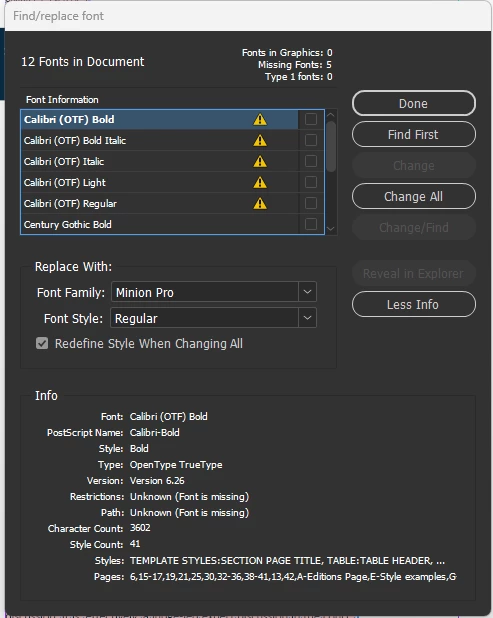
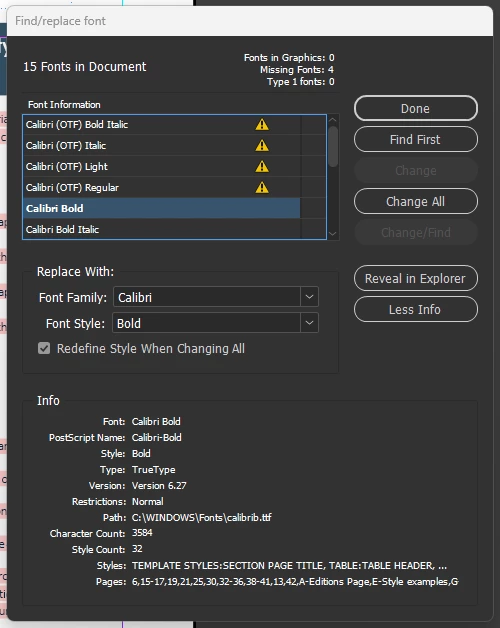


Myself and colleagues are effected, and this is spanning across a lot of our documents. Replacing the font does not fully solve the issue as any forms text fields will not update to the font box.
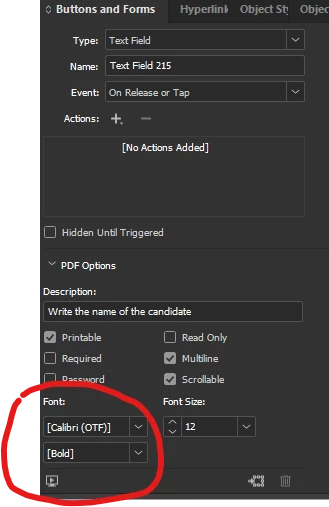


I’ve seen a similar post regarding this with the same issue on times new roman which is marked as resolved but it most certainly not.


FYI, installing calibri via adobe fonts does not work, we are getting a conflict likely due to it already being a system font.


We also running the latest version of indesign.


Any help on this?

    Correct answer Abhishek Rao

    Hi everyone,


    Thank you for your patience and for sharing your experiences. I wanted to share a quick update.

    Our team has confirmed that this is a known bug and is related to the same issue seen earlier with Times New Roman, where font changes after Windows updates affected how InDesign recognizes and matches system fonts. Ref:
    Times New Roman TTF replaced with OTF in InDesign 21.0, causing missing font errors | Community
    Similar recent updates to Calibri are also causing missing font warnings and substitution behavior in InDesign, and this is currently being worked on by the team.

    In the meantime, some users have found that opening the file in InDesign 2025, saving it there, and then reopening it in InDesign 2026 can help refresh the font reference as a temporary workaround. Additionally, if possible, you may try temporarily removing the Windows updates KB5077181 and KB5077869 and check if that helps.

    We’d also encourage you to upvote the related UserVoice report so the team can continue to track its impact:
    [ID-4272938] The new version of InDesign (21.0) does not recognize the Times New Roman font in files saved in the older version (20.5) – Adobe InDesign

    We understand how disruptive this has been, especially for teams relying on Calibri, and we really appreciate your patience.

    I will keep you posted with the updates and progress. 

    Abhishek


    <Marking this as correct to highlight on the top>

    26 replies

    judelb14961078
    Participant
    April 1, 2026

    I just want to add that our company is really frustrated with the lack of correction and attention to this matter as well.  This just happens to be our company font.  And, we’ve been diligently rolling back Windows updates to manage it.  But, we work across 8 different works stations.  2 are Mac, and they have no issues.  It is definitely a PC/Windows issue.  

    We are now on 2 months of having to manage updates on multiple computers.  And, continuing to ignore updates from Windows.  Rolling back isn’t an option because our Mac users can’t roll back as they need 2026 for other projects they are working on.  And, we can’t open 2026 files on a 2025 platform without constantly having to convert back.  

    If we could roll back across all workstations, we would.  But, here we are, having spent an incredible amount of work hours having to babysit a font issue that we shouldn’t be having.  Please fix this issue.  


    Abhishek Rao
    Community Manager
    Community Manager
    April 3, 2026

    Hi ​@judelb14961078,


    I’m really sorry for the inconvenience this has caused you and your team, especially with the added effort required to manage this across multiple systems.

    Please be assured that the team is actively working on this issue, and a fix is already in progress. We’re treating this with priority given the impact it’s having.


    I’ll make sure to keep you posted here as soon as we have any updates or when the fix is available.

    Abhishek

    Shannon Reeves
    Participant
    March 9, 2026

    Hi folks.

    Like Tom and others I have also been impacted badly by this issue with hundreds of form fields for client projects broken.

    Thankfully I have found a fix which appears to resolve the issue by exporting to IDML and editing the Fonts XML directly -- not as difficult as it sounds. I understand others are having issues with Times New Roman and possibly other Windows System fonts. I haven’t tested those cases but hope the same process applied to other fonts can clean up those issues for you as well.

    Here are the steps I followed:

    1. Use Find/Replace Font to remap Calibri (OTF) to Calibri where it can be remapped. If you have no text in Calibri (i.e. form fields only) probably a good idea to add some temporarily to the document to make sure the correct version of Calibri is registered in the document.
    2. Save the file to IDML.
    3. Rename the .idml file extension to .zip
    4. Unzip the archive
    5. Browse to the Resources folder and open the Fonts.xml file with a text editor
    6. Find the <FontFamily> tag which contains the Name=”Calibri (OTF)” property. It should be followed by another <FontFamily> tag with Name=”Calibri”, assuming you have some correctly mapped Calibri text in your document as well (see Step 1). 
    7. Delete the entire section, from the opening <FontFamily Self=”xxxxxx” Name=”Calibri (OTF)”> tag to the closing </FontFamily> tag.
    8. Save the file.
    9. Pack all of the files and folders you unzipped in Step 4 into a new .zip file (don’t accidentally include the original zip file, if it is still in the same location as the files and folders you unzipped). Name it as you like, e.g. YourProject_Clean.zip
    10. Change the file extension of the new zip file to .idml
    11. Open the IDML file in InDesign. If you have trouble opening it check carefully that the new IDML file’s contents (viewed by changing the extension to .zip) match the contents of the one InDesign created for you in Step 2.
    12. Save your converted IDML file to a new InDesign file.

    This has at least for me resulted in clean files with all form fields correctly mapped to whichever style of Calibri was originally applied before the update. 

    I really hope these steps work for others. Please post if you have success!

    Emma33039683mq39
    Participant
    March 31, 2026

    Didn’t work because I couldn’t find a folder called Resources or a Fonts.xml

    Martin FL
    Participant
    March 4, 2026

    Any updates? Same problem here and it is very anoying.

    mjcarver1
    Participating Frequently
    February 24, 2026

    Any updates?

    christinaz56564206
    Participant
    February 23, 2026

    On my PC I had the .ttf files for fonts and the others had .ttf with .otf variation in the file info. Mine did not have .otf variation noted in my files info. When my other coworkers “fix” the fonts and save a file its ends up all pink for me. If I “fix” the fonts and save it then shows up pink for them. 

    Participant
    February 22, 2026

    Also Segoe UI Emoji seems affected…. aargghhh
    Now also my ebook covers are an issue and I desperately need to make changes.

    christinaz56564206
    Participant
    February 20, 2026

    We are having the same issues with Roboto font family on PCs. Our mac users are not affected. 

    molebot
    Participant
    February 20, 2026

    The only way I’ve found to resolve the issue is by removing Windows 11 updates every five weeks, which seems to be the limit. This has been happening since November 2025, and I am responsible for several devices facing the same problem. I urgently need a solution!--endfragment>!--startfragment>

    Participant
    February 19, 2026

    Having the same problem. It started today, pink highlighting all over my ebooks and Adobe not recognising Calibri. I ran a Windows update yesterday afternoon. Tried updating the font just now, nothing seems to work. What's funny is that yesterday Adobe didn't have an issue, but the epub I made from the ebook looked all funny; everything showed up in italic. Now I know why. Would rather not have to change ALL my documents. This is a freaking nightmare as far as I'm concerned.

    Participant
    February 18, 2026

    I’ve got the same problem. I downgraded to InDesign 2025, and for now it works. The 2026 version keeps having major problems. Previously, I couldn’t save many InDesign files...for no apparent reason. It would give an error and keep crashing. I’m sticking with 2025 until the problems are resolved...