Sheena Kaul
Community Manager
Community Manager
June 16, 2020
Answered

InDesign Share for Review - FAQ

  • June 16, 2020
  • 137 replies
  • 63437 views

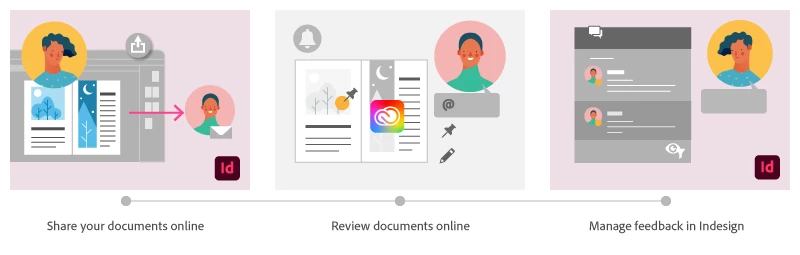
Using Share for Review in InDesign’s June 2020 release, you can share your designs for online review, and manage feedback right within the app. Stakeholders can open the shared document in a browser to provide feedback. Share for Review streamlines and simplifies the review process for both designers and their stakeholders 


The following FAQs provide clarity on common questions around Share for Review 

Share the document for review - FAQ

View reviewer comments - FAQ 

Review the document - FAQ

Best practices


How is Share for Review different from the ‘Integrated comment and review’ feature in InDesign CS5? How does it compare to the Import PDF Comments (IPC) feature?  

Adobe is investing in features and services that make creative collaboration easier and more enjoyable.  

With Share for Review, our aspiration is to make reviewing and editing InDesign creative more seamless, and address the following limitations in CS Review: 

  • Requirement for a flash plugin to use this feature 
  • Lack of support for key features such as email notifications 
  • User challenges with feature discoverability 

Compared to Import PDF Comments (IPC), Share for Review reduces time by eliminating the need to create and share PDFs and collate the resulting feedback. We will be working to enhance the reviewing features and capabilities in Share for Review, which will soon help this tool surpass the experience of IPC, from end to end.   


Does Share for Review include text commenting capabilities? 

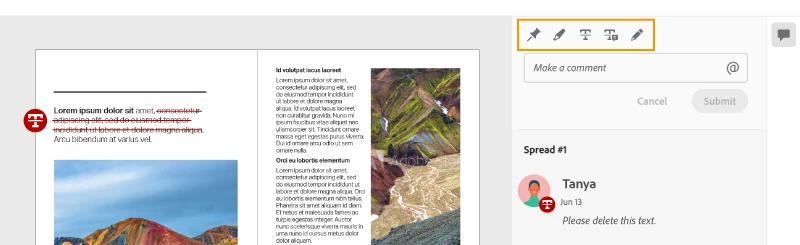
This first version of the feature allows you to provide feedback through the sticky note and pencil tools. We will continue to improve the experience, and we will soon incorporate more text commenting capabilities, including text highlight, text strikethrough, and the ability to accept text comments in a single click. 


Is this feature being introduced into InCopy?  

It is not. Instead, we’ll be making significant updates to InCopy by taking it to the Web to provide better collaboration capabilities. Stay tuned!    


What text capabilities do I have as a reviewer?  

As a reviewer, you will be able to highlight text, strikethrough text, and replace text corresponding to your comment. 


Let us know of any challenges, or questions you have for us around Share for Review and we’ll be happy to assist you. 

Correct answer Nathan Marroquin

This has worked for others:

  1. Save any work and close all open
  2. Sign out of InDesign (Help > Sign out). This will cause indesign to quit.
  3. Launch InDesign again, at which point you should be prompted to sign in again.

137 replies

Participant
May 18, 2021

I have googled and not found any mention of this feature- When you right-click on the document in Share For Review, "Download Document" is available and the client can download the PDF! This is NOT great because that means someone reviewing the document can start using it, printing it, etc, without allowing others to comment and then the designer to edit with those changes. I cannot find an option to disable downloading the PDF, but that is an option within Publish Online. So we could use that instead, but then they can't comment on it. We cannot trust Share For Review if it means well-meaning people within our large organization can disseminate documents mid-review without our knowledge! We used to put DRAFT huge across every page, and don't want to have to start doing that again!

Dave Creamer of IDEAS
Community Expert
Community Expert
May 18, 2021

Re-edited after I re-read the post...


Perhaps you could use certificate-based security and allow commenting. That way, only persons you authorize can open the PDF. You would have to bypass the "share for review" feature but not difficult to work with. You can add you own non-printing button to return the PDF.

David Creamer: Community Expert (ACI and ACE 1995-2023)
Participant
May 18, 2021

Do you mean to not use Share For Review at all, but send PDFs and have them comment through Acrobat? We have had issues with lots of people not having a program to properly view PDFs and were hoping Share For Review is more accessible for more people.

Community Expert
May 11, 2021

"A feature which would be incredibly useful is to be able to share only selected text inside a document for review."


Hi Dave,

that was possible just after the introduction of the feature for a very short time with a hack.

Had no user interface at all. Turned out it was a bug and was fixed quickly.


Check at InDesign UserVoice. There should be a feature request for this, support it with your vote. Ah, this one:


Page range(s) and pages/spreads options in Share for Review
Laura Scott, June 18, 2020
https://indesign.uservoice.com/forums/601021-adobe-indesign-feature-requests/suggestions/40700314-page-range-s-and-pages-spreads-options-in-share-f


"Export options for Share for Review

Ability to select page range(s), individual pages vs spreads, etc. directly in the export process, not buried in the last PDF export settings."


Regards,
Uwe Laubender

( ACP )

Known Participant
May 11, 2021

Thank you for this response - I've done as you suggest.

Participating Frequently
May 18, 2021

Have you looked into work-flow with incopy or linked text documents  if you are primarily interested in the documents text?

Drawback of course is everyone editing needs incopy.

outside of books or small brochures ( anything using large blocks of text) incopy can also be incredibly cumbersome to manage assignments on small chunks of text and doesn't work for a large majority of my own uses but it's worth looking at.


if using large chunks of text you need to other contributors without incopy, Indesign does also have an option in preferences ( or did anyway) to create links when placing a text file. if my memory serves with this though you need to have character styles for any styling you do in indesign because when you update the file and relink there's a tendency to lose all the styling.  I have not used this in a while  so it may be more robust now but improving features hasn't really seemed to be on indesign's radar for awhile now.


Indesign's data merge function is also fairly useless and dated so without investing in a rater hefty 3rd party catalogue builder with better csv/database connection you wont be able to link to an outside document in a manner that's worth your time. This is what we have had to do to manage constantly changing variables that can go into a spreadsheet and be accessible to normal regular people who shouldn't have to have a design or programming degree or need to sign up for an account they don't want, have no other use for and that still makes the process confusing or broken.  

Known Participant
May 11, 2021

Hi there - I produce a series of university publications. A feature which would be incredibly useful is to be able to share only selected text inside a document for review. If this is already possible and I just haven't discovered it, apologies! I cannot overstate how much of a timesaver this would be. 

karabailey
Participant
May 3, 2021

When using Share for Review, is there a way to export a PDF that includes the comments marked on the spreads? I'm exploring options to keep record of changes made to documents as they are udpated. 

Community Expert
April 26, 2021

Sheena,

sorry, no. One cannot find any prerelease build of InDesign under Beta in the CC Desktop App.

The only beta version available there is for Mac OS users to test the new Macs with M1 chips.


For Windows users currently there is no beta version of InDesign.

The Beta category is for all users, the Prerelease category can only be seen if someone is part of Prerelease; go to:

https://www.adobeprerelease.com/

and check "MY PROGRAMS" or "AVAILABLE PROGRAMS" if you are not part of it.


Regards,
Uwe Laubender

( ACP )

Sheena Kaul
Community Manager
Community Manager
April 26, 2021

Thanks for clearing that. 🙂 

Sheena Kaul
Community Manager
Community Manager
April 26, 2021

Hi All, 


The open issues related to the Share for Review feature have been fixed in the Pre-release build. Let us know if you've tried it to see the fix. 


Regards,

Sheena

keithconover
Inspiring
April 26, 2021

Ummm… Sheena… how does one install the Pre-release build?

Dave Creamer of IDEAS
Community Expert
Community Expert
April 26, 2021

It should be listed in the Creative Cloud app. Look at the bottom of the Categories section for "Prerelease". 

David Creamer: Community Expert (ACI and ACE 1995-2023)
Known Participant
April 23, 2021

I believe Adobe should stop promoting Share for Review on the InDesign splash screen if it can't be made more reliable. I recommended it to my team because Adobe did… now I'm embarrassed. More often than not, it does not work properly. Nothing beyond the first share will update. If I have to make any changes to the file, I only get the spinning circle and it never updates the link. The only solution is to delete the original link and start over—every time there's any change. There are also problems if InDesign files are duplicated. 


InDesign 16.1 on Mac OS Catalina

keithconover
Inspiring
April 23, 2021

Shane, I must respectfully disagree with you. You are on Mac and I am on PC, but I have found ways to work around the problems, see my previous post for what I found. And despite the bugs and workarounds, the service is so valuable that I am using it extensively now. I'm a fan, and I will be happier once the bugs are ironed out, and some features are improved, but right now I think it's the best way to collaborate on documents that mix text and graphics, if you're going to be using InDesign to publish. Exporting to word and using word's collaboration features is much clunkier.

Participant
April 25, 2021

I find it interesting that you don't see your statement "I have found ways to work around the problems" as a direct confirmation of how others are claiming the service doesn't work as advertised.

Participant
March 13, 2021

I really want this feature to work better for me. I am hopeful that there will be some serious stability improvements soon. On my Mac InDesign will spontaneously zoom out and jump to a different page, it will randomly apply the status resolved filter turning all edit marks back on, it will sometimes just go blank in the share for review pop down not letting me update the link. Sometimes the review panel is just black. And I can't save a revision. The one file that has to be overwritten. I can't save a v02, v03, etc. without needing to re-share for review which loses all the comments. Again, want this to work but stability is frustrating. 

Participant
March 10, 2021

Attempting to used the Shared Review, InDesign V16.1, MacOS Catalina 10.15.7. I packaged the document on my Lacie external hardrive, I had been working on the document with the new M1 chip laptop. Shared Review did not work on the new laptop. Opened it on my desktop, updated the computer software and the Indesign software to the latest. Restarted the computer. Twice. Still I get the attached reaction.


I'm still too new to design to understand the ICC Profiles, and I don't know if that's the only reason that the Shared Review isn't working. Yikes.


Help.


Thanks ever so much!

Community Expert
March 10, 2021

You'll have to find the problematic image

https://community.adobe.com/t5/indesign/version-4-icc-profiles-were-converted-to-version-2-icc-profiles-during-pdf-export/m-p/10327192


And that is only for the PDF being generated i n the background - I beleve.

Do you need people to download the PDF? If not,  you can turn this off in the settings, I believe.


Participant
March 10, 2021

I found 1 image that was CMYK, where as all the others were RGB. The ICC profile varied, from Document RGB to sRGB IEC61966-2-1 black scaled. I literally have no idea what that means. Uggg. 


I need people to be able to use the Shared Review link and leave comments.


THANK YOU for helping me! I am clearly fumbling. 

Participant
February 16, 2021

Used this feature for the first time last Thursday (11 Feb 2021). Running ID 15.1.3 on Mac mini running 10.13.6

What I have found:

-Pin tool (Sticky note?) works as intended in both the web space and ID. It does block your view of the art.

-Pencil tool works, but the line ends up thinner in ID, and shifts upward about 15 points compared to the web space.

-Text correction tools not available to the owner and any use of these tools by a guest leaves a comment without any visual indicatior to guide the owner to where the comment might reference.


I would suggest the following:

-Pins and other comment markings have a show/hide flag that can be toggled in ID

-Option to edit an existing comment marking (move pin, redraw pencil line, reselect text)

-Possibly, an extra layer in ID file exclusively for comment markings? And with that, a toggle for grouping markings with the underlying text/object, so that moving the marking and the object together is optional.

-At minimum, fix the bugged tools and add a preference for transparency of comment markings.

Sheena Kaul
Community Manager
Community Manager
February 17, 2021

Hi there,


Thanks for the amazing suggestions. 🙂


I'd suggest you post them on the UserVoice so that the team can look into it directly and update you. 


Regards,

Sheena

Participant
February 17, 2021

Sheena,


After I posted all that, I found the UserVoice community and learned a few other things:

-Some of the bugs with the review process are resolved in ID 16, which will be nice if and when I can upgrade, but is useless to me right now.

-I did find the visibility toggle; I was looking for it on individual comments when it was document-wide.

-I discovered you can at least move pins after they are dropped. None of the FAQs you have mention this feature.


Thanks for the help,

Ward